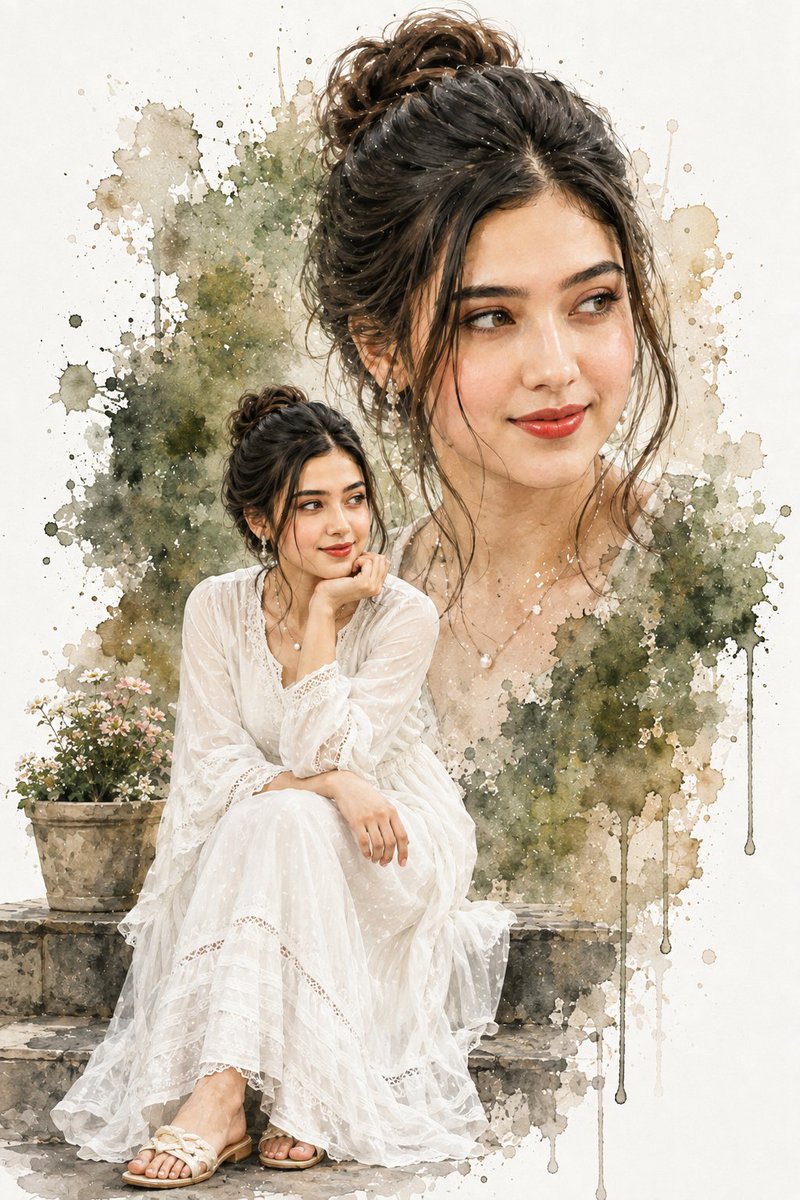
Double Exposure Watercolor Woman Portrait
Generates an elegant vertical watercolor double-exposure portrait of a seated woman with a large blended background face and botanical washes.
이것은 인물과 캐릭터 에 대한 GPT Image 2 프롬프트 사례입니다. 아래의 복사 가능한 프롬프트를 사용하여 유사한 시각 자료를 생성하고, 재사용하기 전에 Awesome GPT Image 2 Prompts 의 저작자 표시 및 상업적 사용 권한을 검토하십시오.
전체 프롬프트 세트가 필요하신가요? 다음을 사용하세요. 인물과 캐릭터 더 많은 관련 예시를 보려면 주제 허브를 열거나 다음을 열어보세요. GPT Image 2 프롬프트 카탈로그 전체 예제 색인, 재사용 가능한 구조 및 출처 표기는 다음을 참조하십시오.
Free 1K preview
Generate one preview image instantly, no sign-up required.
1905/4000
프롬프트
복사 준비 프롬프트
Create a creative double-exposure watercolor portrait composition on a vertical 2:3 canvas with a clean off-white paper background. The subject is {argument name="character description" default="a young South Asian woman with warm light-brown skin, dark expressive eyes, soft red lips, and black hair in a loose messy high bun with wispy strands framing her face"}. Show two integrated views of the same woman: one full-body seated figure in the lower left foreground and one oversized semi-transparent bust portrait occupying the upper right background. The seated woman rests gracefully on weathered stone steps, wearing {argument name="outfit" default="a flowing sheer white lace maxi dress with long sleeves, delicate embroidery, layered ruffles, and white flat sandals"}; she sits with one knee forward, one hand resting on her knee, and her other elbow propped with her chin on her hand, gazing calmly to the side. Add subtle jewelry: dangling pearl earrings and a small pearl pendant necklace. Behind her, blend the large portrait into soft watercolor washes of muted olive green foliage, beige stone tones, gray-brown splatters, and translucent ink blooms, with visible paint drips running downward on the right side. Include {argument name="foreground prop" default="a small terracotta flower pot filled with tiny white and pink blossoms on the stone step to her left"}. Use a refined fashion-illustration watercolor style: realistic facial features, delicate skin shading, crisp eyes and lips, translucent fabric texture, loose edges, granulating pigments, splashes, speckles, and layered wash effects. Keep the palette {argument name="color palette" default="soft ivory, warm beige, muted olive green, charcoal brown, blush pink, and deep black hair"}. No text, no border, no watermark, elegant airy composition with high detail in the face and dress and painterly abstraction around the edges.프롬프트 변수
프롬프트에 있는 편집 가능한 인수 자리 표시자와 해당 기본값입니다.
변하기 쉬운
character description
기본
a young South Asian woman with warm light-brown skin, dark expressive eyes, soft red lips, and black hair in a loose messy high bun with wispy strands framing her face
변하기 쉬운
outfit
기본
a flowing sheer white lace maxi dress with long sleeves, delicate embroidery, layered ruffles, and white flat sandals
변하기 쉬운
foreground prop
기본
a small terracotta flower pot filled with tiny white and pink blossoms on the stone step to her left
변하기 쉬운
color palette
기본
soft ivory, warm beige, muted olive green, charcoal brown, blush pink, and deep black hair
Best for
- - 인물과 캐릭터 visual exploration
- - Image generation and reference-image edits
- - Reusable briefs that keep source attribution visible
Change these parts
- - Subject, product, character, or scene
- - Aspect ratio, camera, lighting, and background
- - Brand, text, color, and output constraints
Recommended model and settings
- - Model: gpt-image-2
- - Input mode: 텍스트 to 이미지
- - Aspect ratio: source
- - Commercial status: review original source
How to use this prompt
- 1. Copy the prompt and preserve its structure for the first test.
- 2. Replace the subject, context, and publishing channel.
- 3. Change one camera, lighting, or style variable per iteration.
- 4. Inspect the output, source, text, and rights before reuse.
Limitations, source, and reuse cautions
- - Generated output is an editable draft, not factual, legal, or rights evidence.
- - Review the linked source, people, brands, logos, text, and third-party media before commercial use.
Awesome GPT Image 2 Prompts 에서 가져왔습니다. 출처 표기가 필요합니다. 상업적 이용 가능 여부는 allowed 입니다. 유료 사용 전에 원저작권 정보를 확인하세요.
이 범주에 속하는 더 많은 사례
범주, 입력 방식 호환성, 품질 및 위험도에 따라 우선순위가 정해집니다.
재사용 및 출처 참고 사항
사례를 미리 확인한 후 이 안내 메시지를 안전하게 사용하십시오.
- 1.프롬프트를 복사하거나 Dovoo의 생성 버튼을 사용하여 직접 엽니다.
- 2.사용 사례에 맞게 변수, 화면 비율 및 참조 이미지를 조정하십시오.
- 3.출판 또는 유료 사용 전에 저작권, 출처 표기 요건 및 브랜드 또는 초상권 관련 위험을 확인하십시오.