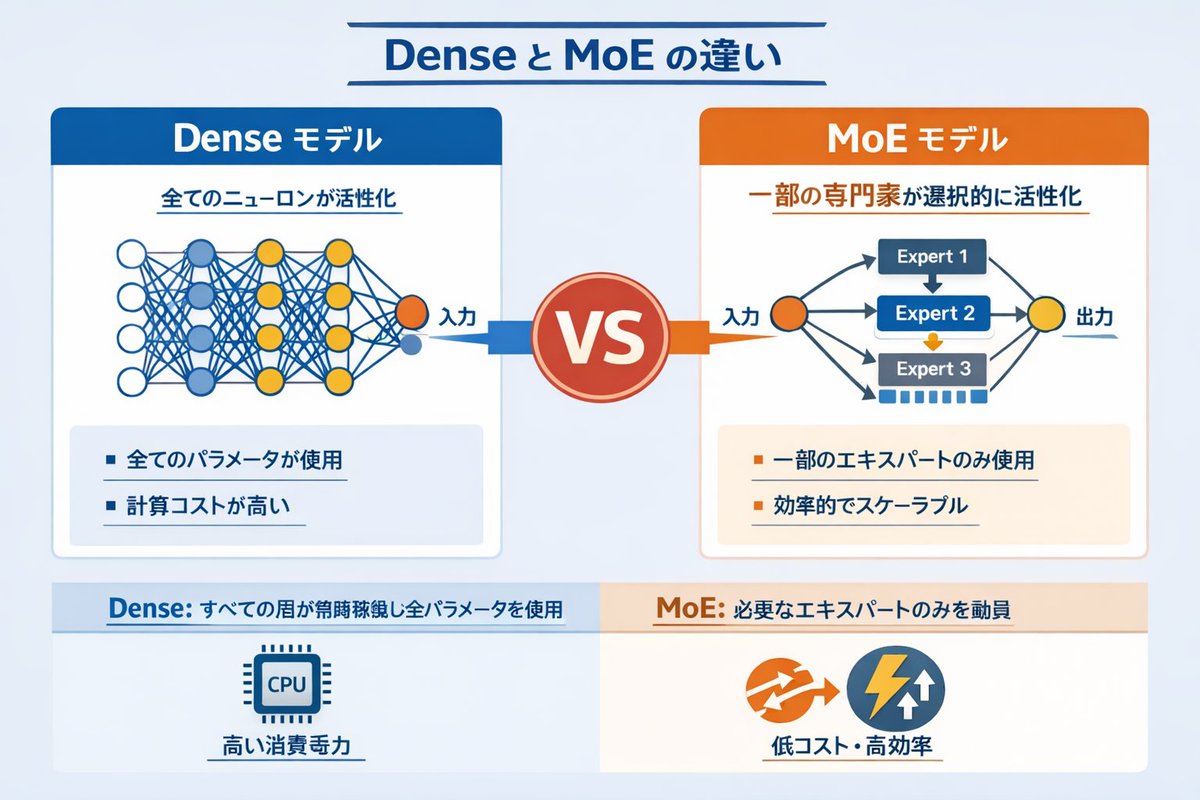
밀집형 vs. MoE 신경망 인포그래픽
네트워크 다이어그램과 핵심 요약을 통해 Dense AI 모델과 Mixture of Experts(MoE) AI 모델을 비교하는 기술 인포그래픽입니다.
이것은 그래픽 및 포스터 에 대한 GPT Image 2 프롬프트 사례입니다. 아래의 복사 가능한 프롬프트를 사용하여 유사한 시각 자료를 생성하고, 재사용하기 전에 Awesome GPT Image 2 Prompts 의 저작자 표시 및 상업적 사용 권한을 검토하십시오.
전체 프롬프트 세트가 필요하신가요? 다음을 사용하세요. 그래픽 및 포스터 더 많은 관련 예시를 보려면 주제 허브를 열거나 다음을 열어보세요. GPT Image 2 프롬프트 카탈로그 전체 예제 색인, 재사용 가능한 구조 및 출처 표기는 다음을 참조하십시오.
Free 1K preview
Generate one preview image instantly, no sign-up required.
2443/4000
프롬프트
복사 준비 프롬프트
{
  "type": "infographic comparison diagram",
  "header": {
    "title": "{argument name=\"main title\" default=\"Dense と MoE の違い\"}"
  },
  "layout": {
    "structure": "two main columns separated by a central VS badge, with a split footer at the bottom",
    "sections": [
      {
        "position": "left column",
        "theme_color": "blue",
        "header": "{argument name=\"left model name\" default=\"Dense モデル\"}",
        "subtitle": "全てのニューロンが活性化",
        "diagram": {
          "type": "fully connected neural network",
          "elements": [
            "1 orange input node, labeled \"Input\"",
            "4 hidden layers with 4, 5, 4, and 2 nodes respectively",
            "nodes colored white, blue, and yellow",
            "dense intersecting connection lines between all adjacent nodes"
          ]
        },
        "bullet_points": {
          "count": 2,
          "items": [
            "{argument name=\"left bullet point\" default=\"全てのパラメータが使用\"}",
            "計算コストが高い"
          ]
        }
      },
      {
        "position": "right column",
        "theme_color": "orange",
        "header": "{argument name=\"right model name\" default=\"MoE モデル\"}",
        "subtitle": "一部の専門家が選択的に活性化",
        "diagram": {
          "type": "mixture of experts network",
          "elements": [
            "1 orange input node, labeled \"Input\"",
            "3 rectangular blocks labeled Expert 1, Expert 2, Expert 3",
            "1 yellow output node, labeled \"Output\"",
            "branching arrows connecting input to experts, and experts to output"
          ]
        },
        "bullet_points": {
          "count": 2,
          "items": [
            "{argument name=\"right bullet point\" default=\"一部のエキスパートのみ使用\"}",
            "効率的でスケーラブル"
          ]
        }
      },
      {
        "position": "center",
        "element": "red circular badge with text VS",
        "connections": "blue arrow pointing left, orange arrow pointing right"
      },
      {
        "position": "footer left",
        "background": "light blue",
        "text": "Dense: すべての層が常時稼働し全パラメータを使用",
        "icon": "1 CPU chip graphic",
        "label": "高い消費電力"
      },
      {
        "position": "footer right",
        "background": "light orange",
        "text": "MoE: 必要なエキスパートのみを動員",
        "icons": "2 circular graphics (orange arrows, blue lightning bolt)",
        "label": "低コスト・高効率"
      }
    ]
  }
}
프롬프트 변수
프롬프트에 있는 편집 가능한 인수 자리 표시자와 해당 기본값입니다.
변하기 쉬운
main title
기본
Dense と MoE の違い
변하기 쉬운
left model name
기본
Dense モデル
변하기 쉬운
left bullet point
기본
全てのパラメータが使用
변하기 쉬운
right model name
기본
MoE モデル
변하기 쉬운
right bullet point
기본
一部のエキスパートのみ使用
Best for
- - 그래픽 및 포스터 visual exploration
- - Image generation and reference-image edits
- - Reusable briefs that keep source attribution visible
Change these parts
- - Subject, product, character, or scene
- - Aspect ratio, camera, lighting, and background
- - Brand, text, color, and output constraints
Recommended model and settings
- - Model: gpt-image-2
- - Input mode: 텍스트 to 이미지
- - Aspect ratio: source
- - Commercial status: review original source
How to use this prompt
- 1. Copy the prompt and preserve its structure for the first test.
- 2. Replace the subject, context, and publishing channel.
- 3. Change one camera, lighting, or style variable per iteration.
- 4. Inspect the output, source, text, and rights before reuse.
Limitations, source, and reuse cautions
- - Generated output is an editable draft, not factual, legal, or rights evidence.
- - Review the linked source, people, brands, logos, text, and third-party media before commercial use.
Awesome GPT Image 2 Prompts 에서 가져왔습니다. 출처 표기가 필요합니다. 상업적 이용 가능 여부는 allowed 입니다. 유료 사용 전에 원저작권 정보를 확인하세요.
이 범주에 속하는 더 많은 사례
범주, 입력 방식 호환성, 품질 및 위험도에 따라 우선순위가 정해집니다.






재사용 및 출처 참고 사항
사례를 미리 확인한 후 이 안내 메시지를 안전하게 사용하십시오.
- 1.프롬프트를 복사하거나 Dovoo의 생성 버튼을 사용하여 직접 엽니다.
- 2.사용 사례에 맞게 변수, 화면 비율 및 참조 이미지를 조정하십시오.
- 3.출판 또는 유료 사용 전에 저작권, 출처 표기 요건 및 브랜드 또는 초상권 관련 위험을 확인하십시오.