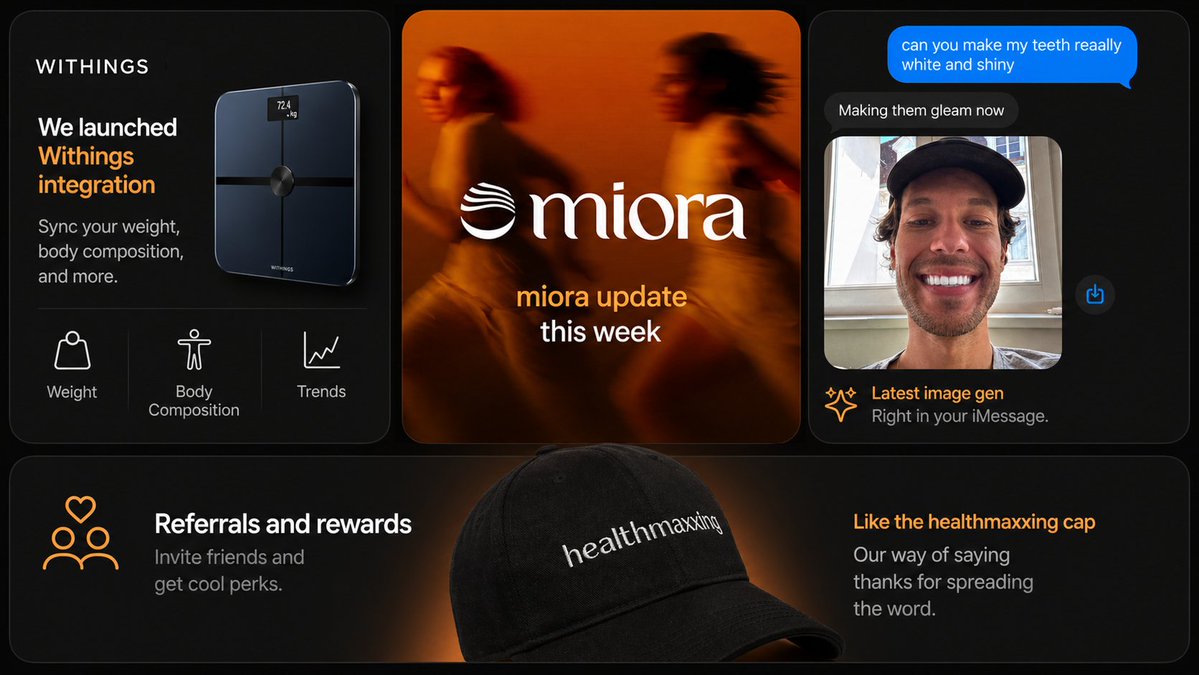
다크 테크 마케팅 슬라이드 콜라주
앱 연동, 브랜드 업데이트, AI 이미지 채팅, 추천 상품 등을 포함한 프리미엄 멀티 패널 스타트업 마케팅 슬라이드로, 소셜 미디어 게시물이나 프레젠테이션 자료에 적합합니다.
이것은 그래픽 및 포스터 에 대한 GPT Image 2 프롬프트 사례입니다. 아래의 복사 가능한 프롬프트를 사용하여 유사한 시각 자료를 생성하고, 재사용하기 전에 Awesome GPT Image 2 Prompts 의 저작자 표시 및 상업적 사용 권한을 검토하십시오.
전체 프롬프트 세트가 필요하신가요? 다음을 사용하세요. 그래픽 및 포스터 더 많은 관련 예시를 보려면 주제 허브를 열거나 다음을 열어보세요. GPT Image 2 프롬프트 카탈로그 전체 예제 색인, 재사용 가능한 구조 및 출처 표기는 다음을 참조하십시오.
Free 1K preview
Generate one preview image instantly, no sign-up required.
3740/4000
프롬프트
복사 준비 프롬프트
{
  "brand": {
    "accent_color": "warm orange",
    "name": "{argument name=\"brand name\" default=\"WITHINGS\"}"
  },
  "canvas": {
    "aspect_ratio": "16:9",
    "background": "deep black with faint warm orange glow accents"
  },
  "design_details": {
    "borders": "subtle thin gray outlines",
    "corners": "large rounded corners on every card",
    "lighting": "moody black background with orange rim lighting and glow",
    "product_rendering": "high-end realistic 3D product and accessory rendering",
    "spacing": "even gutters between cards",
    "typography": "clean sans-serif for UI and marketing copy, elegant serif for the center logo wordmark",
    "ui_style": "minimal premium app/store promo aesthetic"
  },
  "layout": {
    "card_count": 4,
    "sections": [
      {
        "content": "dark card with the brand name at top left, large white and orange headline reading 'We launched Withings integration', smaller subtext 'Sync your weight, body composition, and more.', a glossy black smart scale floating on the right side with a tiny illuminated screen reading '72.4 kg', and a bottom feature row separated by thin dividers showing 3 white line icons with labels",
        "count": 3,
        "labels": [
          "Weight",
          "Body Composition",
          "Trends"
        ],
        "position": "top-left",
        "title": "smart scale product card"
      },
      {
        "content": "warm blurred orange-toned lifestyle image of 2 runners in motion, large centered white serif logo text '{argument name=\"center brand\" default=\"miora\"}' with a wave-like emblem to the left, and stacked lower text with the first line in orange and second line in white",
        "count": 1,
        "labels": [
          "miora update this week"
        ],
        "position": "top-center",
        "title": "brand update card"
      },
      {
        "content": "dark iMessage-style phone conversation interface, bright blue outgoing message bubble at the top, dark gray reply bubble below, Show every face clearly with natural, detailed facial features, a small blue share icon floating to the right, and a footer caption with a spark icon, orange headline, and gray subtext",
        "count": 4,
        "labels": [
          "can you make my teeth reaally white and shiny",
          "Making them gleam now",
          "Latest image gen",
          "Right in your iMessage."
        ],
        "position": "top-right",
        "title": "chat image generation card"
      },
      {
        "content": "wide dark banner with a soft orange spotlight behind a large black baseball cap in the center foreground, white embroidered text on the cap reading '{argument name=\"cap text\" default=\"healthmaxxing\"}', left side has an orange line icon of 3 people with a heart above plus a white headline and gray subtext 'Invite friends and get cool perks.', right side has an orange headline and gray subtext 'Our way of saying thanks for spreading the word.'",
        "count": 2,
        "labels": [
          "Referrals and rewards",
          "Like the healthmaxxing cap"
        ],
        "position": "bottom full-width",
        "title": "referral banner card"
      }
    ],
    "structure": "3 cards across the top row and 1 wide banner card across the full bottom row"
  },
  "style": "premium dark-mode tech brand presentation, sleek product marketing, soft glow lighting, rounded-corner cards, subtle gradients, high contrast, polished startup aesthetic",
  "text_overrides": {
    "center_update_line": "{argument name=\"update text\" default=\"miora update this week\"}",
    "top_left_brand": "{argument name=\"headline brand\" default=\"WITHINGS\"}"
  },
  "type": "modern marketing slide collage"
}
프롬프트 변수
프롬프트에 있는 편집 가능한 인수 자리 표시자와 해당 기본값입니다.
변하기 쉬운
brand name
기본
WITHINGS
변하기 쉬운
center brand
기본
miora
변하기 쉬운
cap text
기본
healthmaxxing
변하기 쉬운
headline brand
기본
WITHINGS
변하기 쉬운
update text
기본
miora update this week
Best for
- - 그래픽 및 포스터 visual exploration
- - Image generation and reference-image edits
- - Reusable briefs that keep source attribution visible
Change these parts
- - Subject, product, character, or scene
- - Aspect ratio, camera, lighting, and background
- - Brand, text, color, and output constraints
Recommended model and settings
- - Model: gpt-image-2
- - Input mode: 텍스트 to 이미지
- - Aspect ratio: source
- - Commercial status: review original source
How to use this prompt
- 1. Copy the prompt and preserve its structure for the first test.
- 2. Replace the subject, context, and publishing channel.
- 3. Change one camera, lighting, or style variable per iteration.
- 4. Inspect the output, source, text, and rights before reuse.
Limitations, source, and reuse cautions
- - Generated output is an editable draft, not factual, legal, or rights evidence.
- - Review the linked source, people, brands, logos, text, and third-party media before commercial use.
Awesome GPT Image 2 Prompts 에서 가져왔습니다. 출처 표기가 필요합니다. 상업적 이용 가능 여부는 allowed 입니다. 유료 사용 전에 원저작권 정보를 확인하세요.
이 범주에 속하는 더 많은 사례
범주, 입력 방식 호환성, 품질 및 위험도에 따라 우선순위가 정해집니다.






재사용 및 출처 참고 사항
사례를 미리 확인한 후 이 안내 메시지를 안전하게 사용하십시오.
- 1.프롬프트를 복사하거나 Dovoo의 생성 버튼을 사용하여 직접 엽니다.
- 2.사용 사례에 맞게 변수, 화면 비율 및 참조 이미지를 조정하십시오.
- 3.출판 또는 유료 사용 전에 저작권, 출처 표기 요건 및 브랜드 또는 초상권 관련 위험을 확인하십시오.