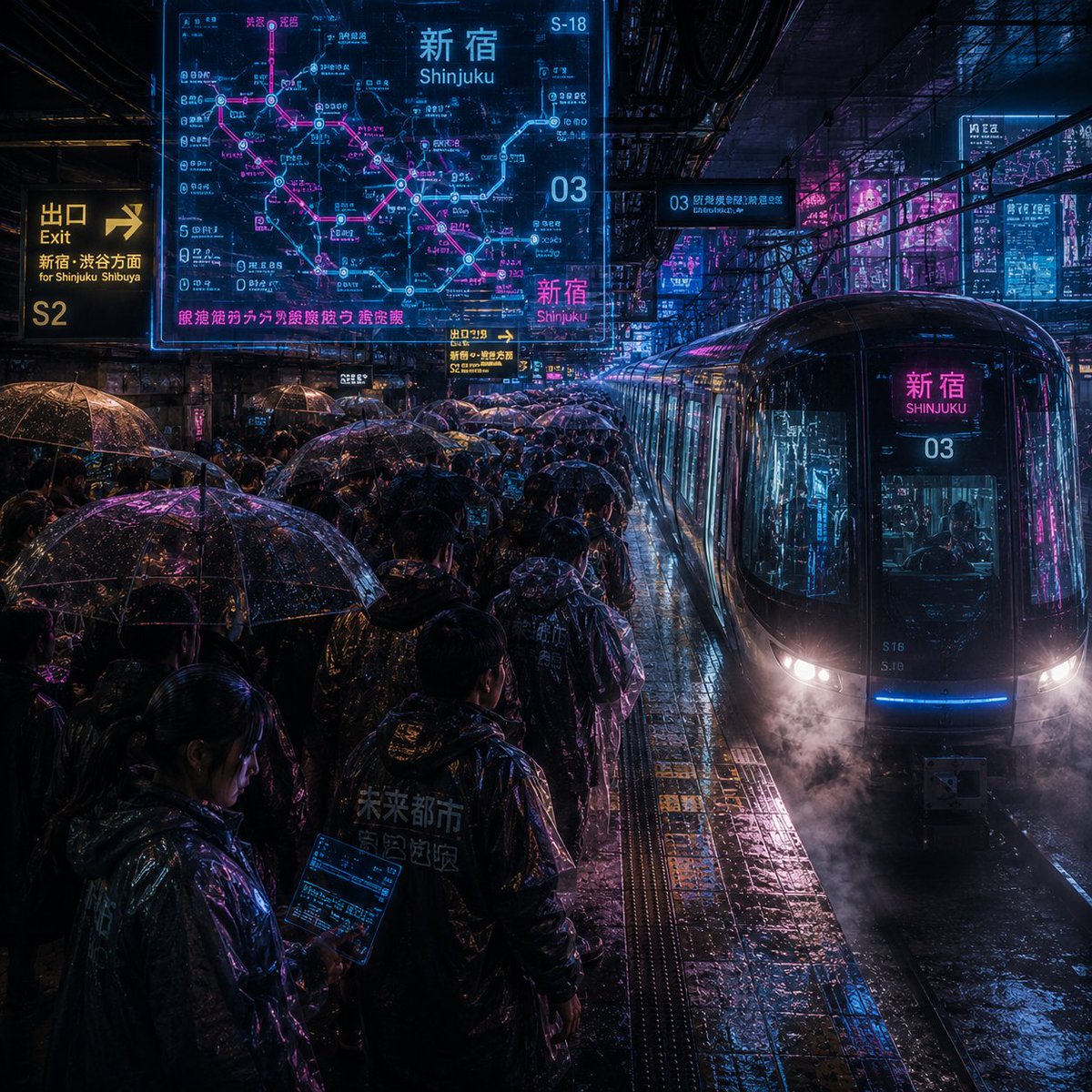
Noisy Cyberpunk Shinjuku Rain Platform
A dense cinematic prompt for generating an ultra-noisy cyberpunk rainy train platform scene with neon transit signage and crowded umbrellas.
이것은 풍경과 자연 에 대한 GPT Image 2 프롬프트 사례입니다. 아래의 복사 가능한 프롬프트를 사용하여 유사한 시각 자료를 생성하고, 재사용하기 전에 Awesome GPT Image 2 Prompts 의 저작자 표시 및 상업적 사용 권한을 검토하십시오.
전체 프롬프트 세트가 필요하신가요? 다음을 사용하세요. 풍경과 자연 더 많은 관련 예시를 보려면 주제 허브를 열거나 다음을 열어보세요. GPT Image 2 프롬프트 카탈로그 전체 예제 색인, 재사용 가능한 구조 및 출처 표기는 다음을 참조하십시오.
Free 1K preview
Generate one preview image instantly, no sign-up required.
2079/4000
프롬프트
복사 준비 프롬프트
Create an extremely noisy, highly detailed cyberpunk rainy night train platform located in {argument name="station name" default="Shinjuku"}, Tokyo. The camera is at platform height, looking down at the crowded platform at an angle, with a sleek black glass commuter train entering from the right, its rounded front flashing with white headlights, blue underlights, and magenta reflections, with steam or mist near the tracks, and the destination display in front of the train reading {argument name="station name" default="Shinjuku"} and {argument name="line number" default="03"}. The scene is filled with commuters wearing dark raincoats and holding 32 clearly visible transparent umbrellas with water droplets on the surface reflecting neon blue, cyan, purple, and bright pink light. The wet tiled floor, tactile yellow platform strips, puddles, track grooves, overhead beams, cables, and dense urban infrastructure should all have distinct textures and visual noise, with rain streaks everywhere. Add 6 prominent glowing information elements: 1 large semi-transparent cyan and magenta route map hologram in the upper left corner labeled {argument name="map headline" default="Shinjuku"} with Japanese station text and pink traffic lines; 1 yellow exit sign on the far left reading {argument name="exit text" default="Exit S2 for Shinjuku Shibuya"}; 1 small yellow platform direction sign near the center; 1 cyan elevated platform sign reading 03; 1 bright magenta station sign in front of the train; and 1 group of vertical neon advertisements in the city background on the right. Use dense Japanese and English traffic typography, including “Shinjuku” and “新宿” where appropriate, but maintain realism rather than perfect readability. Style: A combination of cinematic realism and futuristic UI overlays, extremely high ISO grain, high contrast, wet reflective surfaces, a *Blade Runner*-esque atmosphere, chaotic visual noise, sharp reflections, volumetric rain, deep shadows, electric cyan and magenta tones, 1:1 square composition, no clean negative space, no watermarks.프롬프트 변수
프롬프트에 있는 편집 가능한 인수 자리 표시자와 해당 기본값입니다.
변하기 쉬운
station name
기본
Shinjuku
변하기 쉬운
line number
기본
03
변하기 쉬운
map headline
기본
Shinjuku
변하기 쉬운
exit text
기본
Exit S2 for Shinjuku Shibuya
Best for
- - 풍경과 자연 visual exploration
- - Image generation and reference-image edits
- - Reusable briefs that keep source attribution visible
Change these parts
- - Subject, product, character, or scene
- - Aspect ratio, camera, lighting, and background
- - Brand, text, color, and output constraints
Recommended model and settings
- - Model: gpt-image-2
- - Input mode: 텍스트 to 이미지
- - Aspect ratio: source
- - Commercial status: review original source
How to use this prompt
- 1. Copy the prompt and preserve its structure for the first test.
- 2. Replace the subject, context, and publishing channel.
- 3. Change one camera, lighting, or style variable per iteration.
- 4. Inspect the output, source, text, and rights before reuse.
Limitations, source, and reuse cautions
- - Generated output is an editable draft, not factual, legal, or rights evidence.
- - Review the linked source, people, brands, logos, text, and third-party media before commercial use.
Awesome GPT Image 2 Prompts 에서 가져왔습니다. 출처 표기가 필요합니다. 상업적 이용 가능 여부는 allowed 입니다. 유료 사용 전에 원저작권 정보를 확인하세요.
이 범주에 속하는 더 많은 사례
범주, 입력 방식 호환성, 품질 및 위험도에 따라 우선순위가 정해집니다.






재사용 및 출처 참고 사항
사례를 미리 확인한 후 이 안내 메시지를 안전하게 사용하십시오.
- 1.프롬프트를 복사하거나 Dovoo의 생성 버튼을 사용하여 직접 엽니다.
- 2.사용 사례에 맞게 변수, 화면 비율 및 참조 이미지를 조정하십시오.
- 3.출판 또는 유료 사용 전에 저작권, 출처 표기 요건 및 브랜드 또는 초상권 관련 위험을 확인하십시오.