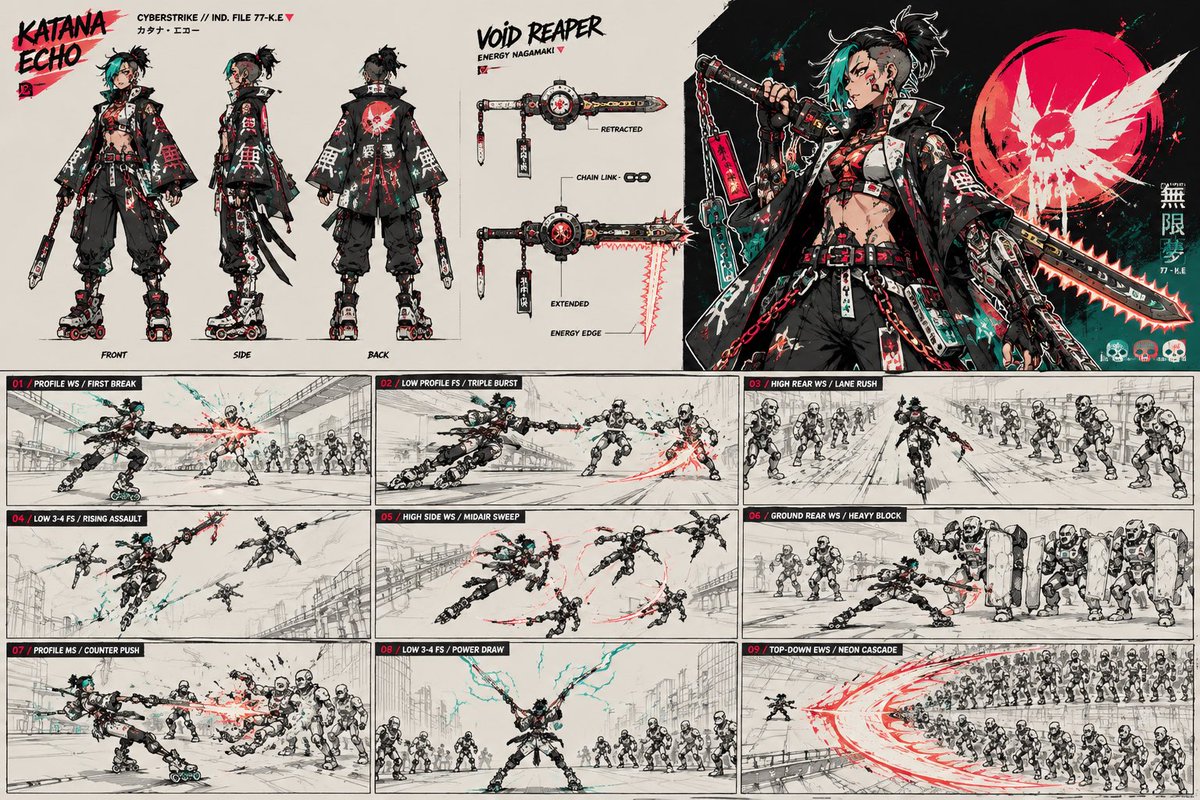
Cyberpunk Samurai Character Sheet
Generates a dense anime cyberpunk character turnaround, weapon spec, hero art, and nine-panel combat storyboard for concept design use.
이것은 애니메이션 & 게임 에 대한 GPT Image 2 프롬프트 사례입니다. 아래의 복사 가능한 프롬프트를 사용하여 유사한 시각 자료를 생성하고, 재사용하기 전에 Awesome GPT Image 2 Prompts 의 저작자 표시 및 상업적 사용 권한을 검토하십시오.
전체 프롬프트 세트가 필요하신가요? 다음을 사용하세요. 애니메이션 & 게임 더 많은 관련 예시를 보려면 주제 허브를 열거나 다음을 열어보세요. GPT Image 2 프롬프트 카탈로그 전체 예제 색인, 재사용 가능한 구조 및 출처 표기는 다음을 참조하십시오.
Free 1K preview
Generate one preview image instantly, no sign-up required.
4000/4000
프롬프트
복사 준비 프롬프트
Goal: Create a high-detail cyberpunk anime character sheet and action storyboard for {argument name="character name" default="Katana Echo"}, a rebellious street samurai with techwear styling and a transforming energy nagamaki weapon.

Canvas: Wide horizontal concept art sheet, 16:9 aspect ratio, off-white paper background with black ink, gritty red and teal accents, manga production-board energy. Use thin panel borders, rough sketch construction lines, splattered paint, handwritten labels, and sharp graphic design.

Top layout: Divide the top half into three main sections. Left section shows exactly 3 full-body turnaround views of the character labeled FRONT, SIDE, and BACK. Center section is a weapon spec panel titled "VOID REAPER" with subtitle "ENERGY NAGAMAKI" and exactly 2 weapon states: "RETRACTED" and "EXTENDED". Add small callouts reading "CHAIN LINK" and "ENERGY EDGE". Right section is a dramatic hero illustration of the character holding the weapon, with a large red circular skull emblem behind them and vertical Japanese-style decorative text. Include file text near the title such as "CYBERSTRIKE // IND. FILE 77-K.E" and small katakana-style name text.

Character details: The character is an androgynous punk cyber-samurai with {argument name="hair color" default="black hair with teal bangs"}, shaved-side messy topknot hair, piercings, red eye makeup, cropped layered jacket, exposed midriff, belts, straps, red chains, utility tags, oversized black hakama-style pants, mechanical roller-blade boots, fingerless gloves, and a black-red-white-teal color palette. Their jacket back has a bold red skull/sun graphic. The pose language is aggressive, fast, and cocky.

Weapon details: The weapon is a hybrid chained nagamaki/chainsaw blade with a black handle, red tags, metal hardware, circular mechanical hub, black-and-white seals, red glowing blade edge, and teal cables. Show it compact in the retracted state and long serrated glowing in the extended state.

Bottom layout: The bottom half is a 3 by 3 storyboard grid with exactly 9 action panels. Each panel has a black header strip with a red number and white tactical move label. Depict the character fighting squads of white humanoid robots in industrial streets and overpasses, with speed lines, red energy arcs, teal sparks, and rough monochrome background perspective.

Storyboard panels, exactly 9: 01 "PROFILE WS / FIRST BREAK" shows a side attack blasting one robot while a row of robots waits behind; 02 "LOW PROFILE FS / TRIPLE BURST" shows the character sliding low and slashing through three targets; 03 "HIGH REAR WS / LANE RUSH" shows a rear chase down a lane between two robot lines; 04 "LOW 3-4 FS / RISING ASSAULT" shows the character leaping upward against airborne robots; 05 "HIGH SIDE WS / MIDAIR SWEEP" shows a midair horizontal sweep cutting multiple robots; 06 "GROUND REAR WS / HEAVY BLOCK" shows the character bracing low against a wall of shielded heavy robots; 07 "PROFILE MS / COUNTER PUSH" shows a close side counterstrike against clustered robots; 08 "LOW 3-4 FS / POWER DRAW" shows the character centered with both arms extended, drawing teal lightning while robots surround them; 09 "TOP-DOWN EWS / NEON CASCADE" shows a bird's-eye massive red crescent slash sweeping through a large robot formation.

Visual style: High-energy Japanese game concept art, cyberpunk manga storyboard, gritty ink linework, cel-shaded accents, limited palette of black, bone white, scarlet red, and electric teal. Keep the page dense but readable, with crisp character silhouettes and dynamic weapon trails.

Text constraints: Use the main title {argument name="title text" default="KATANA ECHO"} in a bold brush font at top left, the weapon title {argument name="weapon title" default="VOID REAPER"} in rough black lettering near the center, and the faction/file label {argument name="file label" default="CYBERSTRIKE // IND. FILE 77-K.E"}. Keep all visible labels in English except small decorative katakana/Japanese glyphs, which may be stylized and secondary. Do not add extra panels, extra turnaround views, or extra weapon states.
프롬프트 변수
프롬프트에 있는 편집 가능한 인수 자리 표시자와 해당 기본값입니다.
변하기 쉬운
character name
기본
Katana Echo
변하기 쉬운
hair color
기본
black hair with teal bangs
변하기 쉬운
title text
기본
KATANA ECHO
변하기 쉬운
weapon title
기본
VOID REAPER
변하기 쉬운
file label
기본
CYBERSTRIKE // IND. FILE 77-K.E
Best for
- - 애니메이션 & 게임 visual exploration
- - Image generation and reference-image edits
- - Reusable briefs that keep source attribution visible
Change these parts
- - Subject, product, character, or scene
- - Aspect ratio, camera, lighting, and background
- - Brand, text, color, and output constraints
Recommended model and settings
- - Model: gpt-image-2
- - Input mode: 텍스트 to 이미지
- - Aspect ratio: source
- - Commercial status: review original source
How to use this prompt
- 1. Copy the prompt and preserve its structure for the first test.
- 2. Replace the subject, context, and publishing channel.
- 3. Change one camera, lighting, or style variable per iteration.
- 4. Inspect the output, source, text, and rights before reuse.
Limitations, source, and reuse cautions
- - Generated output is an editable draft, not factual, legal, or rights evidence.
- - Review the linked source, people, brands, logos, text, and third-party media before commercial use.
Awesome GPT Image 2 Prompts 에서 가져왔습니다. 출처 표기가 필요합니다. 상업적 이용 가능 여부는 allowed 입니다. 유료 사용 전에 원저작권 정보를 확인하세요.
이 범주에 속하는 더 많은 사례
범주, 입력 방식 호환성, 품질 및 위험도에 따라 우선순위가 정해집니다.






재사용 및 출처 참고 사항
사례를 미리 확인한 후 이 안내 메시지를 안전하게 사용하십시오.
- 1.프롬프트를 복사하거나 Dovoo의 생성 버튼을 사용하여 직접 엽니다.
- 2.사용 사례에 맞게 변수, 화면 비율 및 참조 이미지를 조정하십시오.
- 3.출판 또는 유료 사용 전에 저작권, 출처 표기 요건 및 브랜드 또는 초상권 관련 위험을 확인하십시오.