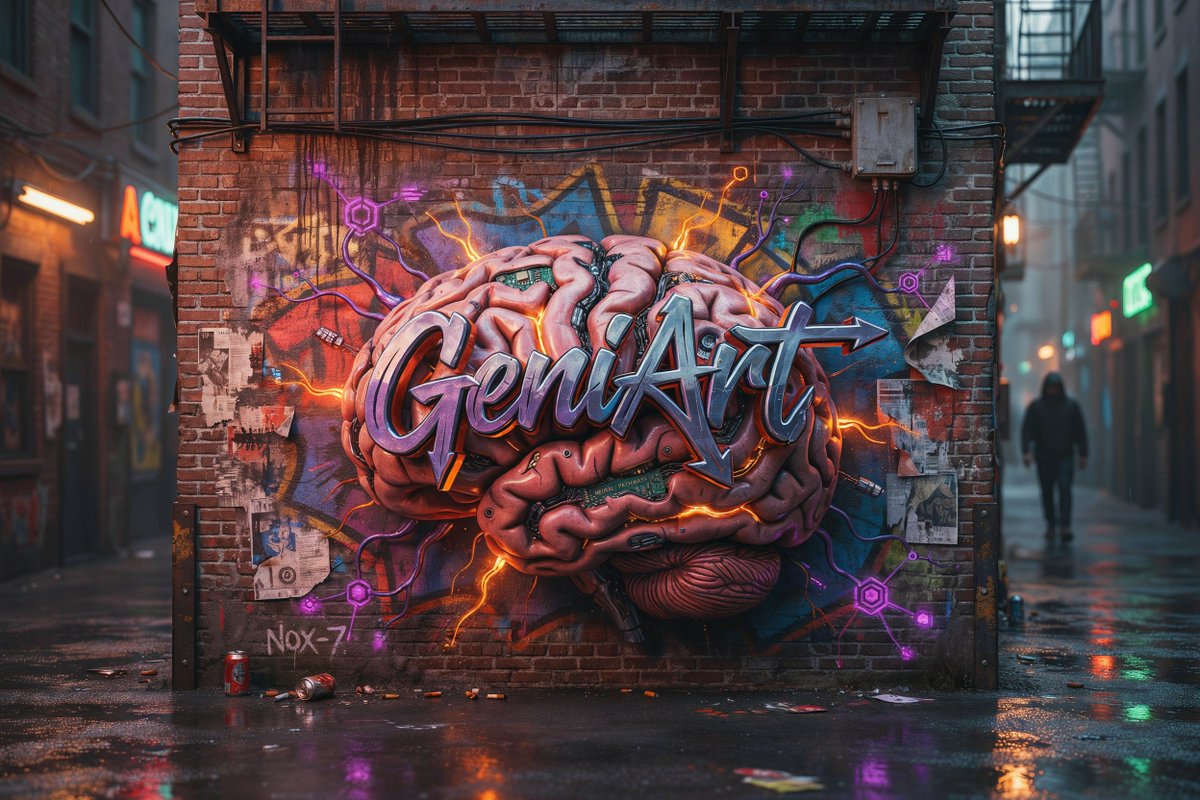
Cyberpunk Brain Graffiti Alley
A cinematic prompt for generating a rainy urban alley with a glowing 3D brain graffiti mural and neon cyberpunk street-art details.
이것은 풍경과 자연 에 대한 GPT Image 2 프롬프트 사례입니다. 아래의 복사 가능한 프롬프트를 사용하여 유사한 시각 자료를 생성하고, 재사용하기 전에 Awesome GPT Image 2 Prompts 의 저작자 표시 및 상업적 사용 권한을 검토하십시오.
전체 프롬프트 세트가 필요하신가요? 다음을 사용하세요. 풍경과 자연 더 많은 관련 예시를 보려면 주제 허브를 열거나 다음을 열어보세요. GPT Image 2 프롬프트 카탈로그 전체 예제 색인, 재사용 가능한 구조 및 출처 표기는 다음을 참조하십시오.
Free 1K preview
Generate one preview image instantly, no sign-up required.
2131/4000
프롬프트
복사 준비 프롬프트
Create a cinematic photorealistic urban alley mural scene at dusk after rain. The image shows a red brick wall at the end of a narrow alley, covered by a large hyper-detailed 3D graffiti mural of an exposed human brain, with glossy pink folds, dark mechanical seams, tiny circuit-board inserts, and glowing orange lightning cracks radiating outward. Across the center of the brain is bold metallic wildstyle graffiti lettering spelling {argument name="graffiti word" default="GeniArt"}, with chrome-blue highlights, purple shadows, black outline, and a sharp arrow extending from the final letter. Behind the brain, add layered colorful street tags and abstract spray shapes in blue, yellow, red, and green. Around the mural include exactly 6 visible neon circuit nodes: 3 purple hexagonal nodes on the left and lower left, 2 purple hexagonal nodes on the right and lower right, and 1 small orange node near the upper right, all connected by thin glowing cables and electric lines. The brick wall has realistic grime, rain streaks, old paper scraps, and urban decay; include exactly 4 torn paper poster fragments on the wall, plus a small handwritten tag reading {argument name="small wall tag" default="Nox-7"} near the lower left. Add industrial details: a black metal fire escape platform above the mural, horizontal black cables across the upper wall, and a beige electrical junction box at upper right with wires running down. The wet pavement reflects orange, purple, green, and red lights; place exactly 2 discarded drink cans near the bottom left foreground, one upright red can and one crushed can lying on its side, with a few small bits of litter scattered nearby. The alley extends into soft-focus city depth on both sides, with neon storefront signs blurred in the background and exactly 1 distant hooded pedestrian silhouette walking on the right side. Use a moody cyberpunk street-art atmosphere, shallow depth of field, realistic rain reflections, volumetric mist, high contrast, ultra-detailed textures, 16:9 composition, no watermark, no extra readable text besides the specified graffiti word and small wall tag.프롬프트 변수
프롬프트에 있는 편집 가능한 인수 자리 표시자와 해당 기본값입니다.
변하기 쉬운
graffiti word
기본
GeniArt
변하기 쉬운
small wall tag
기본
Nox-7
Best for
- - 풍경과 자연 visual exploration
- - Image generation and reference-image edits
- - Reusable briefs that keep source attribution visible
Change these parts
- - Subject, product, character, or scene
- - Aspect ratio, camera, lighting, and background
- - Brand, text, color, and output constraints
Recommended model and settings
- - Model: gpt-image-2
- - Input mode: 텍스트 to 이미지
- - Aspect ratio: source
- - Commercial status: review original source
How to use this prompt
- 1. Copy the prompt and preserve its structure for the first test.
- 2. Replace the subject, context, and publishing channel.
- 3. Change one camera, lighting, or style variable per iteration.
- 4. Inspect the output, source, text, and rights before reuse.
Limitations, source, and reuse cautions
- - Generated output is an editable draft, not factual, legal, or rights evidence.
- - Review the linked source, people, brands, logos, text, and third-party media before commercial use.
Awesome GPT Image 2 Prompts 에서 가져왔습니다. 출처 표기가 필요합니다. 상업적 이용 가능 여부는 allowed 입니다. 유료 사용 전에 원저작권 정보를 확인하세요.
이 범주에 속하는 더 많은 사례
범주, 입력 방식 호환성, 품질 및 위험도에 따라 우선순위가 정해집니다.






재사용 및 출처 참고 사항
사례를 미리 확인한 후 이 안내 메시지를 안전하게 사용하십시오.
- 1.프롬프트를 복사하거나 Dovoo의 생성 버튼을 사용하여 직접 엽니다.
- 2.사용 사례에 맞게 변수, 화면 비율 및 참조 이미지를 조정하십시오.
- 3.출판 또는 유료 사용 전에 저작권, 출처 표기 요건 및 브랜드 또는 초상권 관련 위험을 확인하십시오.