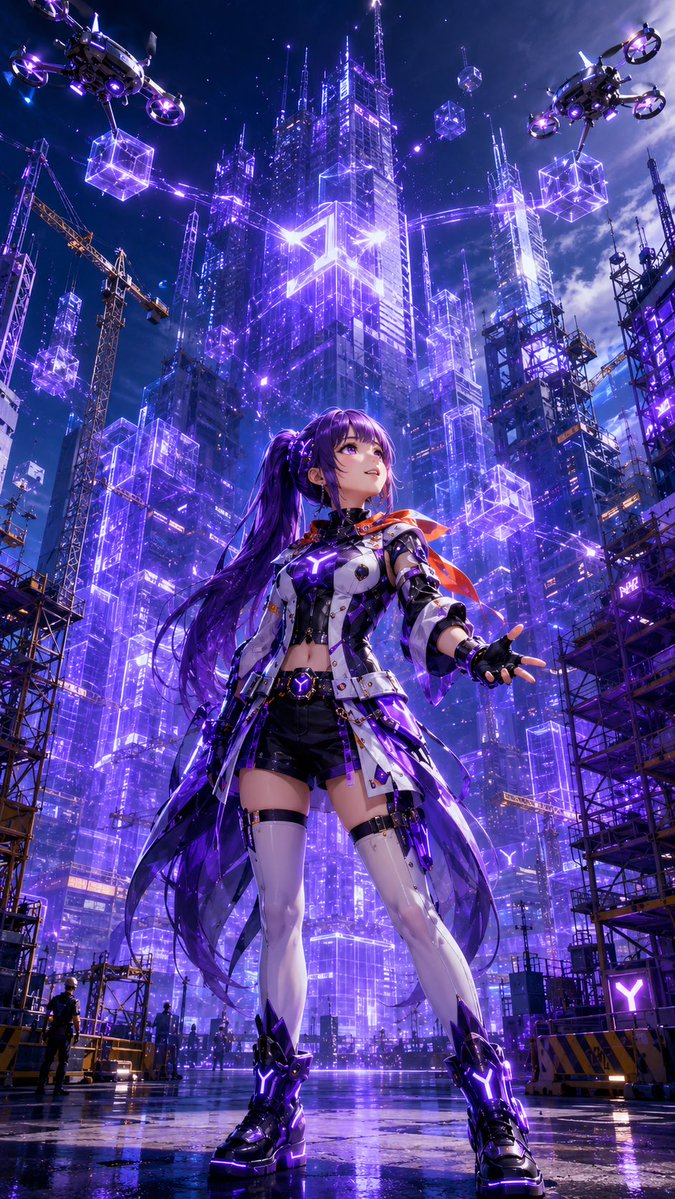
Cyberpunk Anime Heroine Megacity
A cinematic vertical prompt for generating a neon cyberpunk anime heroine standing before a futuristic city under construction.
이것은 애니메이션 & 게임 에 대한 GPT Image 2 프롬프트 사례입니다. 아래의 복사 가능한 프롬프트를 사용하여 유사한 시각 자료를 생성하고, 재사용하기 전에 Awesome GPT Image 2 Prompts 의 저작자 표시 및 상업적 사용 권한을 검토하십시오.
전체 프롬프트 세트가 필요하신가요? 다음을 사용하세요. 애니메이션 & 게임 더 많은 관련 예시를 보려면 주제 허브를 열거나 다음을 열어보세요. GPT Image 2 프롬프트 카탈로그 전체 예제 색인, 재사용 가능한 구조 및 출처 표기는 다음을 참조하십시오.
Free 1K preview
Generate one preview image instantly, no sign-up required.
2249/4000
프롬프트
복사 준비 프롬프트
Create a vertical 9:16 cinematic anime sci-fi key visual of {argument name="character name" default="a futuristic cyberpunk heroine"} standing full-body in the foreground of a rain-slick construction plaza at night, viewed from a dramatic low angle. Character consistency is the top priority: a young anime woman with {argument name="hair color" default="deep violet"} very long twin-tail hair flowing behind her, violet eyes, a confident upward gaze, and a slight heroic smile. She wears a white, black, and metallic futuristic combat jacket with glowing purple circuitry, black shorts, asymmetrical white thigh-high armored stockings, black fingerless gloves, chunky black cyber boots with bright purple Y-shaped lights, belts, straps, small tech pouches, and a translucent dark-purple coat tail or energy cape; add a small orange-red scarf or ribbon fluttering at her shoulder for contrast. Her left arm reaches outward as if controlling holograms, while her stance is wide and powerful. The environment is a towering cyberpunk megacity under construction, filled with glass skyscrapers outlined in intense neon purple and blue light, holographic wireframe architecture, transparent glowing cube modules, cranes, scaffolding, antenna spires, and starry storm clouds. Include exactly 2 large quadcopter cargo drones in the sky, one at the upper left and one at the upper right, each carrying 1 glowing purple wireframe cube beneath it. Include 8 distinct floating holographic cube modules around the city skyline, varying in size and distance, plus many thin purple laser guide lines connecting buildings. Include 3 visible construction cranes, dark scaffolding towers on both sides, and 3 tiny human worker silhouettes near the bottom to emphasize scale. The wet ground must mirror the purple city lights and the character’s boots. Use {argument name="primary neon color" default="electric violet"} as the dominant glow, with blue highlights and small orange construction lights. Style: ultra-detailed Japanese anime illustration, glossy cyberpunk rendering, sharp linework, high contrast, volumetric light beams, lens flares, reflective rain puddles, intricate mechanical costume details, epic poster composition, no text, no watermark, no logo.프롬프트 변수
프롬프트에 있는 편집 가능한 인수 자리 표시자와 해당 기본값입니다.
변하기 쉬운
character name
기본
a futuristic cyberpunk heroine
변하기 쉬운
hair color
기본
deep violet
변하기 쉬운
primary neon color
기본
electric violet
Best for
- - 애니메이션 & 게임 visual exploration
- - Image generation and reference-image edits
- - Reusable briefs that keep source attribution visible
Change these parts
- - Subject, product, character, or scene
- - Aspect ratio, camera, lighting, and background
- - Brand, text, color, and output constraints
Recommended model and settings
- - Model: gpt-image-2
- - Input mode: 텍스트 to 이미지
- - Aspect ratio: source
- - Commercial status: review original source
How to use this prompt
- 1. Copy the prompt and preserve its structure for the first test.
- 2. Replace the subject, context, and publishing channel.
- 3. Change one camera, lighting, or style variable per iteration.
- 4. Inspect the output, source, text, and rights before reuse.
Limitations, source, and reuse cautions
- - Generated output is an editable draft, not factual, legal, or rights evidence.
- - Review the linked source, people, brands, logos, text, and third-party media before commercial use.
Awesome GPT Image 2 Prompts 에서 가져왔습니다. 출처 표기가 필요합니다. 상업적 이용 가능 여부는 allowed 입니다. 유료 사용 전에 원저작권 정보를 확인하세요.
이 범주에 속하는 더 많은 사례
범주, 입력 방식 호환성, 품질 및 위험도에 따라 우선순위가 정해집니다.






재사용 및 출처 참고 사항
사례를 미리 확인한 후 이 안내 메시지를 안전하게 사용하십시오.
- 1.프롬프트를 복사하거나 Dovoo의 생성 버튼을 사용하여 직접 엽니다.
- 2.사용 사례에 맞게 변수, 화면 비율 및 참조 이미지를 조정하십시오.
- 3.출판 또는 유료 사용 전에 저작권, 출처 표기 요건 및 브랜드 또는 초상권 관련 위험을 확인하십시오.