사이버 AI 웨비나 미리보기
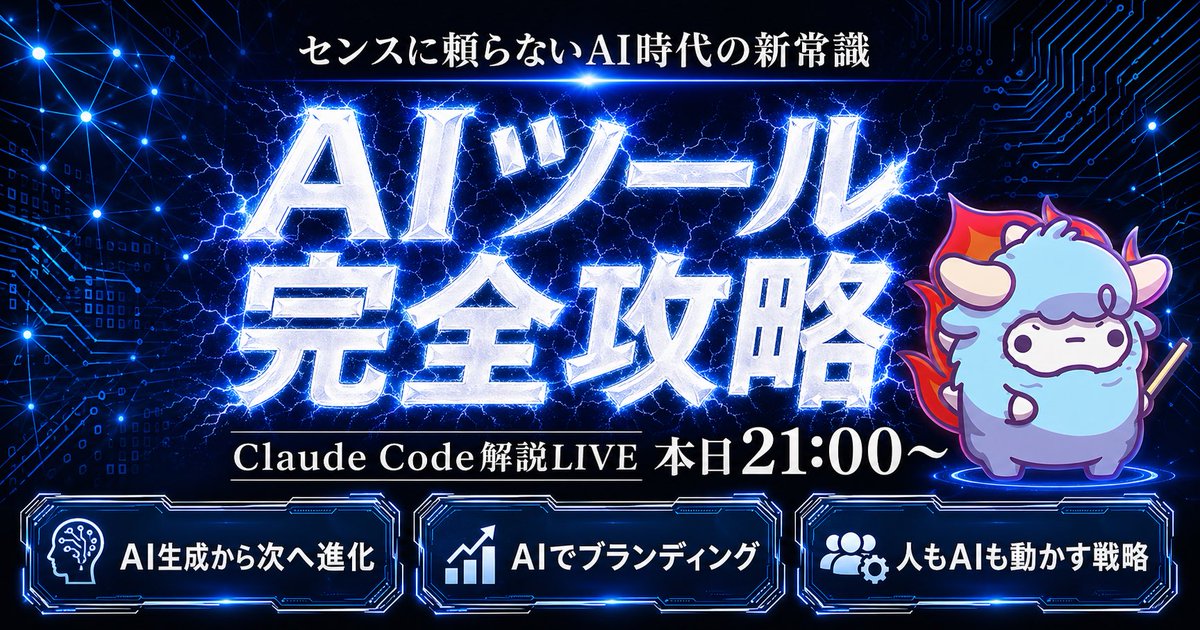
이 프롬프트는 기술 강연, AI 웨비나 또는 홍보 스트림을 위한 강렬한 일본 사이버 스타일의 라이브 스트림 썸네일을 생성합니다. 이 썸네일에는 생동감 넘치는 타이포그래피, 마스코트 캐릭터, 그리고 세 개의 주요 패널이 포함됩니다.
이것은 그래픽 및 포스터 에 대한 GPT Image 2 프롬프트 사례입니다. 아래의 복사 가능한 프롬프트를 사용하여 유사한 시각 자료를 생성하고, 재사용하기 전에 Awesome GPT Image 2 Prompts 의 저작자 표시 및 상업적 사용 권한을 검토하십시오.
전체 프롬프트 세트가 필요하신가요? 다음을 사용하세요. 그래픽 및 포스터 더 많은 관련 예시를 보려면 주제 허브를 열거나 다음을 열어보세요. GPT Image 2 프롬프트 카탈로그 전체 예제 색인, 재사용 가능한 구조 및 출처 표기는 다음을 참조하십시오.
Free 1K preview
Generate one preview image instantly, no sign-up required.
1782/4000
프롬프트
복사 준비 프롬프트
Create a flashy Japanese YouTube thumbnail in a dark futuristic cyber-tech style, 16:9 landscape composition, with a deep navy-to-black background filled with glowing blue circuit-board patterns, connected network nodes, tiny digital squares, and electric energy lines. At the top center, place a small white Japanese headline reading {argument name="headline text" default="センスに頼らないAI時代の新常識"}. In the center, add a massive 2-line Japanese title in metallic silver-white beveled lettering with intense neon-blue outer glow, electric lightning cracking behind and through the letters, reading {argument name="main title" default="AIツール 完全攻略"}. Beneath the main title, place one black horizontal banner with thin gold trim and white serif Japanese text reading {argument name="subheadline text" default="Claude Code Explanation LIVE Today from 9:00 PM"}. On the right side, include 1 cute chibi sheep mascot standing on a glowing blue circular platform, with fluffy light blue and lavender fur, small horns, simple dot eyes, a neutral expression, outlined in purple-blue light, holding a short stick, and surrounded by a red-orange flame aura behind its body. Along the bottom, place 3 glowing futuristic rounded rectangular panels with blue neon borders and dark interiors, evenly spaced left to right. The left panel contains 1 white head-with-circuit icon and the Japanese text {argument name="bottom left label" default="AI生成から次へ進化"}. The center panel contains 1 white upward-trend chart icon and the text "AIでブランディング". The right panel contains 1 white group-and-gear icon and the text "人もAIも動かす戦略". Use extremely high contrast, glossy metallic text effects, layered blue rim lighting, energetic lightning, subtle lens glows, and a premium high-impact webinar thumbnail aesthetic.프롬프트 변수
프롬프트에 있는 편집 가능한 인수 자리 표시자와 해당 기본값입니다.
변하기 쉬운
headline text
기본
センスに頼らないAI時代の新常識
변하기 쉬운
main title
기본
AIツール 完全攻略
변하기 쉬운
subheadline text
기본
Claude Code Explanation LIVE Today from 9:00 PM
변하기 쉬운
bottom left label
기본
AI生成から次へ進化
Best for
- - 그래픽 및 포스터 visual exploration
- - Image generation and reference-image edits
- - Reusable briefs that keep source attribution visible
Change these parts
- - Subject, product, character, or scene
- - Aspect ratio, camera, lighting, and background
- - Brand, text, color, and output constraints
Recommended model and settings
- - Model: gpt-image-2
- - Input mode: 텍스트 to 이미지
- - Aspect ratio: source
- - Commercial status: review original source
How to use this prompt
- 1. Copy the prompt and preserve its structure for the first test.
- 2. Replace the subject, context, and publishing channel.
- 3. Change one camera, lighting, or style variable per iteration.
- 4. Inspect the output, source, text, and rights before reuse.
Limitations, source, and reuse cautions
- - Generated output is an editable draft, not factual, legal, or rights evidence.
- - Review the linked source, people, brands, logos, text, and third-party media before commercial use.
Awesome GPT Image 2 Prompts 에서 가져왔습니다. 출처 표기가 필요합니다. 상업적 이용 가능 여부는 allowed 입니다. 유료 사용 전에 원저작권 정보를 확인하세요.
이 범주에 속하는 더 많은 사례
범주, 입력 방식 호환성, 품질 및 위험도에 따라 우선순위가 정해집니다.






재사용 및 출처 참고 사항
사례를 미리 확인한 후 이 안내 메시지를 안전하게 사용하십시오.
- 1.프롬프트를 복사하거나 Dovoo의 생성 버튼을 사용하여 직접 엽니다.
- 2.사용 사례에 맞게 변수, 화면 비율 및 참조 이미지를 조정하십시오.
- 3.출판 또는 유료 사용 전에 저작권, 출처 표기 요건 및 브랜드 또는 초상권 관련 위험을 확인하십시오.