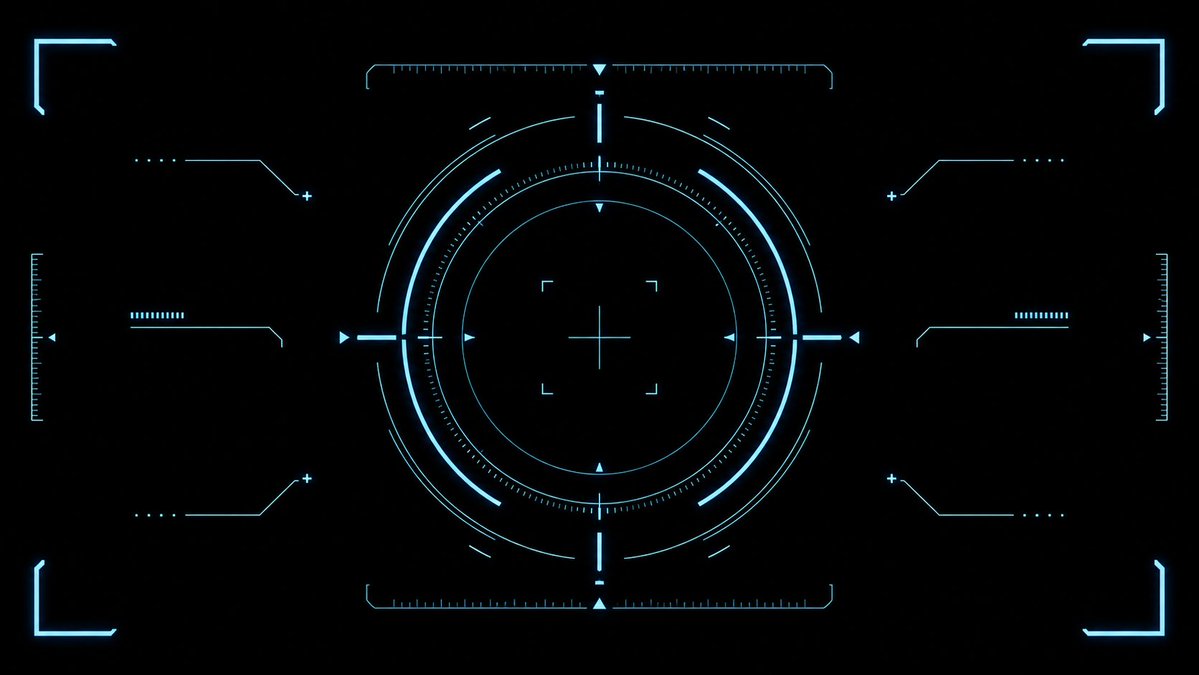
청록색 공상과학 HUD 조준선 오버레이
게임 UI, 비디오 오버레이 및 공상 과학 인터페이스 디자인에 사용할 수 있는 깔끔하고 미래적인 청록색 타겟팅 HUD 효과 에셋을 생성합니다.
이것은 애니메이션 & 게임 에 대한 GPT Image 2 프롬프트 사례입니다. 아래의 복사 가능한 프롬프트를 사용하여 유사한 시각 자료를 생성하고, 재사용하기 전에 Awesome GPT Image 2 Prompts 의 저작자 표시 및 상업적 사용 권한을 검토하십시오.
전체 프롬프트 세트가 필요하신가요? 다음을 사용하세요. 애니메이션 & 게임 더 많은 관련 예시를 보려면 주제 허브를 열거나 다음을 열어보세요. GPT Image 2 프롬프트 카탈로그 전체 예제 색인, 재사용 가능한 구조 및 출처 표기는 다음을 참조하십시오.
Free 1K preview
Generate one preview image instantly, no sign-up required.
2652/4000
프롬프트
복사 준비 프롬프트
{
  "type": "futuristic sci-fi HUD interface effect asset",
  "format": "wide 16:9 transparent-style graphic on pure black background",
  "style": "minimal high-tech vector UI, clean cyan neon glow, thin luminous strokes, symmetrical targeting overlay, game interface / cockpit scanner aesthetic, no text, no logos, no humans",
  "color_palette": {
    "primary": "{argument name=\"glow color\" default=\"electric cyan blue\"}",
    "background": "{argument name=\"background color\" default=\"deep black\"}",
    "line_weight": "ultra-thin technical lines with soft bloom"
  },
  "composition": {
    "overall": "perfectly centered, horizontally symmetrical heads-up display reticle with large circular target in the middle and decorative interface brackets around the edges",
    "canvas": "{argument name=\"aspect ratio\" default=\"16:9 widescreen\"}",
    "central_elements": {
      "count": 10,
      "items": [
        "1 large outer circular ring made from segmented arcs",
        "1 bright inner circular ring",
        "1 dotted micro-tick circular scale surrounding the inner ring",
        "1 thin innermost circle",
        "1 central crosshair with horizontal and vertical lines",
        "4 small corner focus brackets around the crosshair",
        "4 cardinal triangular pointers at top, bottom, left, and right of the circle",
        "4 short bright radial bars at the cardinal directions",
        "multiple fine calibration ticks along the circle",
        "small broken outer orbit arcs for motion-graphic detail"
      ]
    },
    "side_elements": {
      "count": 6,
      "items": [
        "3 left-side connector-line HUD widgets: top, middle, bottom",
        "3 right-side connector-line HUD widgets: top, middle, bottom"
      ],
      "details": "each side widget uses angled circuit-like lines, small dots, plus signs, and short ruler bars, mirrored left to right"
    },
    "edge_elements": {
      "count": 8,
      "items": [
        "4 glowing corner frame brackets, one in each corner",
        "2 vertical ruler scales at the far left and far right edges",
        "2 horizontal ruler scales centered near the top and bottom of the main circle",
        "small triangular side markers near the left and right edges"
      ]
    }
  },
  "lighting": "soft neon bloom around every line, crisp dark negative space, high contrast",
  "rendering": "2D vector effect material, sharp clean geometry, anti-aliased, suitable as a transparent overlay or VFX asset",
  "negative_prompt": "no words, no numbers, no icons with meaning, no cluttered background, no gradients except glow, no realistic objects, no characters"
}
프롬프트 변수
프롬프트에 있는 편집 가능한 인수 자리 표시자와 해당 기본값입니다.
변하기 쉬운
glow color
기본
electric cyan blue
변하기 쉬운
background color
기본
deep black
변하기 쉬운
aspect ratio
기본
16:9 widescreen
Best for
- - 애니메이션 & 게임 visual exploration
- - Image generation and reference-image edits
- - Reusable briefs that keep source attribution visible
Change these parts
- - Subject, product, character, or scene
- - Aspect ratio, camera, lighting, and background
- - Brand, text, color, and output constraints
Recommended model and settings
- - Model: gpt-image-2
- - Input mode: 텍스트 to 이미지
- - Aspect ratio: source
- - Commercial status: review original source
How to use this prompt
- 1. Copy the prompt and preserve its structure for the first test.
- 2. Replace the subject, context, and publishing channel.
- 3. Change one camera, lighting, or style variable per iteration.
- 4. Inspect the output, source, text, and rights before reuse.
Limitations, source, and reuse cautions
- - Generated output is an editable draft, not factual, legal, or rights evidence.
- - Review the linked source, people, brands, logos, text, and third-party media before commercial use.
Awesome GPT Image 2 Prompts 에서 가져왔습니다. 출처 표기가 필요합니다. 상업적 이용 가능 여부는 allowed 입니다. 유료 사용 전에 원저작권 정보를 확인하세요.
이 범주에 속하는 더 많은 사례
범주, 입력 방식 호환성, 품질 및 위험도에 따라 우선순위가 정해집니다.






재사용 및 출처 참고 사항
사례를 미리 확인한 후 이 안내 메시지를 안전하게 사용하십시오.
- 1.프롬프트를 복사하거나 Dovoo의 생성 버튼을 사용하여 직접 엽니다.
- 2.사용 사례에 맞게 변수, 화면 비율 및 참조 이미지를 조정하십시오.
- 3.출판 또는 유료 사용 전에 저작권, 출처 표기 요건 및 브랜드 또는 초상권 관련 위험을 확인하십시오.