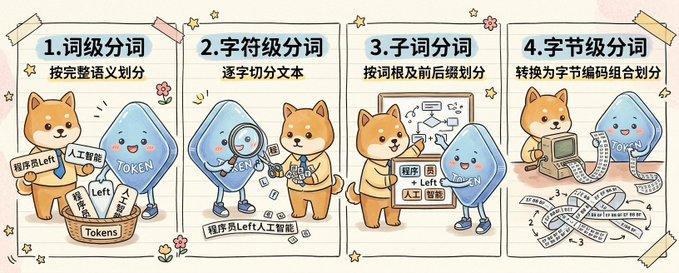
귀여운 4면 토큰화 인포그래픽
이 프롬프트는 두 마스코트 캐릭터가 네 가지 토큰화 방법을 설명하는 손으로 그린 대형 인포그래픽을 생성하며, AI 및 NLP에 대한 소셜 미디어 교육 게시물에 적합합니다.
이것은 그래픽 및 포스터 에 대한 GPT Image 2 프롬프트 사례입니다. 아래의 복사 가능한 프롬프트를 사용하여 유사한 시각 자료를 생성하고, 재사용하기 전에 Awesome GPT Image 2 Prompts 의 저작자 표시 및 상업적 사용 권한을 검토하십시오.
전체 프롬프트 세트가 필요하신가요? 다음을 사용하세요. 그래픽 및 포스터 더 많은 관련 예시를 보려면 주제 허브를 열거나 다음을 열어보세요. GPT Image 2 프롬프트 카탈로그 전체 예제 색인, 재사용 가능한 구조 및 출처 표기는 다음을 참조하십시오.
Free 1K preview
Generate one preview image instantly, no sign-up required.
Free text preview doesn’t preserve reference-image consistency.
4000/4000
프롬프트
복사 준비 프롬프트
{
  "type": "hand-drawn educational infographic illustration",
  "style": "cute notebook doodle style, hand-painted handbook aesthetic, warm beige paper background with faint texture, playful sketchy outlines, soft pastel colors, small flower and star doodles, taped paper-card layout",
  "aspect_ratio": "wide horizontal",
  "subject": {
    "characters": [
      {
        "name": "{argument name=\"dog character name\" default=\"Chai Xiaoqi\"}",
        "species": "Shiba Inu mascot",
        "appearance": "cute orange-brown Shiba Inu with cream muzzle and belly, round face, upright ears, friendly expression, simplified cartoon anatomy"
      },
      {
        "name": "{argument name=\"blue character name\" default=\"Token\"}",
        "species": "blue token mascot",
        "appearance": "rounded triangular blue droplet-shaped character with glossy gradient body, tiny arms and legs, rosy cheeks, smiling face, the word \"{argument name=\"token label\" default=\"TOKEN\"}\" written across the body in white"
      }
    ],
    "theme": "compare four levels of text segmentation in a friendly science-explainer format"
  },
  "layout": {
    "sections": [
      {
        "title": "1. Word-level Segmentation",
        "position": "far left panel",
        "count": 1,
        "subtitle": "Divided according to complete semantics",
        "scene": "A Shiba Inu and a blue Token character stand next to a basket labeled \"Tokens\", which is filled with slips of paper. Visible slips and labels are written with \"Programmer\", \"Left\", \"Artificial Intelligence\", and a small sign next to it reads \"ProgrammerLeft\". The Token character points to the basket, while the Shiba Inu displays sorted fragments."
      },
      {
        "title": "2. Character-level tokenization",
        "position": "left-center panel",
        "count": 1,
        "subtitle": "Splitting the text character by character",
        "scene": "A blue Token character uses a magnifying glass to examine small character blocks scattered on the floor, while a Shiba Inu organizes them nearby. A label strip at the bottom reads \"ProgrammerLeftArtificialIntelligence\", serving as a continuous text sample broken down into individual characters."
      },
      {
        "title": "3. Subword tokenization",
        "position": "right-center panel",
        "count": 1,
        "subtitle": "Divide by root words and prefixes",
        "scene": "The Shiba Inu points to a project demonstrating root word splitting and arrows, with a blue Token mascot standing next to it. Small paper labels contain mixed fragments such as \"program\", \"member\", \"Left\", \"artificial\", \"intelligence\", emphasizing morpheme or subword groupings."
      },
      {
        "title": "4. Byte-level tokenization",
        "position": "far right panel",
        "count": 1,
        "subtitle": "Convert to byte encoding combinations for division",
        "scene": "the Shiba Inu uses a retro computer with a long printed strip emerging from it, and the blue token character stands to the side. Across the lower half are ribbon-like strips filled with repeated byte numbers and symbols, especially \"1\", \"2\", \"3\", \"4\", and \"-3\", illustrating byte encoding combinations."
      }
    ],
    "decorations": {
      "count": 10,
      "items": [
        "4 pieces of taped corners in pale yellow and pink",
        "small five-point stars scattered around panels",
        "tiny flower doodles between panels",
        "curved motion lines near character gestures",
        "notebook-style vertical panel dividers",
        "rounded rectangular panel frames",
        "light shadows behind paper panels",
        "faint horizontal paper grain",
        "small spark icons",
        "hand-drawn accent marks"
      ]
    }
  },
  "composition": "four equal vertical panels arranged left to right across one canvas, each panel with a bold numbered Chinese heading and a smaller subtitle beneath it, each panel showing the two mascots acting out a different tokenization concept",
  "text": {
    "headings": [
      "1. Word-level Segmentation",
      "2. Character-level tokenization",
      "3. Subword tokenization",
      "4. Byte-level tokenization"
    ],
    "subtitles": [
      "Divided according to complete semantics",
      "Splitting the text character by character",
      "Divide by root words and prefixes",
      "Convert to byte encoding combinations for division"
    ]
  },
  "quality": "clean, polished, adorable, presentation-ready educational visual",
  "use_case": "social media science explainer comparing tokenization methods for AI and NLP"
}
프롬프트 변수
프롬프트에 있는 편집 가능한 인수 자리 표시자와 해당 기본값입니다.
변하기 쉬운
dog character name
기본
Chai Xiaoqi
변하기 쉬운
blue character name
기본
Token
변하기 쉬운
token label
기본
TOKEN
Best for
- - 그래픽 및 포스터 visual exploration
- - Image generation and reference-image edits
- - Reusable briefs that keep source attribution visible
Change these parts
- - Subject, product, character, or scene
- - Aspect ratio, camera, lighting, and background
- - Brand, text, color, and output constraints
Recommended model and settings
- - Model: gpt-image-2
- - Input mode: 이미지 to 이미지
- - Aspect ratio: source
- - Commercial status: review original source
How to use this prompt
- 1. Copy the prompt and preserve its structure for the first test.
- 2. Replace the subject, context, and publishing channel.
- 3. Change one camera, lighting, or style variable per iteration.
- 4. Inspect the output, source, text, and rights before reuse.
Limitations, source, and reuse cautions
- - Generated output is an editable draft, not factual, legal, or rights evidence.
- - Review the linked source, people, brands, logos, text, and third-party media before commercial use.
Awesome GPT Image 2 Prompts 에서 가져왔습니다. 출처 표기가 필요합니다. 상업적 이용 가능 여부는 allowed 입니다. 유료 사용 전에 원저작권 정보를 확인하세요.
이 범주에 속하는 더 많은 사례
범주, 입력 방식 호환성, 품질 및 위험도에 따라 우선순위가 정해집니다.






재사용 및 출처 참고 사항
사례를 미리 확인한 후 이 안내 메시지를 안전하게 사용하십시오.
- 1.프롬프트를 복사하거나 Dovoo의 생성 버튼을 사용하여 직접 엽니다.
- 2.사용 사례에 맞게 변수, 화면 비율 및 참조 이미지를 조정하십시오.
- 3.출판 또는 유료 사용 전에 저작권, 출처 표기 요건 및 브랜드 또는 초상권 관련 위험을 확인하십시오.