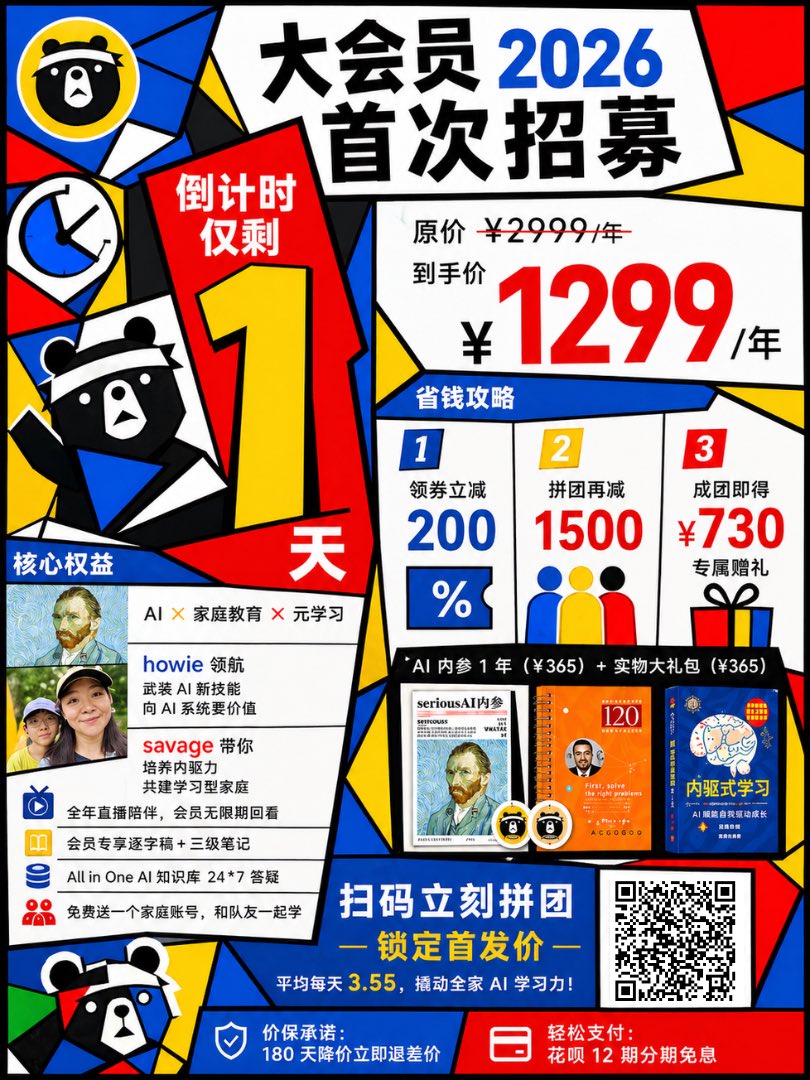
큐비즘풍 중국 회원권 홍보 포스터
이 프롬프트는 회원 가입 출시를 위한 다채로운 기하학적 중국어 마케팅 포스터를 생성하며, 소셜 미디어 홍보, 캠페인 광고 및 판매 발표 그래픽에 유용합니다.
이것은 그래픽 및 포스터 에 대한 GPT Image 2 프롬프트 사례입니다. 아래의 복사 가능한 프롬프트를 사용하여 유사한 시각 자료를 생성하고, 재사용하기 전에 Awesome GPT Image 2 Prompts 의 저작자 표시 및 상업적 사용 권한을 검토하십시오.
전체 프롬프트 세트가 필요하신가요? 다음을 사용하세요. 그래픽 및 포스터 더 많은 관련 예시를 보려면 주제 허브를 열거나 다음을 열어보세요. GPT Image 2 프롬프트 카탈로그 전체 예제 색인, 재사용 가능한 구조 및 출처 표기는 다음을 참조하십시오.
Free 1K preview
Generate one preview image instantly, no sign-up required.
4000/4000
프롬프트
복사 준비 프롬프트
Create a bold Chinese promotional poster in a chaotic graphic style combining Mondrian, Fauvism, and Cubism, featuring thick black outlines, irregular geometric color blocks, and high-contrast colors of red, blue, yellow, white, and black. The layout is a compact, single-page vertical membership event poster, including multiple tilted panels and sharp angular divisions, presenting a cut-and-paste collage and retro commercial poster design feel. Place a huge white trapezoid panel at the top center, containing the oversized black Chinese title: the first line “大会员” (Grand Membership), the second line “首次招募” (First Recruitment), and integrate the year {argument name="year" default="2026"} as a prominent bright blue large number into the title. Add 4 decorative icon/mascot elements on the left: a circular bear face Logo within a yellow circle in the upper left corner, a blue and white clock icon below it, a half-body black and white bear mascot wearing a blue scarf and raising one arm in the left center, and a cropped bear mascot face in the lower left corner. Add a tall red countdown panel in the left center, with the white Chinese text “倒计时仅剩” (Countdown Remaining) at the top, a huge yellow number “1” in the middle, and a large white “天” (days) at the bottom. Place a large white price panel in the upper right corner, displaying the original price line “原价 ¥2999/年” (¥2999/year) (2999 with a strikethrough), followed by the text “到手价” (Final Price), and the huge red price “¥1299/年”. Below this, create a blue title bar labeled “省钱攻略” (Money-Saving Guide), and divide this area into 3 vertical discount columns, labeled 1, 2, and 3. The first column displays “领券立减” (Coupon Discount) and a huge blue “200” number, with a coupon icon in the shape of a percentage below it. The second column displays “拼团再减” (Group Purchase Discount) and a huge red “1500” number, with three simplified blue, yellow, and red human icons below it. The third column displays “成团即得” (Get Gift Upon Success) and a huge red “¥730” number, with the smaller black text “专属赠礼” (Exclusive Gift) and a gift box icon below it. Add a white benefits panel with a blue label titled “核心权益” (Core Benefits) in the lower left corner. Inside, place 2 small rectangular avatar thumbnails on the upper left, and list 3 lines of text to the right: “AI × 家庭教育 × 元学习” (AI × Family Education × Meta-Learning), the name “howie” highlighted in blue followed by black Chinese descriptive text, and the name “savage” highlighted in red followed by black Chinese descriptive text. Below these texts, include 4 rows of benefits with blue small icons: “全年直播陪伴,会员无限期回看” (All-year live streaming, unlimited replay for members), “会员专享逐字稿 + 三级笔记” (Exclusive transcripts + three-level notes for members), “All in One AI 知识库 24*7 答疑” (All in One AI Knowledge Base 24*7 Q&A), and “免费送一个家庭账号,和队友一起学” (Free family account, learn together with teammates). Create a black horizontal bar spanning the bottom center, containing the white text “AI 内参 1 年(¥365) + 实物大礼包(¥365)” (1 year of AI Insights ¥365 + Physical Gift Package ¥365). Below this bar, display 3 product images side-by-side: a magazine-style booklet cover, an orange notebook/book cover, and a blue book cover, with 2 small circular mascot badges next to the products. Place a large blue call-to-action panel in the bottom center, with the prominent white Chinese text “扫码立刻拼团” (Scan to group purchase now) and the yellow subtitle “— 锁定首发价 —” (— Lock in the initial price —), followed by a smaller white and yellow alternating text: “平均每天 3.55,撬动全家 AI 学习力!” (Average of ¥3.55 per day, unlock the AI learning potential of the whole family!). Add a black and white QR code within a white box in the lower right corner. Create 2 footer bars at the very bottom: a blue bar on the left with a shield icon and white text “价保承诺:180 天降价立即退差价” (Price Guarantee: 180-day price drop, immediate refund of the difference); and a red bar on the right with a card/payment icon and white text “轻松支付:花呗 12 期分期免息” (Easy Payment: 12 interest-free installments with Huabei). Use extra-thick sans-serif Chinese fonts, exaggerated proportion contrasts, dynamic asymmetrical composition, overlapping panels, creating a vibrant social media marketing commercial poster feel.프롬프트 변수
프롬프트에 있는 편집 가능한 인수 자리 표시자와 해당 기본값입니다.
변하기 쉬운
year
기본
2026
Best for
- - 그래픽 및 포스터 visual exploration
- - Image generation and reference-image edits
- - Reusable briefs that keep source attribution visible
Change these parts
- - Subject, product, character, or scene
- - Aspect ratio, camera, lighting, and background
- - Brand, text, color, and output constraints
Recommended model and settings
- - Model: gpt-image-2
- - Input mode: 텍스트 to 이미지
- - Aspect ratio: source
- - Commercial status: review original source
How to use this prompt
- 1. Copy the prompt and preserve its structure for the first test.
- 2. Replace the subject, context, and publishing channel.
- 3. Change one camera, lighting, or style variable per iteration.
- 4. Inspect the output, source, text, and rights before reuse.
Limitations, source, and reuse cautions
- - Generated output is an editable draft, not factual, legal, or rights evidence.
- - Review the linked source, people, brands, logos, text, and third-party media before commercial use.
Awesome GPT Image 2 Prompts 에서 가져왔습니다. 출처 표기가 필요합니다. 상업적 이용 가능 여부는 allowed 입니다. 유료 사용 전에 원저작권 정보를 확인하세요.
이 범주에 속하는 더 많은 사례
범주, 입력 방식 호환성, 품질 및 위험도에 따라 우선순위가 정해집니다.






재사용 및 출처 참고 사항
사례를 미리 확인한 후 이 안내 메시지를 안전하게 사용하십시오.
- 1.프롬프트를 복사하거나 Dovoo의 생성 버튼을 사용하여 직접 엽니다.
- 2.사용 사례에 맞게 변수, 화면 비율 및 참조 이미지를 조정하십시오.
- 3.출판 또는 유료 사용 전에 저작권, 출처 표기 요건 및 브랜드 또는 초상권 관련 위험을 확인하십시오.