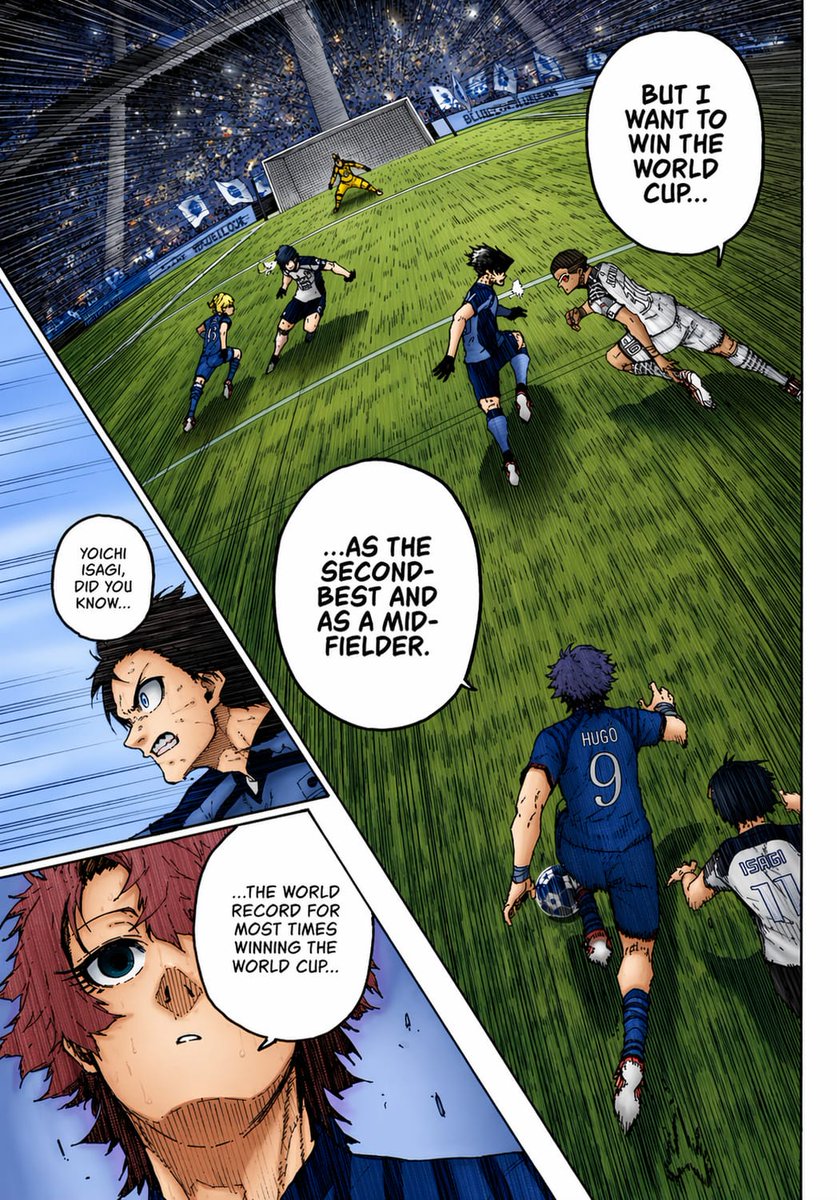
컬러로 채색된 축구 만화 페이지
이 기능을 사용하면 기울어진 경기장 축구 장면, 삽입된 클로즈업 패널, 굵은 글씨의 대화가 포함된 생동감 넘치는 풀컬러 스포츠 만화 페이지를 만들 수 있으며, 만화 채색 테스트나 애니메이션 스타일의 만화 작업에 이상적입니다.
이것은 애니메이션 & 게임 에 대한 GPT Image 2 프롬프트 사례입니다. 아래의 복사 가능한 프롬프트를 사용하여 유사한 시각 자료를 생성하고, 재사용하기 전에 Awesome GPT Image 2 Prompts 의 저작자 표시 및 상업적 사용 권한을 검토하십시오.
전체 프롬프트 세트가 필요하신가요? 다음을 사용하세요. 애니메이션 & 게임 더 많은 관련 예시를 보려면 주제 허브를 열거나 다음을 열어보세요. GPT Image 2 프롬프트 카탈로그 전체 예제 색인, 재사용 가능한 구조 및 출처 표기는 다음을 참조하십시오.
Free 1K preview
Generate one preview image instantly, no sign-up required.
2358/4000
프롬프트
복사 준비 프롬프트
A full-color manga page in the style of a dramatic sports manga, showing an intense soccer match inside a huge domed stadium packed with a blue-and-white crowd. Use sharp ink lines, dense crosshatching, screentone texture, dynamic speed lines, and vivid anime coloring as if a black-and-white manga page has been professionally colorized. The composition is a single page with 3 panels: 1 large main panel covering most of the page, plus 2 narrow diagonal inset panels stacked along the left side. In the main panel, show a steeply tilted wide-angle view of the penalty area and goal from an elevated sideline perspective, with the green grass stretched by perspective and filled with directional hatching. Count 6 visible players in the main panel: 4 blue-uniform players and 2 white-uniform players, plus 1 goalkeeper in yellow at the goal. The most prominent player is seen from behind in the lower center-right wearing a blue jersey with “HUGO” and the number 9, running toward the play with one arm extended. Near him on the lower right edge, show another player in a white jersey labeled “ISAGI” with the number 11, also running forward. In the midground, show 4 more field players contesting the ball: 3 in blue and 1 in white, with one white-uniform player diving or lunging horizontally from the right toward the center. The goal stands near the top center-left, with the yellow goalkeeper bracing in front of the net. Add 3 speech bubbles in the main panel, large white manga balloons with hand-lettered uppercase English text: “BUT I WANT TO WIN THE WORLD CUP...”, “...AS THE SECOND-BEST AND AS A MID-FIELDER.”, and “...THE WORLD RECORD FOR MOST TIMES WINNING THE WORLD CUP...”. In the left-side inset area, create 2 diagonal panels. The upper inset panel shows a close-up of a dark-haired character in blue, partly obscured by a soft rectangular blur over the center of the face and torso area, with a small speech bubble that says, “YOICHI ISAGI, DID YOU KNOW...”. The lower inset panel shows a close-up of a reddish-haired character with a wide blue eye, sweat on the face, and a pale blue background, looking surprised or stunned. Maintain bold black panel borders, dramatic foreshortening, and a high-energy tournament atmosphere. Use a blue, green, white, and yellow palette with strong contrast and authentic manga-page coloring aesthetics.
Best for
- - 애니메이션 & 게임 visual exploration
- - Image generation and reference-image edits
- - Reusable briefs that keep source attribution visible
Change these parts
- - Subject, product, character, or scene
- - Aspect ratio, camera, lighting, and background
- - Brand, text, color, and output constraints
Recommended model and settings
- - Model: gpt-image-2
- - Input mode: 텍스트 to 이미지
- - Aspect ratio: source
- - Commercial status: review original source
How to use this prompt
- 1. Copy the prompt and preserve its structure for the first test.
- 2. Replace the subject, context, and publishing channel.
- 3. Change one camera, lighting, or style variable per iteration.
- 4. Inspect the output, source, text, and rights before reuse.
Limitations, source, and reuse cautions
- - Generated output is an editable draft, not factual, legal, or rights evidence.
- - Review the linked source, people, brands, logos, text, and third-party media before commercial use.
Awesome GPT Image 2 Prompts 에서 가져왔습니다. 출처 표기가 필요합니다. 상업적 이용 가능 여부는 allowed 입니다. 유료 사용 전에 원저작권 정보를 확인하세요.
이 범주에 속하는 더 많은 사례
범주, 입력 방식 호환성, 품질 및 위험도에 따라 우선순위가 정해집니다.






재사용 및 출처 참고 사항
사례를 미리 확인한 후 이 안내 메시지를 안전하게 사용하십시오.
- 1.프롬프트를 복사하거나 Dovoo의 생성 버튼을 사용하여 직접 엽니다.
- 2.사용 사례에 맞게 변수, 화면 비율 및 참조 이미지를 조정하십시오.
- 3.출판 또는 유료 사용 전에 저작권, 출처 표기 요건 및 브랜드 또는 초상권 관련 위험을 확인하십시오.