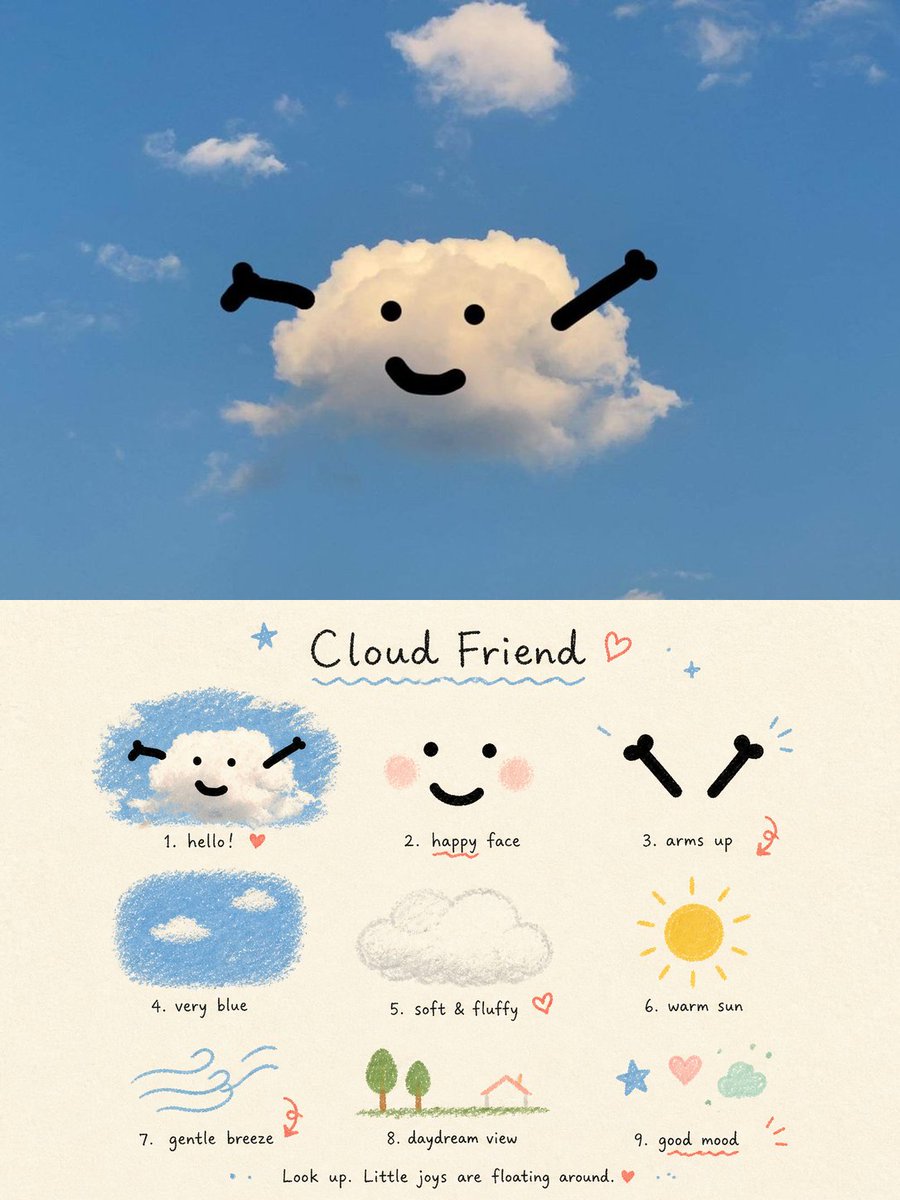
Cloud Friend Scrapbook Poster
A whimsical vertical poster featuring a smiling cloud in a blue sky above a nine-part hand-drawn cloud-themed mood board.
이것은 그래픽 및 포스터 에 대한 GPT Image 2 프롬프트 사례입니다. 아래의 복사 가능한 프롬프트를 사용하여 유사한 시각 자료를 생성하고, 재사용하기 전에 Awesome GPT Image 2 Prompts 의 저작자 표시 및 상업적 사용 권한을 검토하십시오.
전체 프롬프트 세트가 필요하신가요? 다음을 사용하세요. 그래픽 및 포스터 더 많은 관련 예시를 보려면 주제 허브를 열거나 다음을 열어보세요. GPT Image 2 프롬프트 카탈로그 전체 예제 색인, 재사용 가능한 구조 및 출처 표기는 다음을 참조하십시오.
Free 1K preview
Generate one preview image instantly, no sign-up required.
2848/4000
프롬프트
복사 준비 프롬프트
Goal: Create a whimsical two-part aesthetic poster about a cute cloud character, combining a real-sky photo scene on top with a hand-drawn scrapbook guide below.

Canvas: Vertical 3:4 poster. The top half is a realistic outdoor sky photograph; the bottom half is a cream paper illustration panel with a soft grainy texture.

Top scene: A bright blue daytime sky with a few small white clouds. In the center, one fluffy white cloud is turned into a friendly character using simple black graphic features: exactly 2 dot eyes, 1 curved smiling mouth, and 2 raised bone-like arms angled upward from the left and right sides. The mood is light, airy, relaxed, and childlike. Use natural sunlight and keep the sky spacious.

Bottom panel title: Handwritten title centered near the top: {argument name="title text" default="Cloud Friend"}. Add a small blue star to the left, a red heart to the right, tiny blue sparkles, and a wavy blue underline beneath the title.

Bottom layout: Arrange exactly 9 small illustrated vignettes in a loose 3-by-3 grid, each with a handwritten numbered caption underneath. The style should look like colored pencil, crayon, and ink on warm off-white paper.

Nine vignettes and captions:
1. “hello!” — a small smiling cloud character inside a rough blue scribble patch, with two black arms and a tiny red heart.
2. “happy face” — a simple face made of 2 black dot eyes, 1 black smile, and 2 soft pink blush circles.
3. “arms up” — two separate black bone-like arms raised like a cheering gesture, with small blue motion marks and a red doodle accent.
4. “very blue” — a rounded rectangle of textured blue crayon sky containing exactly 2 small white clouds.
5. “soft & fluffy” — a pale gray pencil sketch of one fluffy cloud outline, with a small red heart.
6. “warm sun” — a yellow-orange circular sun with short radiating rays.
7. “gentle breeze” — light blue flowing wind lines with a small swirl and red doodle accent.
8. “daydream view” — a tiny simple landscape with exactly 2 green trees, a green ground line, and a small red-roof house outline.
9. “good mood” — a cheerful doodle cluster containing 1 blue star, 1 pink heart, 1 mint green cloud, small dots, and red accent lines.

Footer text: Centered along the bottom in small handwritten lettering: {argument name="footer quote" default="Look up. Little joys are floating around."} followed by a small red heart and blue dots.

Visual style: Mix realistic photography in the top half with naive hand-drawn journaling in the bottom half. Use soft blue, cream, black, pastel pink, yellow, mint, and red accents. Keep all text handwritten, imperfect, casual, and charming.

Constraints: Preserve the exact two-panel composition, the exact count of 9 numbered vignettes, and the friendly minimalist cloud face. Avoid extra characters, logos, watermarks, or dense text.
프롬프트 변수
프롬프트에 있는 편집 가능한 인수 자리 표시자와 해당 기본값입니다.
변하기 쉬운
title text
기본
Cloud Friend
변하기 쉬운
footer quote
기본
Look up. Little joys are floating around.
Best for
- - 그래픽 및 포스터 visual exploration
- - Image generation and reference-image edits
- - Reusable briefs that keep source attribution visible
Change these parts
- - Subject, product, character, or scene
- - Aspect ratio, camera, lighting, and background
- - Brand, text, color, and output constraints
Recommended model and settings
- - Model: gpt-image-2
- - Input mode: 텍스트 to 이미지
- - Aspect ratio: source
- - Commercial status: review original source
How to use this prompt
- 1. Copy the prompt and preserve its structure for the first test.
- 2. Replace the subject, context, and publishing channel.
- 3. Change one camera, lighting, or style variable per iteration.
- 4. Inspect the output, source, text, and rights before reuse.
Limitations, source, and reuse cautions
- - Generated output is an editable draft, not factual, legal, or rights evidence.
- - Review the linked source, people, brands, logos, text, and third-party media before commercial use.
Awesome GPT Image 2 Prompts 에서 가져왔습니다. 출처 표기가 필요합니다. 상업적 이용 가능 여부는 allowed 입니다. 유료 사용 전에 원저작권 정보를 확인하세요.
이 범주에 속하는 더 많은 사례
범주, 입력 방식 호환성, 품질 및 위험도에 따라 우선순위가 정해집니다.






재사용 및 출처 참고 사항
사례를 미리 확인한 후 이 안내 메시지를 안전하게 사용하십시오.
- 1.프롬프트를 복사하거나 Dovoo의 생성 버튼을 사용하여 직접 엽니다.
- 2.사용 사례에 맞게 변수, 화면 비율 및 참조 이미지를 조정하십시오.
- 3.출판 또는 유료 사용 전에 저작권, 출처 표기 요건 및 브랜드 또는 초상권 관련 위험을 확인하십시오.