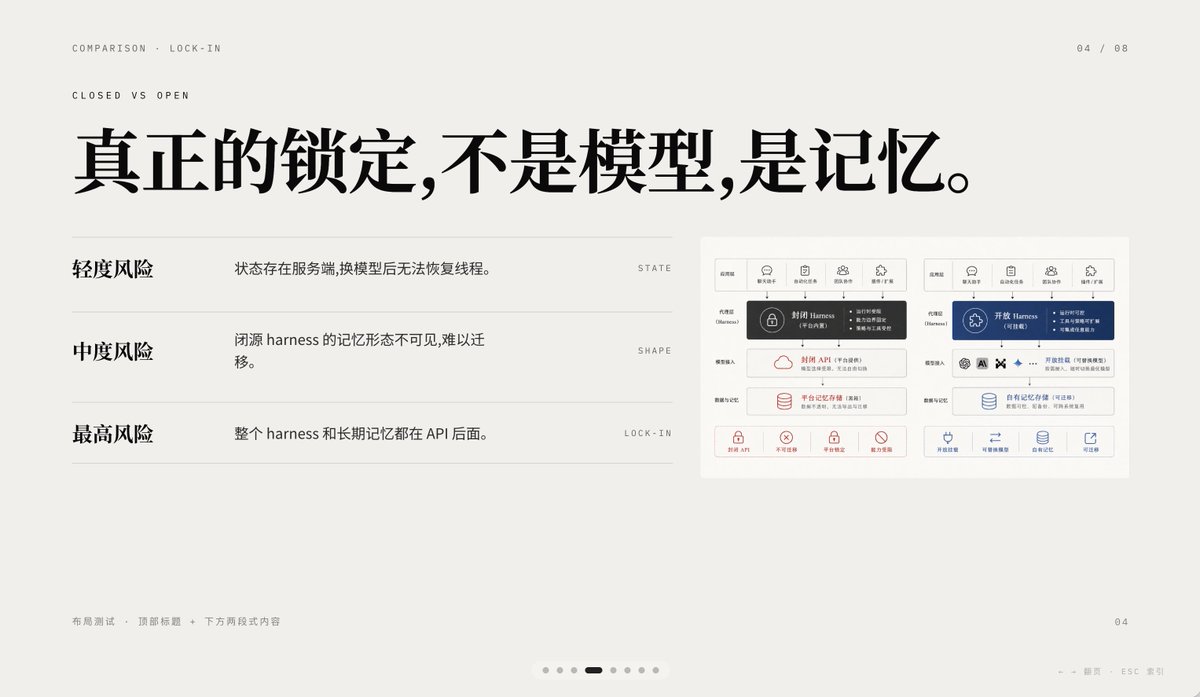
AI 종속성 최소화 비교 슬라이드
이 프롬프트는 폐쇄형 AI 메모리 종속성과 개방형 AI 메모리 종속성을 비교하는 세련된 중국어 프레젠테이션 슬라이드를 생성합니다. 이 슬라이드는 기조 연설, 제품 전략 발표 및 고급 인포그래픽 PPT에 적합합니다.
이것은 그래픽 및 포스터 에 대한 GPT Image 2 프롬프트 사례입니다. 아래의 복사 가능한 프롬프트를 사용하여 유사한 시각 자료를 생성하고, 재사용하기 전에 Awesome GPT Image 2 Prompts 의 저작자 표시 및 상업적 사용 권한을 검토하십시오.
전체 프롬프트 세트가 필요하신가요? 다음을 사용하세요. 그래픽 및 포스터 더 많은 관련 예시를 보려면 주제 허브를 열거나 다음을 열어보세요. GPT Image 2 프롬프트 카탈로그 전체 예제 색인, 재사용 가능한 구조 및 출처 표기는 다음을 참조하십시오.
Free 1K preview
Generate one preview image instantly, no sign-up required.
2878/4000
프롬프트
복사 준비 프롬프트
A 16:9 minimalist editing style presentation Slides with a warm, light gray paper background, ample whitespace, and a layout following a refined Swiss style grid, possessing a high-end PPT/Keynote design aesthetic. This Slides is a comparison page about “Lock-in”, using elegant Chinese typography and mixing in tiny English navigation text. Place two lines of small, uppercase English breadcrumb navigation in the upper left corner: “COMPARISON · LOCK-IN” and below it “CLOSED VS OPEN”, using a narrow, light-weight sans-serif font with wide letter spacing. Place a page number indicator “04 / 08” in the upper right corner. In the upper half, centered slightly to the left, add a large, bold, black Chinese font title: “True lock-in is not the model, it’s the memory.” Below the title, in the left area, create three lines of a comparison list, separated by thin horizontal lines. The first line has a bold Chinese label “Light Risk” on the left, and an explanation on the right: “State exists on the server, and threads cannot be restored after changing the model.”, aligned with a small, uppercase English keyword on the far right: “STATE”. The second line has a bold label “Medium Risk”, with the explanation “The memory form of a closed-source harness is invisible and difficult to migrate.”, and the keyword “SHAPE” on the far right. The third line has a bold label “Highest Risk”, with the explanation “The entire harness and long-term memory are behind the API.”, and the keyword “LOCK-IN” on the far right. Place a small embedded comparison chart card on the right side of the Slides, with a white background and a subtle border, containing two side-by-side system architecture panels. The left panel represents a closed system, decorated with dark gray and soft red accents; the right panel represents an open system, decorated with dark blue accents. Each panel should have 5 small icon labels at the top, with a highlighted harness module in the center, and multiple rounded rectangle modules stacked below, with a row of 4 small capability icons with short Chinese labels at the bottom. Keep the embedded chart details rich but the size small, so it serves as a supporting visual element rather than the visual focus. Add small, light gray Chinese footer text in the lower left corner: “Layout Test · Top Title + Two-Section Content”. Place a small page number “04” in the lower right corner. Add a carousel indicator centered along the bottom edge, containing 7 small dots, with the 4th dot as a short, dark rounded capsule representing the current page, and the other 6 as light gray dots. Add a faint navigation prompt in the lower right edge: “← → Page ESC Close”. Use clear vector text rendering, understated contrast, elegant spacing, and a calm, high-end infographic style suitable for AI platform comparison and API memory lock-in business presentations.
Best for
- - 그래픽 및 포스터 visual exploration
- - Image generation and reference-image edits
- - Reusable briefs that keep source attribution visible
Change these parts
- - Subject, product, character, or scene
- - Aspect ratio, camera, lighting, and background
- - Brand, text, color, and output constraints
Recommended model and settings
- - Model: gpt-image-2
- - Input mode: 텍스트 to 이미지
- - Aspect ratio: source
- - Commercial status: review original source
How to use this prompt
- 1. Copy the prompt and preserve its structure for the first test.
- 2. Replace the subject, context, and publishing channel.
- 3. Change one camera, lighting, or style variable per iteration.
- 4. Inspect the output, source, text, and rights before reuse.
Limitations, source, and reuse cautions
- - Generated output is an editable draft, not factual, legal, or rights evidence.
- - Review the linked source, people, brands, logos, text, and third-party media before commercial use.
Awesome GPT Image 2 Prompts 에서 가져왔습니다. 출처 표기가 필요합니다. 상업적 이용 가능 여부는 allowed 입니다. 유료 사용 전에 원저작권 정보를 확인하세요.
이 범주에 속하는 더 많은 사례
범주, 입력 방식 호환성, 품질 및 위험도에 따라 우선순위가 정해집니다.






재사용 및 출처 참고 사항
사례를 미리 확인한 후 이 안내 메시지를 안전하게 사용하십시오.
- 1.프롬프트를 복사하거나 Dovoo의 생성 버튼을 사용하여 직접 엽니다.
- 2.사용 사례에 맞게 변수, 화면 비율 및 참조 이미지를 조정하십시오.
- 3.출판 또는 유료 사용 전에 저작권, 출처 표기 요건 및 브랜드 또는 초상권 관련 위험을 확인하십시오.