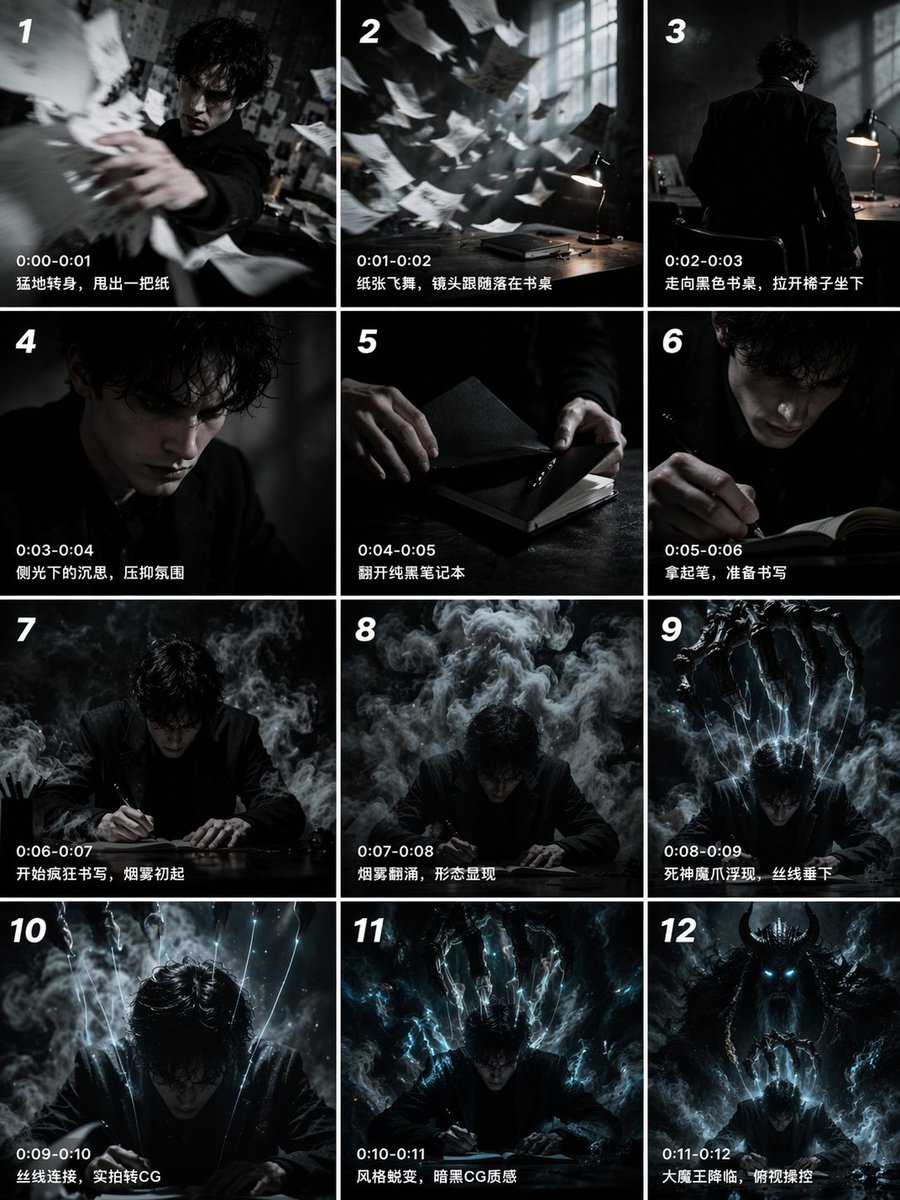
12패널 시네마틱 스토리보드 그리드
타임스탬프와 캡션이 포함된 12컷 순차 스토리보드를 생성하여 단편 영화 사전 시각화 또는 비디오 제작 프롬프트에 활용하기에 적합합니다.
이것은 일러스트레이션 및 미술 에 대한 GPT Image 2 프롬프트 사례입니다. 아래의 복사 가능한 프롬프트를 사용하여 유사한 시각 자료를 생성하고, 재사용하기 전에 Awesome GPT Image 2 Prompts 의 저작자 표시 및 상업적 사용 권한을 검토하십시오.
전체 프롬프트 세트가 필요하신가요? 다음을 사용하세요. 일러스트레이션 및 미술 더 많은 관련 예시를 보려면 주제 허브를 열거나 다음을 열어보세요. GPT Image 2 프롬프트 카탈로그 전체 예제 색인, 재사용 가능한 구조 및 출처 표기는 다음을 참조하십시오.
Free 1K preview
Generate one preview image instantly, no sign-up required.
2756/4000
프롬프트
복사 준비 프롬프트
{
  "type": "12-panel cinematic storyboard grid",
  "style": "{argument name=\"visual style\" default=\"dark cinematic transitioning to dark fantasy CG\"}",
  "character": "{argument name=\"main character\" default=\"pale young man with messy black hair in a dark suit\"}",
  "layout": {
    "columns": 3,
    "rows": 4,
    "panel_count": 12
  },
  "panels": [
    {
      "id": "1",
      "timestamp": "0:00-0:01",
      "caption": "Suddenly turning around, he threw out a piece of paper.",
      "visual": "character throwing papers at camera"
    },
    {
      "id": "2",
      "timestamp": "0:01-0:02",
      "caption": "The paper fluttered, and the camera followed it as it landed on the desk.",
      "visual": "papers flying in dark room with desk lamp"
    },
    {
      "id": "3",
      "timestamp": "0:02-0:03",
      "caption": "Walking towards the black desk, he pulled out a chair and sat down.",
      "visual": "character walking away towards desk"
    },
    {
      "id": "4",
      "timestamp": "0:03-0:04",
      "caption": "Pensive in the sidelight, a suppressed atmosphere.",
      "visual": "close-up of character's face in shadow"
    },
    {
      "id": "5",
      "timestamp": "0:04-0:05",
      "caption": "Opening the pure black notebook.",
      "visual": "close-up of hands opening a black notebook"
    },
    {
      "id": "6",
      "timestamp": "0:05-0:06",
      "caption": "Pick up the pen, prepare to write",
      "visual": "close-up of character holding pen over notebook"
    },
    {
      "id": "7",
      "timestamp": "0:06-0:07",
      "caption": "Start writing frantically, smoke begins to rise",
      "visual": "character writing frantically, smoke rising"
    },
    {
      "id": "8",
      "timestamp": "0:07-0:08",
      "caption": "Smoke swirls, a form appears",
      "visual": "thick smoke surging around character"
    },
    {
      "id": "9",
      "timestamp": "0:08-0:09",
      "caption": "The Reaper's demonic claws emerge, threads descend",
      "visual": "skeletal hands emerging above, glowing threads hanging down"
    },
    {
      "id": "10",
      "timestamp": "0:09-0:10",
      "caption": "Threads connect, live-action transitions to CG",
      "visual": "glowing threads attaching to character's head"
    },
    {
      "id": "11",
      "timestamp": "0:10-0:11",
      "caption": "Style transformation, dark CG texture",
      "visual": "magical energy, heavy CG fantasy style shift"
    },
    {
      "id": "12",
      "timestamp": "0:11-0:12",
      "caption": "The Great Demon King descends, overlooking and controlling",
      "visual": "{argument name=\"final entity\" default=\"giant horned demon figure\"} looming behind, controlling character like a puppet"
    }
  ]
}
프롬프트 변수
프롬프트에 있는 편집 가능한 인수 자리 표시자와 해당 기본값입니다.
변하기 쉬운
visual style
기본
dark cinematic transitioning to dark fantasy CG
변하기 쉬운
main character
기본
pale young man with messy black hair in a dark suit
변하기 쉬운
final entity
기본
giant horned demon figure
Best for
- - 일러스트레이션 및 미술 visual exploration
- - Image generation and reference-image edits
- - Reusable briefs that keep source attribution visible
Change these parts
- - Subject, product, character, or scene
- - Aspect ratio, camera, lighting, and background
- - Brand, text, color, and output constraints
Recommended model and settings
- - Model: gpt-image-2
- - Input mode: 텍스트 to 이미지
- - Aspect ratio: source
- - Commercial status: review original source
How to use this prompt
- 1. Copy the prompt and preserve its structure for the first test.
- 2. Replace the subject, context, and publishing channel.
- 3. Change one camera, lighting, or style variable per iteration.
- 4. Inspect the output, source, text, and rights before reuse.
Limitations, source, and reuse cautions
- - Generated output is an editable draft, not factual, legal, or rights evidence.
- - Review the linked source, people, brands, logos, text, and third-party media before commercial use.
Awesome GPT Image 2 Prompts 에서 가져왔습니다. 출처 표기가 필요합니다. 상업적 이용 가능 여부는 allowed 입니다. 유료 사용 전에 원저작권 정보를 확인하세요.
이 범주에 속하는 더 많은 사례
범주, 입력 방식 호환성, 품질 및 위험도에 따라 우선순위가 정해집니다.






재사용 및 출처 참고 사항
사례를 미리 확인한 후 이 안내 메시지를 안전하게 사용하십시오.
- 1.프롬프트를 복사하거나 Dovoo의 생성 버튼을 사용하여 직접 엽니다.
- 2.사용 사례에 맞게 변수, 화면 비율 및 참조 이미지를 조정하십시오.
- 3.출판 또는 유료 사용 전에 저작권, 출처 표기 요건 및 브랜드 또는 초상권 관련 위험을 확인하십시오.