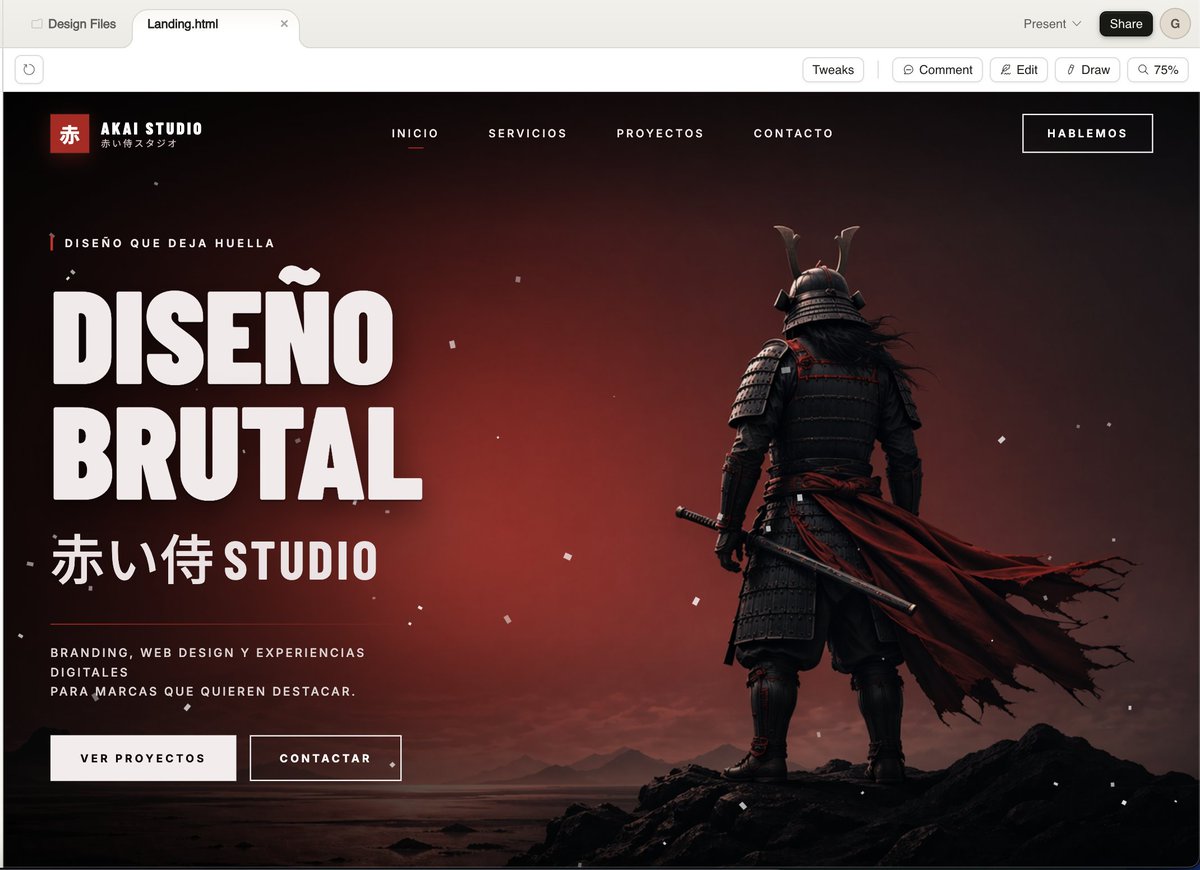
시네마틱 사무라이 에이전시 랜딩 페이지
이 기능을 사용하면 크리에이티브 스튜디오를 위한 고급 다크 웹 랜딩 페이지 히어로 룩을 생성할 수 있으며, 대담한 브랜딩, 웹 디자인 또는 에이전시 컨셉 작업을 선보이기에 이상적입니다.
이것은 그래픽 및 포스터 에 대한 GPT Image 2 프롬프트 사례입니다. 아래의 복사 가능한 프롬프트를 사용하여 유사한 시각 자료를 생성하고, 재사용하기 전에 Awesome GPT Image 2 Prompts 의 저작자 표시 및 상업적 사용 권한을 검토하십시오.
전체 프롬프트 세트가 필요하신가요? 다음을 사용하세요. 그래픽 및 포스터 더 많은 관련 예시를 보려면 주제 허브를 열거나 다음을 열어보세요. GPT Image 2 프롬프트 카탈로그 전체 예제 색인, 재사용 가능한 구조 및 출처 표기는 다음을 참조하십시오.
Free 1K preview
Generate one preview image instantly, no sign-up required.
2286/4000
프롬프트
복사 준비 프롬프트
A cinematic, dark-style landing page model showcasing a Japanese creative agency named {argument name="studio name" default="AKAI STUDIO"}, presented in a modern desktop browser window. The page features a dramatic black-to-deep-red gradient background with a melancholic sunset glow, scattered with fine white dust or ash particles, and utilizes a widescreen hero layout. On the right, place a full-body shot of a samurai from behind, standing on jagged black rocks on a calm shore, wearing layered dark armor and a horned helmet, holding a katana at his side, with a long, tattered deep-red cloak billowing strongly to the right. On the left, create a prominent, oversized white, compact sans-serif headline text (in Spanish) that reads {argument name="headline text" default="DISEÑO BRUTAL"}, stacked in two lines. Above the headline, add a line of small red vertical decorative micro-copy text: {argument name="eyebrow text" default="DISEÑO QUE DEJA HUELLA"}. Below the headline, add large Japanese characters followed by the word STUDIO: {argument name="subheadline text" default="赤い侍 STUDIO"}. Below that, place a short white, mixed-case supporting paragraph text: {argument name="body text" default="BRANDING, WEB DESIGN Y EXPERIENCIAS DIGITALES PARA MARCAS QUE QUIEREN DESTACAR。"}. Below the copy, add two call-to-action buttons: a solid light-colored button labeled “VER PROYECTOS” and an outlined dark-colored button labeled “CONTACTAR”. In the top navigation bar, include 4 centered, uppercase menu items: “INICIO”, “SERVICIOS”, “PROYECTOS”, “CONTACTO”, with “INICIO” underlined in red to indicate its active state. Place a bordered button labeled {argument name="top button text" default="HABLEMOS"} in the upper right corner. In the upper left corner of the website header, add a Logo area containing a small red square with the Chinese character “赤”, the brand name “AKAI STUDIO”, and a small Japanese subtitle below. The overall style should present a combination of high-end brutalist web design and a cinematic game main visual: ultra-detailed UI modeling, sharp typography, strong contrast, a luxurious agency aesthetic, minimalist yet powerful composition, a black, white, and red color scheme, fine grain, realistic lighting and shadows, and a high-end presentation.프롬프트 변수
프롬프트에 있는 편집 가능한 인수 자리 표시자와 해당 기본값입니다.
변하기 쉬운
studio name
기본
AKAI STUDIO
변하기 쉬운
headline text
기본
DISEÑO BRUTAL
변하기 쉬운
eyebrow text
기본
DISEÑO QUE DEJA HUELLA
변하기 쉬운
subheadline text
기본
赤い侍 STUDIO
변하기 쉬운
body text
기본
BRANDING, WEB DESIGN Y EXPERIENCIAS DIGITALES PARA MARCAS QUE QUIEREN DESTACAR。
변하기 쉬운
top button text
기본
HABLEMOS
Best for
- - 그래픽 및 포스터 visual exploration
- - Image generation and reference-image edits
- - Reusable briefs that keep source attribution visible
Change these parts
- - Subject, product, character, or scene
- - Aspect ratio, camera, lighting, and background
- - Brand, text, color, and output constraints
Recommended model and settings
- - Model: gpt-image-2
- - Input mode: 텍스트 to 이미지
- - Aspect ratio: source
- - Commercial status: review original source
How to use this prompt
- 1. Copy the prompt and preserve its structure for the first test.
- 2. Replace the subject, context, and publishing channel.
- 3. Change one camera, lighting, or style variable per iteration.
- 4. Inspect the output, source, text, and rights before reuse.
Limitations, source, and reuse cautions
- - Generated output is an editable draft, not factual, legal, or rights evidence.
- - Review the linked source, people, brands, logos, text, and third-party media before commercial use.
Awesome GPT Image 2 Prompts 에서 가져왔습니다. 출처 표기가 필요합니다. 상업적 이용 가능 여부는 allowed 입니다. 유료 사용 전에 원저작권 정보를 확인하세요.
이 범주에 속하는 더 많은 사례
범주, 입력 방식 호환성, 품질 및 위험도에 따라 우선순위가 정해집니다.






재사용 및 출처 참고 사항
사례를 미리 확인한 후 이 안내 메시지를 안전하게 사용하십시오.
- 1.프롬프트를 복사하거나 Dovoo의 생성 버튼을 사용하여 직접 엽니다.
- 2.사용 사례에 맞게 변수, 화면 비율 및 참조 이미지를 조정하십시오.
- 3.출판 또는 유료 사용 전에 저작권, 출처 표기 요건 및 브랜드 또는 초상권 관련 위험을 확인하십시오.