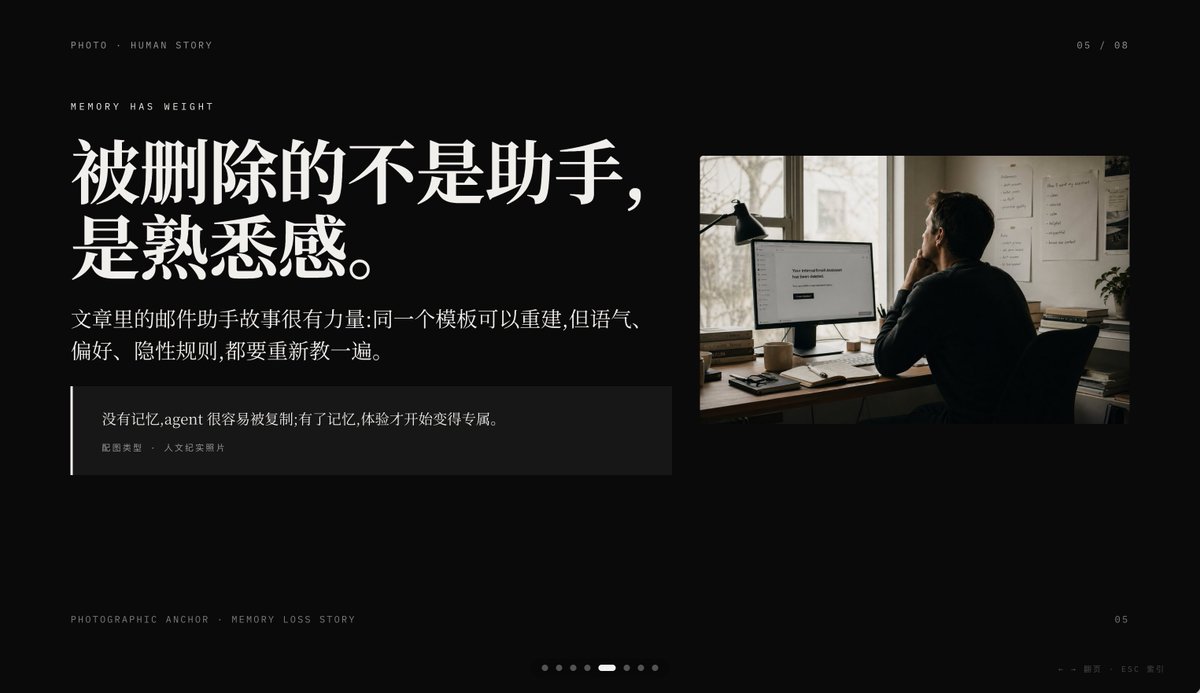
영화적 기억 상실 PPT 슬라이드
이 프롬프트는 중국어 스토리텔링 서체와 다큐멘터리 스타일의 사무실 사진을 결합한 고급스러운 검정 배경의 프레젠테이션 슬라이드를 생성합니다. 키노트나 PPT의 내러티브 페이지에 이상적입니다.
이것은 그래픽 및 포스터 에 대한 GPT Image 2 프롬프트 사례입니다. 아래의 복사 가능한 프롬프트를 사용하여 유사한 시각 자료를 생성하고, 재사용하기 전에 Awesome GPT Image 2 Prompts 의 저작자 표시 및 상업적 사용 권한을 검토하십시오.
전체 프롬프트 세트가 필요하신가요? 다음을 사용하세요. 그래픽 및 포스터 더 많은 관련 예시를 보려면 주제 허브를 열거나 다음을 열어보세요. GPT Image 2 프롬프트 카탈로그 전체 예제 색인, 재사용 가능한 구조 및 출처 표기는 다음을 참조하십시오.
Free 1K preview
Generate one preview image instantly, no sign-up required.
2704/4000
프롬프트
복사 준비 프롬프트
Create a minimalist, cinematic presentation Slides with a deep black background and high-end editing style PPT layout, in a 16:9 widescreen aspect ratio. The layout should employ an asymmetrical design, with a large text block on the left and a documentary-style photograph in the upper right corner, leaving ample negative space. Use elegant and high-contrast Chinese fonts to create a high-end magazine feel. Place a line of small, uppercase, miniature text in the upper left corner: “PHOTO • HUMAN STORY”. Below that, add another line of small, uppercase text: “MEMORY HAS WEIGHT”. The main title on the left should be a very prominent, white, bold Chinese font, split into two lines: {argument name="headline text" default="What's lost isn't the assistant,\nbut the familiarity."}. Below the title, place a smaller paragraph of white or light gray Chinese text, consisting of two lines: {argument name="body text" default="The email assistant story in the article is powerful: the same template can be rebuilt, but the tone,\npreferences, and implicit rules all need to be retaught."}. Add a dark, semi-transparent quote box below, with a thin white vertical line along the left edge; the box should contain two layers of text: a Chinese quote {argument name="quote" default="Without memory, an agent is easily copied; with memory, the experience becomes uniquely its own."}, and a smaller line of attribution text “Image Type · Humanistic Documentary Photo”. On the right, insert a warm-toned humanistic documentary photograph: an adult with their back to the camera, sitting at a dimly lit office desk looking at a computer monitor; a desk lamp stands to the left of the monitor, and files are posted on the wall, with soft daylight streaming through the window. The monitor screen displays a simple white interface, with the centered text being {argument name="screen text" default="Your conversational Assistant has been deleted."}. The photo should have a film photography texture, with tones of soft browns and grays, creating an intimate, deep, and slightly melancholic atmosphere. Add similar interface pagination details: “05 / 08” in the upper right corner, miniature text “PHOTOGRAPHIC ANCHOR · MEMORY LOSS STORY” in the lower left corner, small text “05” in the lower right corner, and 8 tiny pagination dots at the bottom center, with the 5th dot highlighted as a slender white capsule, and the rest as dark gray dots. Add a small navigation prompt in the lower right corner: “← → Page · ESC Close”. Overall atmosphere: editorial style, restrained, cinematic, memory and loss, high-end Keynote slide design, concise spacing, precise alignment, high-end narrative presentation aesthetics.프롬프트 변수
프롬프트에 있는 편집 가능한 인수 자리 표시자와 해당 기본값입니다.
변하기 쉬운
headline text
기본
What's lost isn't the assistant,\nbut the familiarity.
변하기 쉬운
body text
기본
The email assistant story in the article is powerful: the same template can be rebuilt, but the tone,\npreferences, and implicit rules all need to be retaught.
변하기 쉬운
quote
기본
Without memory, an agent is easily copied; with memory, the experience becomes uniquely its own.
변하기 쉬운
screen text
기본
Your conversational Assistant has been deleted.
Best for
- - 그래픽 및 포스터 visual exploration
- - Image generation and reference-image edits
- - Reusable briefs that keep source attribution visible
Change these parts
- - Subject, product, character, or scene
- - Aspect ratio, camera, lighting, and background
- - Brand, text, color, and output constraints
Recommended model and settings
- - Model: gpt-image-2
- - Input mode: 텍스트 to 이미지
- - Aspect ratio: source
- - Commercial status: review original source
How to use this prompt
- 1. Copy the prompt and preserve its structure for the first test.
- 2. Replace the subject, context, and publishing channel.
- 3. Change one camera, lighting, or style variable per iteration.
- 4. Inspect the output, source, text, and rights before reuse.
Limitations, source, and reuse cautions
- - Generated output is an editable draft, not factual, legal, or rights evidence.
- - Review the linked source, people, brands, logos, text, and third-party media before commercial use.
Awesome GPT Image 2 Prompts 에서 가져왔습니다. 출처 표기가 필요합니다. 상업적 이용 가능 여부는 allowed 입니다. 유료 사용 전에 원저작권 정보를 확인하세요.
이 범주에 속하는 더 많은 사례
범주, 입력 방식 호환성, 품질 및 위험도에 따라 우선순위가 정해집니다.






재사용 및 출처 참고 사항
사례를 미리 확인한 후 이 안내 메시지를 안전하게 사용하십시오.
- 1.프롬프트를 복사하거나 Dovoo의 생성 버튼을 사용하여 직접 엽니다.
- 2.사용 사례에 맞게 변수, 화면 비율 및 참조 이미지를 조정하십시오.
- 3.출판 또는 유료 사용 전에 저작권, 출처 표기 요건 및 브랜드 또는 초상권 관련 위험을 확인하십시오.