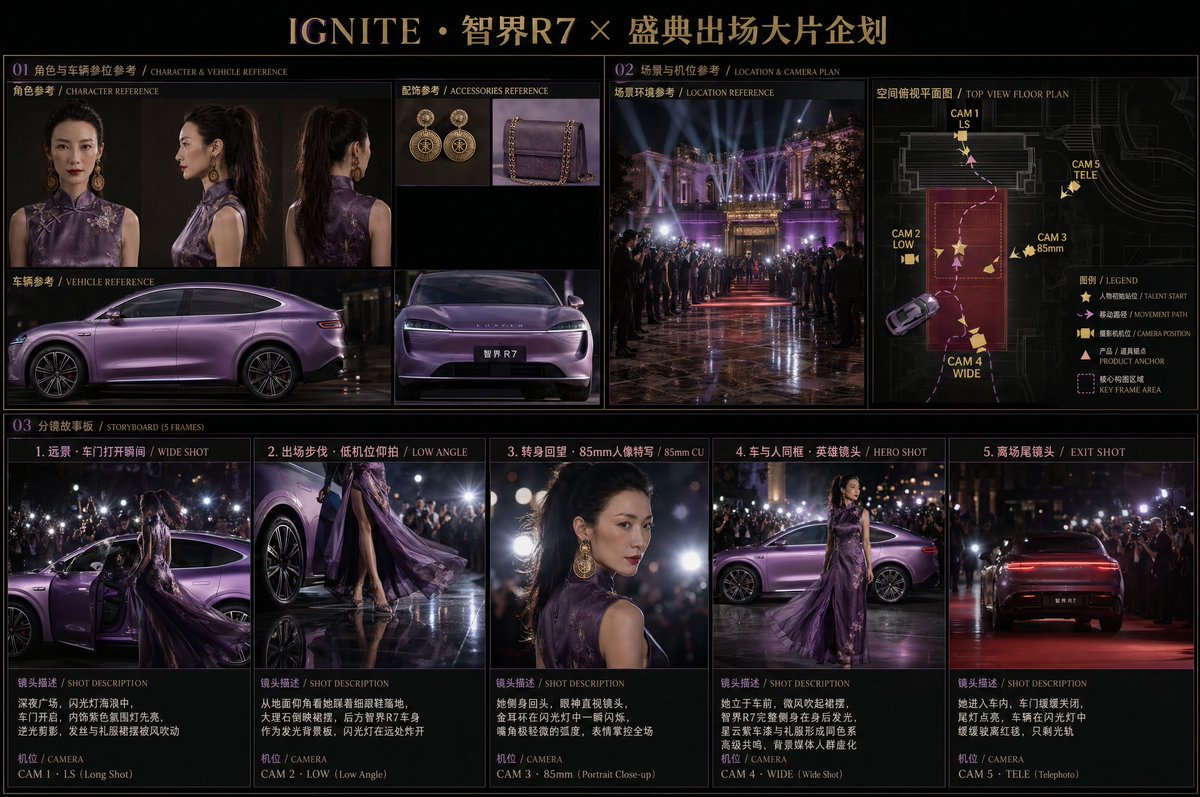
영화 편집 스토리보드
고급 캐릭터와 고급 차량을 특징으로 하는, 복잡하고 다층적인 고급 영화 스토리보드 제작을 위한 프롬프트입니다. 캐릭터의 성격, 차량 사양, 조명 환경, 그리고 5프레임으로 구성된 스토리 전개 시퀀스를 정의합니다.
이것은 일러스트레이션 및 미술 에 대한 GPT Image 2 프롬프트 사례입니다. 아래의 복사 가능한 프롬프트를 사용하여 유사한 시각 자료를 생성하고, 재사용하기 전에 Awesome GPT Image 2 Prompts 의 저작자 표시 및 상업적 사용 권한을 검토하십시오.
전체 프롬프트 세트가 필요하신가요? 다음을 사용하세요. 일러스트레이션 및 미술 더 많은 관련 예시를 보려면 주제 허브를 열거나 다음을 열어보세요. GPT Image 2 프롬프트 카탈로그 전체 예제 색인, 재사용 가능한 구조 및 출처 표기는 다음을 참조하십시오.
Free 1K preview
Generate one preview image instantly, no sign-up required.
Free text preview doesn’t preserve reference-image consistency.
2779/4000
프롬프트
복사 준비 프롬프트
- Character: Oriental female @image_1, black high ponytail, modified Cheongsam {argument name="dress color" default="dark purple"} gown @image_2, gold vintage large hoop earrings, red lips, cold and noble temperament.
- Vehicle: @image_3 {argument name="car model" default="Huawei Zhijie R7"}, Nebula Purple paint, streamlined sedan silhouette, license plate with Chinese characters 'Zhijie R7'.

Scene: Outside a top-tier night award ceremony or international film festival venue. Marble plaza, flanked by media with long lenses and flashlights. Faraway buildings with giant light installations and a red carpet extension.

Storyboard plan, deep black high-end editorial layout, purple and gold color scheme title: "{argument name="storyboard title" default="IGNITE · Zhijie R7 × Grand Ceremony Entrance Blockbuster Project"}"

Section 1 - Character and Vehicle Reference (professional lookbook layout style): Extracting from reference images - front/side of character, full side of vehicle, close-up of front, macro of earrings and handbag.

Section 2 - Divided into left and right parts:
Left: Real scene reference for environment (night lobby atmosphere photo).
Right: Top-down spatial floor plan. Notated with: spatial outlines (stairs/plaza/aisles), initial character position + dashed path arrows, 5 camera positions (number + abbreviation), camera direction arrows, product/prop anchors, highlighted core composition areas.

5-Frame Storyboard (2.39:1 CinemaScope):
Frame 1: Long shot · Moment door opens. Night plaza in a sea of flashes, door opens, purple interior ambient light lights up first, backlit silhouette, hair and hem blowing in wind.
Frame 2: Entrance walk · Low angle shot. Looking up from ground level as she steps down in stilettos, marble reflecting the hem, Zhijie R7 body in back as a glowing backdrop, flashes bursting in distance.
Frame 3: Turn back · 85mm portrait close-up. She turns sideways, looking directly at the camera, gold earrings glint in the flash, very slight curve of the mouth, expression controlling the scene.
Frame 4: Hero shot of car and person. She stands in front of the car, breeze blowing the dress, Zhijie R7 full side glowing behind, Nebula Purple paint and gown forming a high-end chromatic harmony, background media crowd blurred.
Frame 5: Departure end shot. She enters the car, door closes slowly, taillights light up, vehicle slowly drives away from the red carpet amidst flashes, leaving only light trails.

Lighting and Style:
Strong night side-backlight · Instant flash exposure feel. Deep black background · Purple car body as one of the only light sources. 2.39:1 anamorphic wide screen · Large aperture shallow depth of field. Keywords: Absolute protagonist aura · Event-level narrative · Movie premiere quality.
프롬프트 변수
프롬프트에 있는 편집 가능한 인수 자리 표시자와 해당 기본값입니다.
변하기 쉬운
dress color
기본
dark purple
변하기 쉬운
car model
기본
Huawei Zhijie R7
변하기 쉬운
storyboard title
기본
IGNITE · Zhijie R7 × Grand Ceremony Entrance Blockbuster Project
Best for
- - 일러스트레이션 및 미술 visual exploration
- - Image generation and reference-image edits
- - Reusable briefs that keep source attribution visible
Change these parts
- - Subject, product, character, or scene
- - Aspect ratio, camera, lighting, and background
- - Brand, text, color, and output constraints
Recommended model and settings
- - Model: gpt-image-2
- - Input mode: 이미지 to 이미지
- - Aspect ratio: source
- - Commercial status: review original source
How to use this prompt
- 1. Copy the prompt and preserve its structure for the first test.
- 2. Replace the subject, context, and publishing channel.
- 3. Change one camera, lighting, or style variable per iteration.
- 4. Inspect the output, source, text, and rights before reuse.
Limitations, source, and reuse cautions
- - Generated output is an editable draft, not factual, legal, or rights evidence.
- - Review the linked source, people, brands, logos, text, and third-party media before commercial use.
Awesome GPT Image 2 Prompts 에서 가져왔습니다. 출처 표기가 필요합니다. 상업적 이용 가능 여부는 allowed 입니다. 유료 사용 전에 원저작권 정보를 확인하세요.
이 범주에 속하는 더 많은 사례
범주, 입력 방식 호환성, 품질 및 위험도에 따라 우선순위가 정해집니다.






재사용 및 출처 참고 사항
사례를 미리 확인한 후 이 안내 메시지를 안전하게 사용하십시오.
- 1.프롬프트를 복사하거나 Dovoo의 생성 버튼을 사용하여 직접 엽니다.
- 2.사용 사례에 맞게 변수, 화면 비율 및 참조 이미지를 조정하십시오.
- 3.출판 또는 유료 사용 전에 저작권, 출처 표기 요건 및 브랜드 또는 초상권 관련 위험을 확인하십시오.