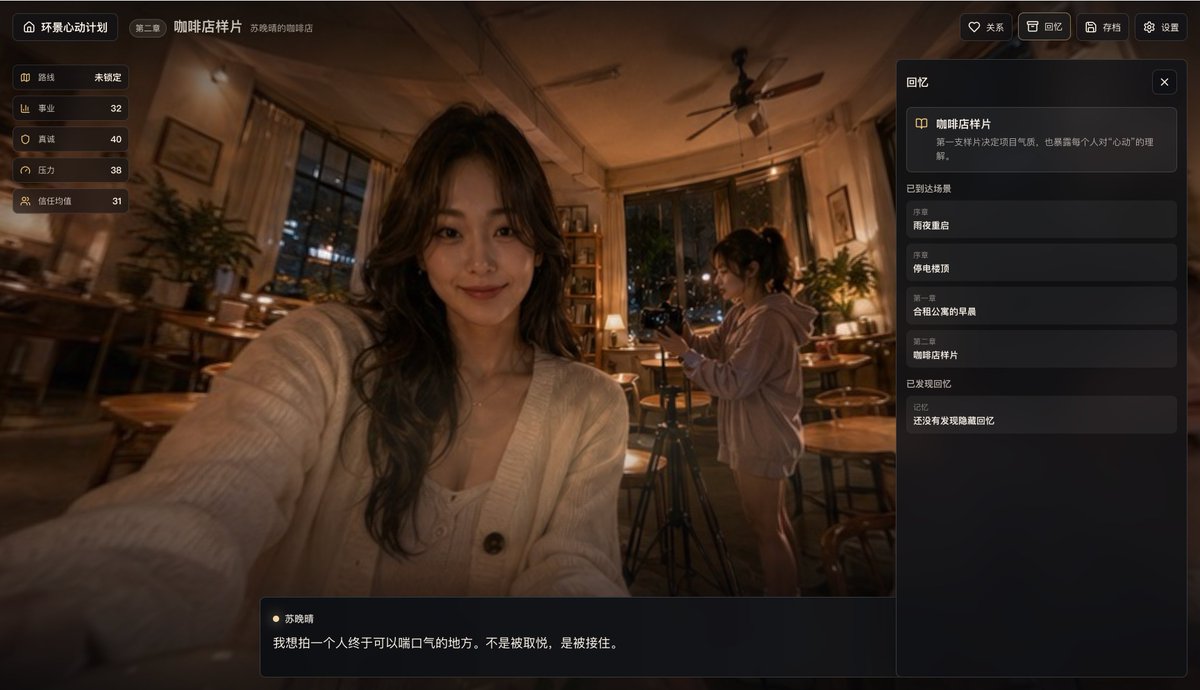
시네마틱 카페 스토리 앱 UI
따뜻한 밤 카페에서 셀카를 찍는 장면을 배경으로 세련된 중국 스토리텔링 앱 인터페이스 목업을 제작했습니다. 제품 컨셉, 게임 UI 쇼케이스, 인터랙티브 스토리 데모에 이상적입니다.
이것은 제품 및 상업 에 대한 GPT Image 2 프롬프트 사례입니다. 아래의 복사 가능한 프롬프트를 사용하여 유사한 시각 자료를 생성하고, 재사용하기 전에 Awesome GPT Image 2 Prompts 의 저작자 표시 및 상업적 사용 권한을 검토하십시오.
전체 프롬프트 세트가 필요하신가요? 다음을 사용하세요. 제품 및 상업 더 많은 관련 예시를 보려면 주제 허브를 열거나 다음을 열어보세요. GPT Image 2 프롬프트 카탈로그 전체 예제 색인, 재사용 가능한 구조 및 출처 표기는 다음을 참조하십시오.
Free 1K preview
Generate one preview image instantly, no sign-up required.
4000/4000
프롬프트
복사 준비 프롬프트
{
  "background_scene": {
    "camera": "slightly wide-angle selfie perspective from the front-left, immersive and casual",
    "environment_details": {
      "count": 10,
      "items": [
        "large windows showing night city lights",
        "ceiling fan",
        "wooden tables",
        "wooden chairs and stools",
        "potted plants",
        "table lamps",
        "bookshelf",
        "framed wall art",
        "curtains",
        "camera tripod"
      ]
    },
    "lighting": "warm tungsten café lighting with deep shadows and orange-brown tones",
    "location": "cozy coffee shop at night",
    "subjects": [
      {
        "appearance": "long wavy dark hair, cream knit cardigan over a light top, seated close to camera, extended arm toward lens, Show every face clearly with natural, detailed facial features",
        "count": 1,
        "role": "foreground woman taking a selfie"
      },
      {
        "appearance": "ponytail, oversized light hoodie, standing beside a camera on a tripod, Show every face clearly with natural, detailed facial features",
        "count": 1,
        "role": "background woman filming"
      }
    ]
  },
  "generation_notes": "Create a polished product mockup / in-app screenshot for {argument name=\"app name\" default=\"Panoramic Heartbeat Project\"}, showing chapter {argument name=\"chapter label\" default=\"Chapter 2\"} and scene title {argument name=\"scene title\" default=\"Coffee Shop Sample\"}. Keep the exact Chinese labels visible. Emphasize a warm emotional café atmosphere, realistic photographic background, cinematic depth of field, and elegant dark UI overlays. Include the exact dialogue line and stats values. Use subtle vignette, glossy panel edges, and a premium narrative-game interface aesthetic.",
  "language": "Chinese UI",
  "layout": {
    "bottom_dialogue_box": {
      "count": 2,
      "items": [
        "Character name \"Su Xiaoqing\"",
        "Dialogue text \"I want to photograph a place where a person can finally breathe. Not to be pleased, but to be caught.\""
      ],
      "position": "bottom center-left overlay"
    },
    "left_stats_panel": {
      "count": 5,
      "labels": [
        "route",
        "career",
        "sincerity",
        "pressure",
        "trust average"
      ],
      "position": "top-left vertical card stack",
      "values": [
        "Not locked",
        "32",
        "40",
        "38",
        "31"
      ]
    },
    "right_memory_panel": {
      "count": 6,
      "position": "right sidebar",
      "sections": [
        {
          "count": 1,
          "labels": [
            "Coffee Shop Sample"
          ],
          "title": "featured memory card"
        },
        {
          "count": 4,
          "labels": [
            "Reunion on a rainy night",
            "Rooftop during a blackout",
            "Morning in a shared apartment",
            "Coffee Shop Sample"
          ],
          "title": "Arrived at the scene"
        },
        {
          "count": 1,
          "labels": [
            "Hidden memories not yet found"
          ],
          "title": "Memories found"
        }
      ],
      "title": "Memories"
    },
    "top_bar": {
      "count": 8,
      "items": [
        "home icon button",
        "Title \"Panoramic Heartbeat Project\"",
        "Chapter Tag \"Chapter 2\"",
        "Main page title \"Coffee Shop Sample\"",
        "Subtitle \"Xiao Qing Su's Coffee Shop\"",
        "Favorite button \"Relationship\"",
        "Review button \"Memories\"",
        "Archive button \"Archive\" and Settings button \"Settings\""
      ]
    }
  },
  "product": "story-driven life simulation / memory collection app",
  "screen": {
    "aspect_ratio": "16:9 landscape",
    "style": "premium mobile-game-like desktop web app, moody, emotional, softly blurred edges, amber highlights, realistic photography background with crisp UI panels",
    "theme": "dark translucent glassmorphism overlay on top of a warm café photo"
  },
  "text_style": {
    "accent": "soft gold / amber icons and highlights",
    "color": "off-white and muted gray on dark translucent panels",
    "font": "clean modern sans-serif Chinese UI font"
  },
  "type": "cinematic app interface screenshot"
}
프롬프트 변수
프롬프트에 있는 편집 가능한 인수 자리 표시자와 해당 기본값입니다.
변하기 쉬운
app name
기본
Panoramic Heartbeat Project
변하기 쉬운
chapter label
기본
Chapter 2
변하기 쉬운
scene title
기본
Coffee Shop Sample
Best for
- - 제품 및 상업 visual exploration
- - Image generation and reference-image edits
- - Reusable briefs that keep source attribution visible
Change these parts
- - Subject, product, character, or scene
- - Aspect ratio, camera, lighting, and background
- - Brand, text, color, and output constraints
Recommended model and settings
- - Model: gpt-image-2
- - Input mode: 텍스트 to 이미지
- - Aspect ratio: source
- - Commercial status: review original source
How to use this prompt
- 1. Copy the prompt and preserve its structure for the first test.
- 2. Replace the subject, context, and publishing channel.
- 3. Change one camera, lighting, or style variable per iteration.
- 4. Inspect the output, source, text, and rights before reuse.
Limitations, source, and reuse cautions
- - Generated output is an editable draft, not factual, legal, or rights evidence.
- - Review the linked source, people, brands, logos, text, and third-party media before commercial use.
Awesome GPT Image 2 Prompts 에서 가져왔습니다. 출처 표기가 필요합니다. 상업적 이용 가능 여부는 allowed 입니다. 유료 사용 전에 원저작권 정보를 확인하세요.
이 범주에 속하는 더 많은 사례
범주, 입력 방식 호환성, 품질 및 위험도에 따라 우선순위가 정해집니다.






재사용 및 출처 참고 사항
사례를 미리 확인한 후 이 안내 메시지를 안전하게 사용하십시오.
- 1.프롬프트를 복사하거나 Dovoo의 생성 버튼을 사용하여 직접 엽니다.
- 2.사용 사례에 맞게 변수, 화면 비율 및 참조 이미지를 조정하십시오.
- 3.출판 또는 유료 사용 전에 저작권, 출처 표기 요건 및 브랜드 또는 초상권 관련 위험을 확인하십시오.