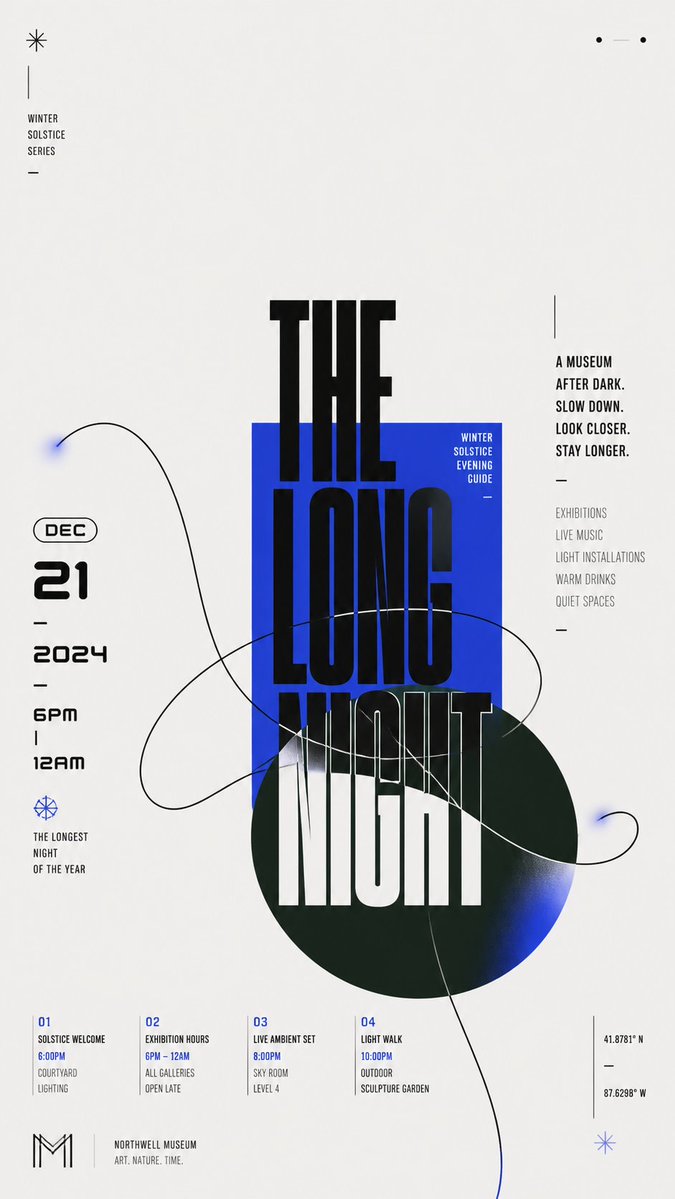
Modern Chinese Graphic Design
A technical prompt for creating flat graphics featuring bold Chinese characters, geometric blocks, and organic contour lines.
이것은 그래픽 및 포스터 에 대한 GPT Image 2 프롬프트 사례입니다. 아래의 복사 가능한 프롬프트를 사용하여 유사한 시각 자료를 생성하고, 재사용하기 전에 Awesome GPT Image 2 Prompts 의 저작자 표시 및 상업적 사용 권한을 검토하십시오.
전체 프롬프트 세트가 필요하신가요? 다음을 사용하세요. 그래픽 및 포스터 더 많은 관련 예시를 보려면 주제 허브를 열거나 다음을 열어보세요. GPT Image 2 프롬프트 카탈로그 전체 예제 색인, 재사용 가능한 구조 및 출처 표기는 다음을 참조하십시오.
Free 1K preview
Generate one preview image instantly, no sign-up required.
3012/4000
프롬프트
복사 준비 프롬프트
Build a modern flat graphic around {argument name="subject" default="any chosen subject object"}, with a huge Chinese theme character, geometric color blocks, and a single-line organic contour interlacing through one another. Keep an overall bright, clean background field, letting approximately two-thirds or more of the space remain empty, and concentrate the main weight in an off-center cluster: a saturated rectangular block in the theme's primary color first establishes a stable plane; a deeper, low-lightness, cool-toned circle overlaps from beneath it and extends beyond the boundary; the core Chinese theme character advances vertically in oversized, heavy, geometric black strokes across the white background, rectangle, and circle, with partial occlusion and cropping creating a strong scale jump; on the left, the date and a bilingual subtitle form a compact numeric column, while on the right, short vertical sentences set in two stroke-weight tiers balance the weight; a few miniature captions, short dashes, and linear symbols scatter along the edges, creating a three-level reading rhythm from main character to side notes to details. Abstract the dynamic relationship derived from the theme into one continuous organic contour, drawn as a broad sweeping loop with a clear, near-black single line that enters from the large empty field, passes through the color blocks, and crosses the edge; the curve intersects itself several times while remaining legible as a single path; keep most of its interior as the underlying background color, adding only localized, transparent, fading fills in the theme's primary color at the tips and extended sections, so the light line creates tension with the heavy giant character. Adapt the color scheme to the theme: let a clean, high-lightness neutral background carry the largest area; keep the theme's primary color vivid and highly saturated, using it for the rectangle and the localized transparent gradient; use a deep cool support color for the circle, separated in hue from the primary color and blending softly into the primary color at its end; use near-black for text and the contour, with a very small amount of light text reversed onto the primary color block; fix unequal areas, lightness hierarchy, and saturation differences, but do not fix specific color names. Render all elements as flat surfaces like matte digital printing, with sharp contour edges and gradients only as two localized, slowly feathered transitions; do not add dimensional shadows, paper grain, or global lighting effects. Keep typography in a low-contrast, broad, thick, near-geometric black sans-serif skeleton; allow the main character's parts to be elongated, offset, cut out, and switched between color-block backgrounds; give numbers a rounded futuristic structure and compress small text with narrow letterforms and loose tracking. Replace brand names, advertising copy, and concrete dates with new theme information. Preserve in the final result the extreme white프롬프트 변수
프롬프트에 있는 편집 가능한 인수 자리 표시자와 해당 기본값입니다.
변하기 쉬운
subject
기본
any chosen subject object
Best for
- - 그래픽 및 포스터 visual exploration
- - Image generation and reference-image edits
- - Reusable briefs that keep source attribution visible
Change these parts
- - Subject, product, character, or scene
- - Aspect ratio, camera, lighting, and background
- - Brand, text, color, and output constraints
Recommended model and settings
- - Model: gpt-image-2
- - Input mode: 텍스트 to 이미지
- - Aspect ratio: source
- - Commercial status: review original source
How to use this prompt
- 1. Copy the prompt and preserve its structure for the first test.
- 2. Replace the subject, context, and publishing channel.
- 3. Change one camera, lighting, or style variable per iteration.
- 4. Inspect the output, source, text, and rights before reuse.
Limitations, source, and reuse cautions
- - Generated output is an editable draft, not factual, legal, or rights evidence.
- - Review the linked source, people, brands, logos, text, and third-party media before commercial use.
Awesome GPT Image 2 Prompts 에서 가져왔습니다. 출처 표기가 필요합니다. 상업적 이용 가능 여부는 allowed 입니다. 유료 사용 전에 원저작권 정보를 확인하세요.
이 범주에 속하는 더 많은 사례
범주, 입력 방식 호환성, 품질 및 위험도에 따라 우선순위가 정해집니다.






재사용 및 출처 참고 사항
사례를 미리 확인한 후 이 안내 메시지를 안전하게 사용하십시오.
- 1.프롬프트를 복사하거나 Dovoo의 생성 버튼을 사용하여 직접 엽니다.
- 2.사용 사례에 맞게 변수, 화면 비율 및 참조 이미지를 조정하십시오.
- 3.출판 또는 유료 사용 전에 저작권, 출처 표기 요건 및 브랜드 또는 초상권 관련 위험을 확인하십시오.