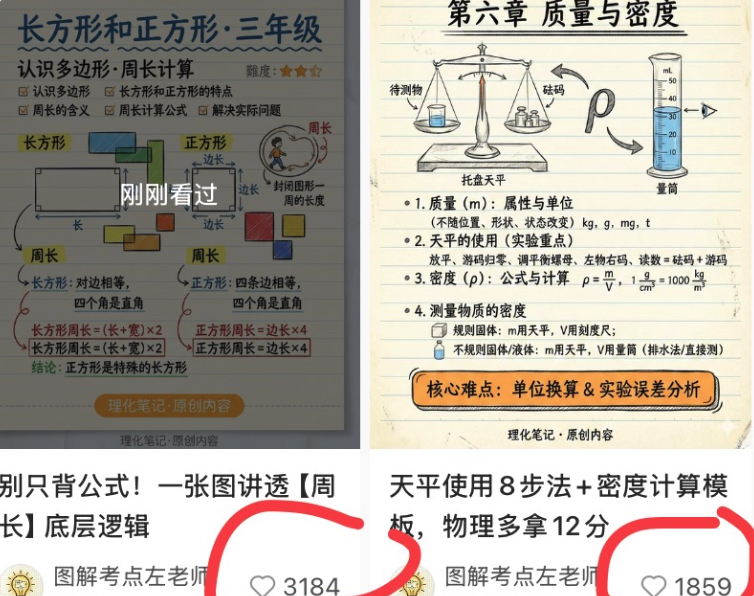
Chinese Study Card Social Screenshot
Generates a two-column social media screenshot featuring Chinese math and physics educational infographic cards with captions and circled like counts.
이것은 그래픽 및 포스터 에 대한 GPT Image 2 프롬프트 사례입니다. 아래의 복사 가능한 프롬프트를 사용하여 유사한 시각 자료를 생성하고, 재사용하기 전에 Awesome GPT Image 2 Prompts 의 저작자 표시 및 상업적 사용 권한을 검토하십시오.
전체 프롬프트 세트가 필요하신가요? 다음을 사용하세요. 그래픽 및 포스터 더 많은 관련 예시를 보려면 주제 허브를 열거나 다음을 열어보세요. GPT Image 2 프롬프트 카탈로그 전체 예제 색인, 재사용 가능한 구조 및 출처 표기는 다음을 참조하십시오.
Free 1K preview
Generate one preview image instantly, no sign-up required.
4000/4000
프롬프트
복사 준비 프롬프트
Objective: Create a square social media collage screenshot showcasing two Chinese learning card posts side-by-side, resembling a portfolio preview of work by creators of elementary school math and science visual notes.

Canvas: A square screenshot crop of 756x628 pixels, with a white background, divided into left and right columns. Each column contains an educational note image at the top, followed by a partial social media title area. The overall appearance should present a slightly compressed feel, similar to a phone screenshot, with soft shadows and edge cropping.

Layout: Use 2 post cards. Left post: A math knowledge card about rectangles and squares for grade 3, located in the upper left, with the title and number of likes displayed below. Right post: A physics knowledge card about mass and density, located in the upper right, with the title and number of likes displayed below. Add bold, hand-drawn red marker circles around the two like areas, slightly cropped at the bottom.

Left Card Details: Beige lined notebook paper background with blue and black handwritten Chinese. Title text: {argument name="left card title" default="Rectangle and Square · Grade 3"}. Subtitle: “Recognizing Polygons · Perimeter Calculation”. The upper right corner includes a 3-star orange difficulty rating. The card contains 2 main illustration sections: one labeled “Rectangle”, showing a rectangle with length and width arrows; and another labeled “Square”, showing a square with equal side length labels. Include 4 colored small squares/rectangles around the illustrations: blue, green, orange, and yellow. Include a small circular illustration of a person walking around the shape to explain the perimeter. Add a semi-transparent dark mask in the center of the card with large white text “Just Viewed”. The bottom formulas and notes explain the perimeter of a rectangle and the perimeter of a square, including boxed formulas such as “Rectangle Perimeter = (Length + Width) × 2” and “Square Perimeter = Side Length × 4”. Add an orange rounded capsule label at the bottom that reads “Physics and Chemistry Notes · Original Content”.

Right Card Details: Beige lined notebook paper background with neat black handwritten Chinese. Title text: {argument name="right card title" default="Chapter Six: Mass and Density"}. The top includes 3 main science object illustrations: a balance scale with items and weights, a horseshoe magnet with arrows, and a graduated cylinder with blue liquid. Add labels such as “Object to be measured”, “Weights”, “Balance Scale”, and “Graduated Cylinder”. Below, include 4 numbered learning sections: 1. Mass and Units, 2. Steps for Using a Balance Scale, 3. Density Formula and Units, 4. Density Measurement. Show the density formula “ρ=m/V” and unit conversions, including “1 g/cm³ = 1000 kg/m³”. Add an orange rounded rectangular annotation at the bottom that reads “Key Difficulties: Unit Conversion & Experimental Error Analysis”, along with small text at the bottom that reads “Physics and Chemistry Notes · Original Content”.

Bottom Social Media Area: Below the left card, display a bold Chinese title starting with “Don’t just memorize formulas! Understand the underlying logic of [Perimeter] in one diagram”. Below the right card, display a bold Chinese title starting with “8 Steps for Using a Balance Scale + Density Calculation Template, Get 12 More Points in Physics”. Below each title, display a small circular avatar with a yellow light bulb icon and the creator’s name “Teacher Zuo of Illustrated Exam Points”. Display 2 visible like widgets, each with a gray outline heart icon and a number: left side likes {argument name="left like count" default="3184"}, right side likes {argument name="right like count" default="1859"}. Circle these two like widgets with bold red hand-drawn markers.

Visual Style: Concise Chinese educational infographic cards, hand-drawn textbook aesthetics, lined paper texture, soft pastel chart colors, black/blue handwritten annotations, orange emphasis boxes, realistic screenshot cropping, no photorealistic people except for small, simple illustrations, no watermarks except for the displayed creator/footer text.

Constraints: All visible text must be in Chinese in the specified locations. No more than 2 post cards, no more than 3 science objects at the top of the right card, no more than 2 main geometric illustrations on the left card, no more than 4 numbered sections on the right card, and no more than 2 circled like widgets.
프롬프트 변수
프롬프트에 있는 편집 가능한 인수 자리 표시자와 해당 기본값입니다.
변하기 쉬운
left card title
기본
Rectangle and Square · Grade 3
변하기 쉬운
right card title
기본
Chapter Six: Mass and Density
변하기 쉬운
left like count
기본
3184
변하기 쉬운
right like count
기본
1859
Best for
- - 그래픽 및 포스터 visual exploration
- - Image generation and reference-image edits
- - Reusable briefs that keep source attribution visible
Change these parts
- - Subject, product, character, or scene
- - Aspect ratio, camera, lighting, and background
- - Brand, text, color, and output constraints
Recommended model and settings
- - Model: gpt-image-2
- - Input mode: 텍스트 to 이미지
- - Aspect ratio: source
- - Commercial status: review original source
How to use this prompt
- 1. Copy the prompt and preserve its structure for the first test.
- 2. Replace the subject, context, and publishing channel.
- 3. Change one camera, lighting, or style variable per iteration.
- 4. Inspect the output, source, text, and rights before reuse.
Limitations, source, and reuse cautions
- - Generated output is an editable draft, not factual, legal, or rights evidence.
- - Review the linked source, people, brands, logos, text, and third-party media before commercial use.
Awesome GPT Image 2 Prompts 에서 가져왔습니다. 출처 표기가 필요합니다. 상업적 이용 가능 여부는 allowed 입니다. 유료 사용 전에 원저작권 정보를 확인하세요.
이 범주에 속하는 더 많은 사례
범주, 입력 방식 호환성, 품질 및 위험도에 따라 우선순위가 정해집니다.






재사용 및 출처 참고 사항
사례를 미리 확인한 후 이 안내 메시지를 안전하게 사용하십시오.
- 1.프롬프트를 복사하거나 Dovoo의 생성 버튼을 사용하여 직접 엽니다.
- 2.사용 사례에 맞게 변수, 화면 비율 및 참조 이미지를 조정하십시오.
- 3.출판 또는 유료 사용 전에 저작권, 출처 표기 요건 및 브랜드 또는 초상권 관련 위험을 확인하십시오.