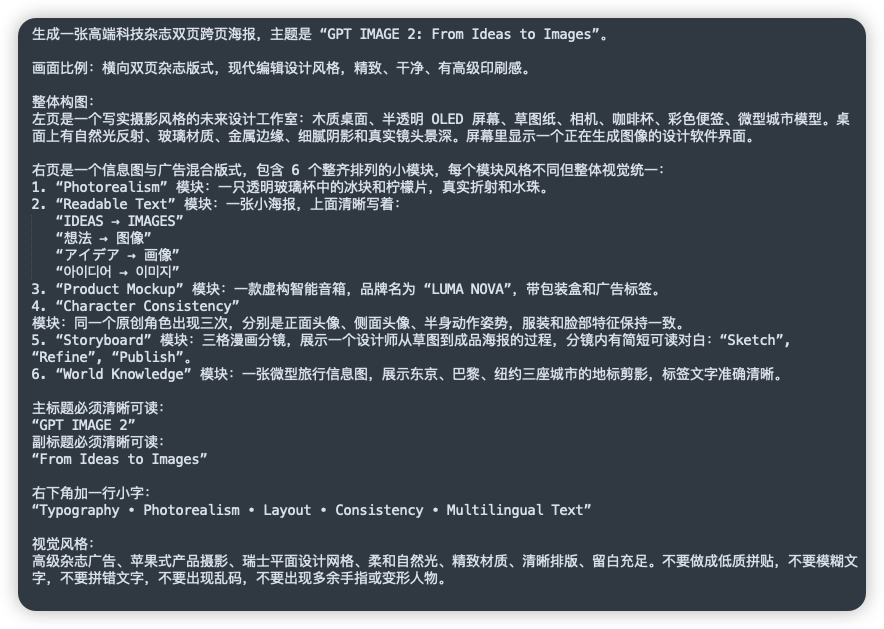
GPT 이미지 2용 중국어 프롬프트 시트
이 기능은 복잡한 이미지 생성 지침에 대한 소셜 미디어 게시물이나 데모에 유용한, 상세한 중국어 안내 문서의 깔끔한 어두운 UI 스타일 스크린샷을 생성합니다.
이것은 다른 영감 에 대한 GPT Image 2 프롬프트 사례입니다. 아래의 복사 가능한 프롬프트를 사용하여 유사한 시각 자료를 생성하고, 재사용하기 전에 Awesome GPT Image 2 Prompts 의 저작자 표시 및 상업적 사용 권한을 검토하십시오.
전체 프롬프트 세트가 필요하신가요? 다음을 사용하세요. 다른 영감 더 많은 관련 예시를 보려면 주제 허브를 열거나 다음을 열어보세요. GPT Image 2 프롬프트 카탈로그 전체 예제 색인, 재사용 가능한 구조 및 출처 표기는 다음을 참조하십시오.
Free 1K preview
Generate one preview image instantly, no sign-up required.
2157/4000
프롬프트
복사 준비 프롬프트
A clean screenshot-like image showing a dark charcoal rounded-rectangle panel filled with dense simplified Chinese prompt text in white sans-serif font, presented as a text document or note on a flat dark background. The composition is a single full-frame panel with generous padding and subtle shadow, like a modern UI card. At the top is a sentence describing the creation of a high-end technology magazine double-page spread poster, with the English title in quotation marks: “GPT IMAGE 2: From Ideas to Images”. Below it are multiple left-aligned paragraphs of Chinese text with consistent line spacing, describing layout ratio, modern editorial design style, and a detailed two-page composition. In the middle section, there is a numbered list with exactly 6 items labeled 1 through 6, each item naming a module in English inside quotation marks followed by Chinese explanations. The 6 module names are exactly: “Photorealism”, “Readable Text”, “Product Mockup”, “Character Consistency”, “Storyboard”, and “World Knowledge”. Under item 2, include 5 separate quoted multilingual text lines as subitems, exactly these: “IDEAS → IMAGES”, “想法 → 图像”, “アイデア → 画像”, “아이디어 → 이미지”, and “فكرة → صورة”. Later in the text, add a section specifying the main title and subtitle as clearly readable quoted English lines: “GPT IMAGE 2” and “From Ideas to Images”. Near the lower portion, add another Chinese line introducing a small caption at the bottom right, followed by the exact quoted English caption: “Typography • Photorealism • Layout • Consistency • Multilingual Text”. At the bottom, include a final Chinese paragraph about visual style requirements such as premium ad feel, Apple-style product photography, Swiss graphic design, soft natural light, refined materials, clear layout, ample whitespace, and avoiding low-quality textures, blurry text, gibberish, or deformed fingers. The text should appear crisp and fully legible, with realistic screen-capture fidelity, high contrast, subtle anti-aliased edges, no illustrations, no icons, no photos, no extra interface chrome beyond the single dark card, and an overall polished editorial-tech presentation.
Best for
- - 다른 영감 visual exploration
- - Image generation and reference-image edits
- - Reusable briefs that keep source attribution visible
Change these parts
- - Subject, product, character, or scene
- - Aspect ratio, camera, lighting, and background
- - Brand, text, color, and output constraints
Recommended model and settings
- - Model: gpt-image-2
- - Input mode: 텍스트 to 이미지
- - Aspect ratio: source
- - Commercial status: review original source
How to use this prompt
- 1. Copy the prompt and preserve its structure for the first test.
- 2. Replace the subject, context, and publishing channel.
- 3. Change one camera, lighting, or style variable per iteration.
- 4. Inspect the output, source, text, and rights before reuse.
Limitations, source, and reuse cautions
- - Generated output is an editable draft, not factual, legal, or rights evidence.
- - Review the linked source, people, brands, logos, text, and third-party media before commercial use.
Awesome GPT Image 2 Prompts 에서 가져왔습니다. 출처 표기가 필요합니다. 상업적 이용 가능 여부는 allowed 입니다. 유료 사용 전에 원저작권 정보를 확인하세요.
이 범주에 속하는 더 많은 사례
범주, 입력 방식 호환성, 품질 및 위험도에 따라 우선순위가 정해집니다.






재사용 및 출처 참고 사항
사례를 미리 확인한 후 이 안내 메시지를 안전하게 사용하십시오.
- 1.프롬프트를 복사하거나 Dovoo의 생성 버튼을 사용하여 직접 엽니다.
- 2.사용 사례에 맞게 변수, 화면 비율 및 참조 이미지를 조정하십시오.
- 3.출판 또는 유료 사용 전에 저작권, 출처 표기 요건 및 브랜드 또는 초상권 관련 위험을 확인하십시오.