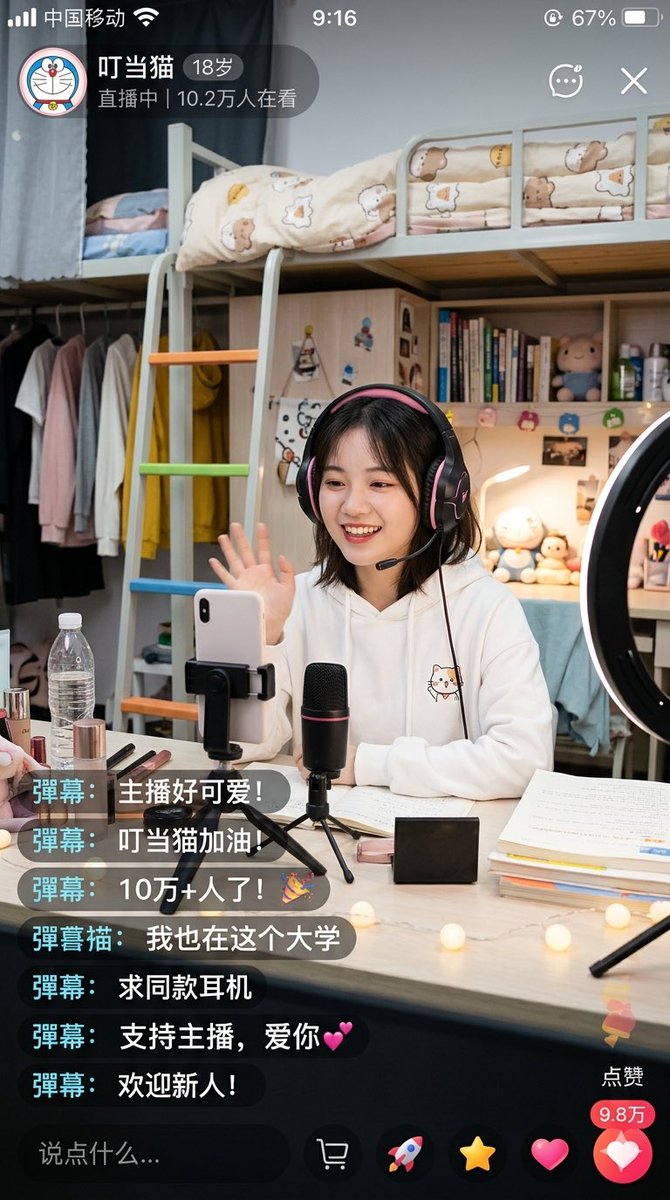
중국 기숙사 라이브 스트리밍 화면 캡처
이 기능은 기숙사 방에서 라이브 스트리밍을 하는 여대생의 모습을 실사처럼 재현한 모바일 라이브 스트리밍 앱 스크린샷을 생성합니다. 소셜 미디어 UI 목업이나 사실적인 AI 라이프스타일 장면 제작에 유용합니다.
이것은 인물과 캐릭터 에 대한 GPT Image 2 프롬프트 사례입니다. 아래의 복사 가능한 프롬프트를 사용하여 유사한 시각 자료를 생성하고, 재사용하기 전에 Awesome GPT Image 2 Prompts 의 저작자 표시 및 상업적 사용 권한을 검토하십시오.
전체 프롬프트 세트가 필요하신가요? 다음을 사용하세요. 인물과 캐릭터 더 많은 관련 예시를 보려면 주제 허브를 열거나 다음을 열어보세요. GPT Image 2 프롬프트 카탈로그 전체 예제 색인, 재사용 가능한 구조 및 출처 표기는 다음을 참조하십시오.
Free 1K preview
Generate one preview image instantly, no sign-up required.
2876/4000
프롬프트
복사 준비 프롬프트
A highly realistic vertical smartphone screenshot showcasing a warm university dorm livestream scene within a Chinese livestreaming app. The interface should resemble a genuine iPhone screenshot, including a status bar displaying Chinese carrier text, time 9:16, and approximately 67% battery. The upper left corner features a circular cartoon avatar and a livestream badge displaying the streamer's name “Dingdang Cat”, age “18 years old”, and the text “LIVE | 102k viewers”. Add small icons for chat, menu, and close in the upper right corner. The main scene depicts a young female college student sitting at a desk, waving towards the phone camera. Show every face clearly with natural, detailed facial features. She has shoulder-length dark short hair, wears large black and pink over-ear gaming headphones, and is dressed in a white hooded sweatshirt with a cute cat illustration on the chest. She is livestreaming in a tidy, warmly lit dorm bedroom. Behind her is a light-colored loft bed with safety rails and cream-colored bedding featuring bear and star patterns, along with a ladder with orange, green, and blue rungs. Below and to the side of the loft bed are shelves and a wardrobe area with light-colored clothes and a bright yellow hooded sweatshirt hanging. The shelves display vertically stacked books, small plush toys, bottles, and personal items. A ring light is visible on the right edge of the frame. On the desk in front of her are: a smartphone clamped in a holder, a black desktop microphone with a faint red accent mounted on a mini tripod, an open laptop and papers, stacked textbooks, cosmetics including lipstick and makeup brushes, a transparent water bottle, a small black rectangular box, and warm-toned string lights scattered on the desktop. The lighting should feel soft, homely, and inviting, with realistic indoor shadows and a slight smartphone shooting texture. Overlay 7 floating real-time chat comments in the lower left corner, using dark semi-transparent rounded rectangles with cyan name tags. The comments, from top to bottom, are: “Bullet comment: The streamer is so cute!”, “Bullet comment: Go Dingdang Cat!”, “Bullet comment: 100k+ viewers!🎉”, “Bullet comment Cat: I'm at this university too”, “Bullet comment: Where can I buy the same headphones?”, “Bullet comment: Support the streamer, love you💕”, “Bullet comment: Welcome newcomers!”. Include a dark comment input field at the bottom with the placeholder text “Say something…”, and a row of livestream operation icons. Add a vertical like area in the lower right corner with a “Like” label, a red count bubble displaying “98k”, and a large pink heart button. Overall style: Photo-realistic Chinese social media livestream screenshot, credible App UI, detailed dorm environment, cute young campus streamer aesthetic, natural composition, clear text rendering, no extra panels.
Best for
- - 인물과 캐릭터 visual exploration
- - Image generation and reference-image edits
- - Reusable briefs that keep source attribution visible
Change these parts
- - Subject, product, character, or scene
- - Aspect ratio, camera, lighting, and background
- - Brand, text, color, and output constraints
Recommended model and settings
- - Model: gpt-image-2
- - Input mode: 텍스트 to 이미지
- - Aspect ratio: source
- - Commercial status: review original source
How to use this prompt
- 1. Copy the prompt and preserve its structure for the first test.
- 2. Replace the subject, context, and publishing channel.
- 3. Change one camera, lighting, or style variable per iteration.
- 4. Inspect the output, source, text, and rights before reuse.
Limitations, source, and reuse cautions
- - Generated output is an editable draft, not factual, legal, or rights evidence.
- - Review the linked source, people, brands, logos, text, and third-party media before commercial use.
Awesome GPT Image 2 Prompts 에서 가져왔습니다. 출처 표기가 필요합니다. 상업적 이용 가능 여부는 allowed 입니다. 유료 사용 전에 원저작권 정보를 확인하세요.
이 범주에 속하는 더 많은 사례
범주, 입력 방식 호환성, 품질 및 위험도에 따라 우선순위가 정해집니다.






재사용 및 출처 참고 사항
사례를 미리 확인한 후 이 안내 메시지를 안전하게 사용하십시오.
- 1.프롬프트를 복사하거나 Dovoo의 생성 버튼을 사용하여 직접 엽니다.
- 2.사용 사례에 맞게 변수, 화면 비율 및 참조 이미지를 조정하십시오.
- 3.출판 또는 유료 사용 전에 저작권, 출처 표기 요건 및 브랜드 또는 초상권 관련 위험을 확인하십시오.