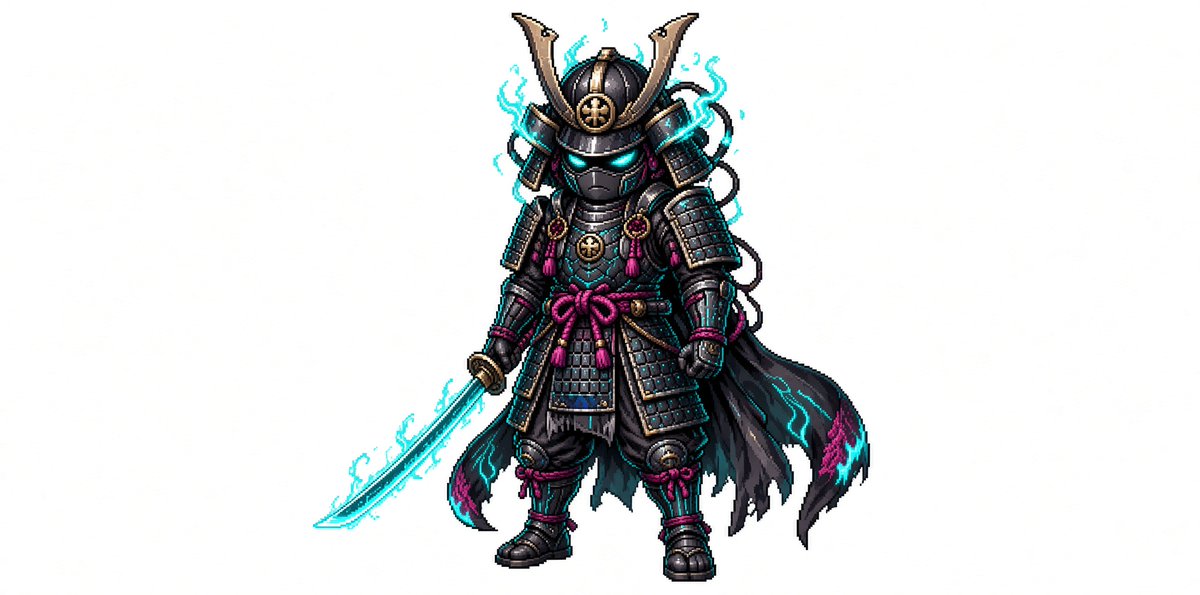
Chibi Pixel Samurai Transformation
Transforms a detailed samurai reference into a compact chibi pixel-art game sprite while preserving its key armor and weapon design.
이것은 애니메이션 & 게임 에 대한 GPT Image 2 프롬프트 사례입니다. 아래의 복사 가능한 프롬프트를 사용하여 유사한 시각 자료를 생성하고, 재사용하기 전에 Awesome GPT Image 2 Prompts 의 저작자 표시 및 상업적 사용 권한을 검토하십시오.
전체 프롬프트 세트가 필요하신가요? 다음을 사용하세요. 애니메이션 & 게임 더 많은 관련 예시를 보려면 주제 허브를 열거나 다음을 열어보세요. GPT Image 2 프롬프트 카탈로그 전체 예제 색인, 재사용 가능한 구조 및 출처 표기는 다음을 참조하십시오.
Free 1K preview
Generate one preview image instantly, no sign-up required.
1533/4000
프롬프트
복사 준비 프롬프트
Create a full-body chibi pixel art character on a plain white background: a tiny cyber-samurai warrior named {argument name="character name" default="neon shadow samurai"}, centered with lots of empty space around him. The character has a large helmeted head and small body proportions, wearing ornate black samurai armor with dark gunmetal plates, gold trim, and magenta cord knots. The helmet has a tall crescent-shaped golden maedate, side armor flaps, a circular gold crest on the forehead, and a black face mask with glowing cyan eyes. Add exactly one glowing katana held downward in the left hand, with a cyan energy blade and light electric aura. The armor includes layered shoulder guards, chest plates, skirt plates, shin guards, boots, gauntlets, braided cords, small tassels, and a magenta waist bow. Behind him is exactly one tattered black cloak flowing to the right, edged with cyan and magenta flame-like markings. Add cyan electrical wisps around the helmet, sword, shoulders, and cloak, but keep the silhouette readable. Style should be crisp retro game sprite art with detailed pixel shading, high contrast outlines, subtle dithering, and a fantasy RPG character-sheet feel. Use {argument name="armor color" default="black and gunmetal"} as the dominant armor palette, {argument name="accent color" default="cyan"} for all glow effects, and {argument name="secondary accent color" default="magenta"} for cords and decorative highlights. No text, no logo, no scenery, no shadow-heavy background, no extra characters.프롬프트 변수
프롬프트에 있는 편집 가능한 인수 자리 표시자와 해당 기본값입니다.
변하기 쉬운
character name
기본
neon shadow samurai
변하기 쉬운
armor color
기본
black and gunmetal
변하기 쉬운
accent color
기본
cyan
변하기 쉬운
secondary accent color
기본
magenta
Best for
- - 애니메이션 & 게임 visual exploration
- - Image generation and reference-image edits
- - Reusable briefs that keep source attribution visible
Change these parts
- - Subject, product, character, or scene
- - Aspect ratio, camera, lighting, and background
- - Brand, text, color, and output constraints
Recommended model and settings
- - Model: gpt-image-2
- - Input mode: 텍스트 to 이미지
- - Aspect ratio: source
- - Commercial status: review original source
How to use this prompt
- 1. Copy the prompt and preserve its structure for the first test.
- 2. Replace the subject, context, and publishing channel.
- 3. Change one camera, lighting, or style variable per iteration.
- 4. Inspect the output, source, text, and rights before reuse.
Limitations, source, and reuse cautions
- - Generated output is an editable draft, not factual, legal, or rights evidence.
- - Review the linked source, people, brands, logos, text, and third-party media before commercial use.
Awesome GPT Image 2 Prompts 에서 가져왔습니다. 출처 표기가 필요합니다. 상업적 이용 가능 여부는 allowed 입니다. 유료 사용 전에 원저작권 정보를 확인하세요.
이 범주에 속하는 더 많은 사례
범주, 입력 방식 호환성, 품질 및 위험도에 따라 우선순위가 정해집니다.






재사용 및 출처 참고 사항
사례를 미리 확인한 후 이 안내 메시지를 안전하게 사용하십시오.
- 1.프롬프트를 복사하거나 Dovoo의 생성 버튼을 사용하여 직접 엽니다.
- 2.사용 사례에 맞게 변수, 화면 비율 및 참조 이미지를 조정하십시오.
- 3.출판 또는 유료 사용 전에 저작권, 출처 표기 요건 및 브랜드 또는 초상권 관련 위험을 확인하십시오.