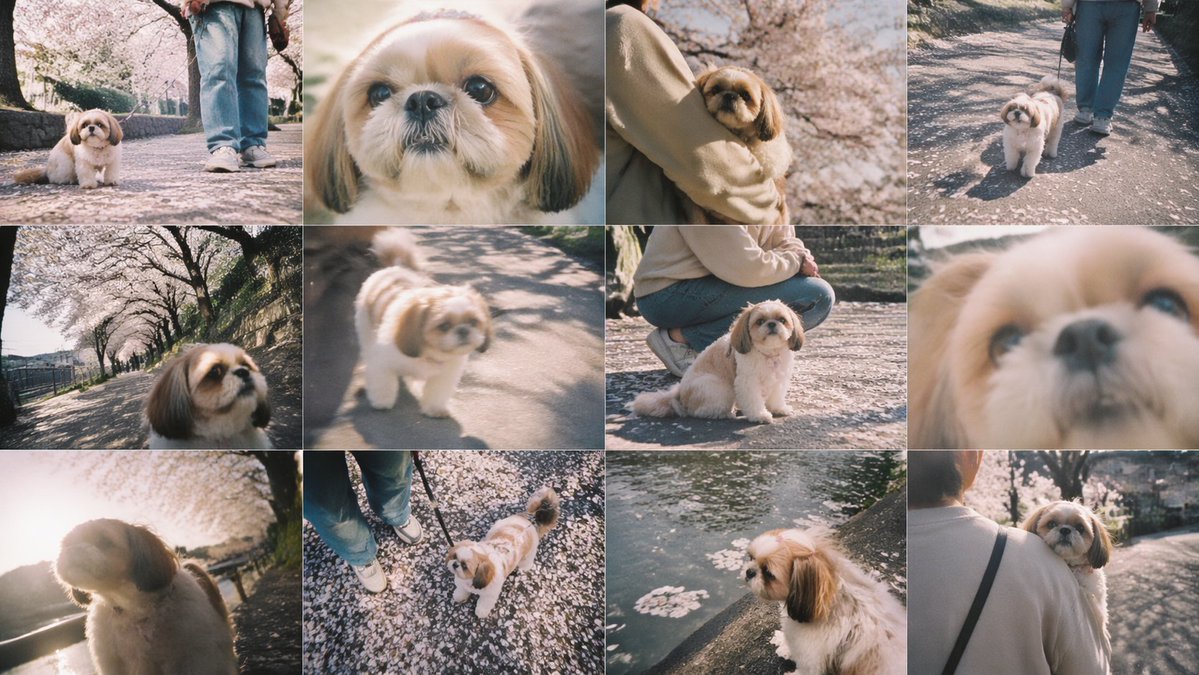
벚꽃 시추 사진 콜라주
벚꽃 아래를 거니는 작은 강아지와 주인의 모습을 담은 몽환적인 12컷짜리 봄 반려동물 사진 콜라주입니다. 추억이 담긴 소셜 미디어 게시물이나 라이프스타일 몽타주 제작에 적합합니다.
이것은 인물과 캐릭터 에 대한 GPT Image 2 프롬프트 사례입니다. 아래의 복사 가능한 프롬프트를 사용하여 유사한 시각 자료를 생성하고, 재사용하기 전에 Awesome GPT Image 2 Prompts 의 저작자 표시 및 상업적 사용 권한을 검토하십시오.
전체 프롬프트 세트가 필요하신가요? 다음을 사용하세요. 인물과 캐릭터 더 많은 관련 예시를 보려면 주제 허브를 열거나 다음을 열어보세요. GPT Image 2 프롬프트 카탈로그 전체 예제 색인, 재사용 가능한 구조 및 출처 표기는 다음을 참조하십시오.
Free 1K preview
Generate one preview image instantly, no sign-up required.
Free text preview doesn’t preserve reference-image consistency.
3915/4000
프롬프트
복사 준비 프롬프트
{
  "type": "photo collage",
  "style": "soft vintage smartphone photography, dreamy spring atmosphere, slightly faded colors, warm pastel tones, shallow depth of field, natural sunlight, gentle film-like bloom, candid pet snapshots",
  "subject": {
    "primary": "a small Shih Tzu",
    "dog": {
      "breed": "Shih Tzu",
      "fur": "fluffy cream and white coat with tan-brown ears and face markings",
      "expression": "calm, curious, gentle"
    },
    "owner": {
      "presence": "partially visible in several frames",
      "clothing": "light beige sweatshirt or jacket, blue jeans, white sneakers, black shoulder strap bag"
    }
  },
  "setting": {
    "location": "a cherry blossom-lined riverside walking path",
    "season": "spring",
    "details": [
      "fallen pink petals scattered across the pavement",
      "rows of blooming sakura trees",
      "stone embankment and canal water",
      "dappled tree shadows on the ground"
    ]
  },
  "layout": {
    "grid": {
      "rows": 3,
      "columns": 4,
      "count": 12
    },
    "sections": [
      {
        "position": "row 1, column 1",
        "description": "low-angle full-body shot of the dog sitting on a petal-covered path, owner's legs visible behind"
      },
      {
        "position": "row 1, column 2",
        "description": "extreme close-up portrait of the dog's face, partially obscured by a centered beige rectangle censor block"
      },
      {
        "position": "row 1, column 3",
        "description": "the owner holding the dog in their arms under blooming cherry trees, medium close shot"
      },
      {
        "position": "row 1, column 4",
        "description": "the dog walking on a leash beside the owner along the sunlit path"
      },
      {
        "position": "row 2, column 1",
        "description": "wide-angle, slightly tilted close-up of the dog's face with the cherry blossom path receding behind"
      },
      {
        "position": "row 2, column 2",
        "description": "soft-focus candid shot of the dog standing on the path in sunlight"
      },
      {
        "position": "row 2, column 3",
        "description": "the owner crouching beside the seated dog on the petal-covered ground"
      },
      {
        "position": "row 2, column 4",
        "description": "very soft, blurred extreme close-up of the dog's face filling the frame"
      },
      {
        "position": "row 3, column 1",
        "description": "backlit side portrait of the dog with bright sun flare and glowing fur"
      },
      {
        "position": "row 3, column 2",
        "description": "top-down view of the dog looking up at the camera near the owner's shoes on a ground covered with petals"
      },
      {
        "position": "row 3, column 3",
        "description": "side profile of the dog perched beside canal water with floating cherry blossom petals"
      },
      {
        "position": "row 3, column 4",
        "description": "rear view of the owner carrying the dog while walking away along the blossom-lined path"
      }
    ]
  },
  "image_direction": "Create a 12-panel collage of candid pet photos featuring {argument name=\"dog breed\" default=\"a small Shih Tzu\"} during a spring walk under cherry blossoms. Keep the same dog and owner across all panels. Use a nostalgic Japanese snapshot aesthetic with soft blur in some frames, low and wide angles, intimate close-ups, and warm afternoon light. The dog should have {argument name=\"dog appearance\" default=\"fluffy cream and white fur with tan-brown ears\"}. The owner wears {argument name=\"owner outfit\" default=\"a beige top, blue jeans, and white sneakers\"}. The setting is {argument name=\"location\" default=\"a sakura-lined riverside path covered in fallen petals\"}. Include one panel with {argument name=\"censored element\" default=\"a centered beige censor block covering part of an extreme close-up\"}."
}
프롬프트 변수
프롬프트에 있는 편집 가능한 인수 자리 표시자와 해당 기본값입니다.
변하기 쉬운
dog breed
기본
a small Shih Tzu
변하기 쉬운
dog appearance
기본
fluffy cream and white fur with tan-brown ears
변하기 쉬운
owner outfit
기본
a beige top, blue jeans, and white sneakers
변하기 쉬운
location
기본
a sakura-lined riverside path covered in fallen petals
변하기 쉬운
censored element
기본
a centered beige censor block covering part of an extreme close-up
Best for
- - 인물과 캐릭터 visual exploration
- - Image generation and reference-image edits
- - Reusable briefs that keep source attribution visible
Change these parts
- - Subject, product, character, or scene
- - Aspect ratio, camera, lighting, and background
- - Brand, text, color, and output constraints
Recommended model and settings
- - Model: gpt-image-2
- - Input mode: 이미지 to 이미지
- - Aspect ratio: source
- - Commercial status: review original source
How to use this prompt
- 1. Copy the prompt and preserve its structure for the first test.
- 2. Replace the subject, context, and publishing channel.
- 3. Change one camera, lighting, or style variable per iteration.
- 4. Inspect the output, source, text, and rights before reuse.
Limitations, source, and reuse cautions
- - Generated output is an editable draft, not factual, legal, or rights evidence.
- - Review the linked source, people, brands, logos, text, and third-party media before commercial use.
Awesome GPT Image 2 Prompts 에서 가져왔습니다. 출처 표기가 필요합니다. 상업적 이용 가능 여부는 allowed 입니다. 유료 사용 전에 원저작권 정보를 확인하세요.
이 범주에 속하는 더 많은 사례
범주, 입력 방식 호환성, 품질 및 위험도에 따라 우선순위가 정해집니다.






재사용 및 출처 참고 사항
사례를 미리 확인한 후 이 안내 메시지를 안전하게 사용하십시오.
- 1.프롬프트를 복사하거나 Dovoo의 생성 버튼을 사용하여 직접 엽니다.
- 2.사용 사례에 맞게 변수, 화면 비율 및 참조 이미지를 조정하십시오.
- 3.출판 또는 유료 사용 전에 저작권, 출처 표기 요건 및 브랜드 또는 초상권 관련 위험을 확인하십시오.