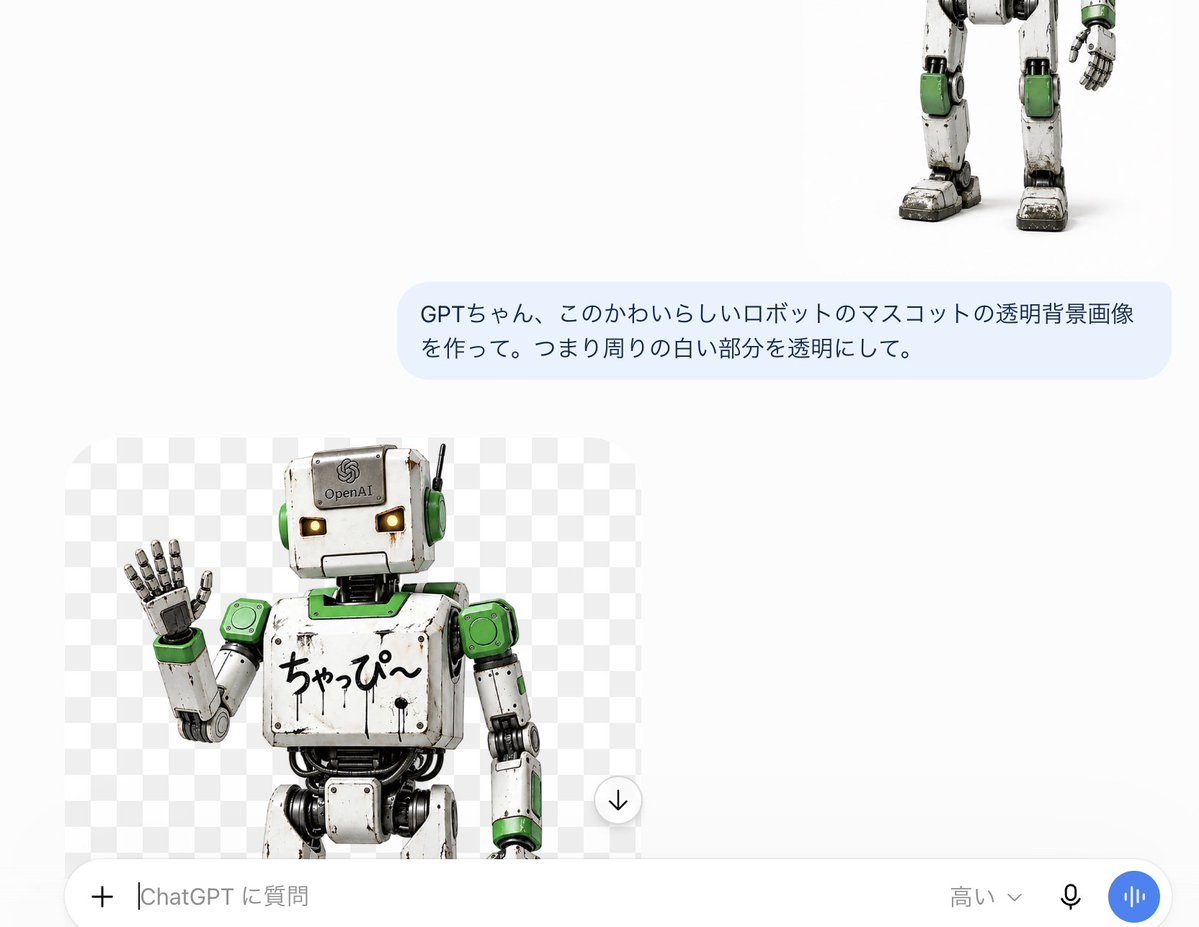
ChatGPT Transparent Robot Screenshot
Creates a Japanese ChatGPT-style screenshot showing a generated transparent-background robot mascot preview.
이것은 다른 영감 에 대한 GPT Image 2 프롬프트 사례입니다. 아래의 복사 가능한 프롬프트를 사용하여 유사한 시각 자료를 생성하고, 재사용하기 전에 Awesome GPT Image 2 Prompts 의 저작자 표시 및 상업적 사용 권한을 검토하십시오.
전체 프롬프트 세트가 필요하신가요? 다음을 사용하세요. 다른 영감 더 많은 관련 예시를 보려면 주제 허브를 열거나 다음을 열어보세요. GPT Image 2 프롬프트 카탈로그 전체 예제 색인, 재사용 가능한 구조 및 출처 표기는 다음을 참조하십시오.
Free 1K preview
Generate one preview image instantly, no sign-up required.
2772/4000
프롬프트
복사 준비 프롬프트
Goal: Create a realistic screenshot of a ChatGPT mobile interface, showcasing a transparent background image generation result of a cute robot mascot.

Canvas: Horizontal screenshot, approximately 1200 × 895 pixels in size, using a simple white application background with plenty of blank space. The interface should be presented as a ChatGPT conversation on a mobile phone or tablet, not a refined poster.

Layout: Place 3 main visible content elements: Place 1 partial robot image in the upper right corner, showing only the lower body, legs, and one hand; Place 1 light blue user message bubble in the upper right, centered; Place 1 generated image preview card in the lower left corner. Add 1 full-width input bar at the bottom.

User Message Bubble: Rounded rectangle, filled with light blue. The Japanese text must be exactly the same: {argument name="user message" default="GPTちゃん、このかわいらしいロボットのマスコットの透明背景画像を作って。つまり周りの白い部分を透明にして。"}. Use dark gray sans-serif font, two lines, left-aligned.

Generated Image Preview Card: Rounded rectangle preview box with a gray and white checkered transparent background pattern. Inside, include 1 cute, aged robot mascot, cropped at the thigh, standing slightly to the left, waving its left hand. Near the bottom right edge of the preview, include 1 circular download button overlay, a white circle with a black downward arrow.

Robot Details: The robot is a charming retro toy-style humanoid mascot with a square grayish-white head, tiny amber glowing rectangular eyes, green circular earmuffs, a thin black antenna on the right side of its head, worn and scratched metal panels with visible black joints and cables, green accents on the shoulders, neck plate, wrists, knees, and side panels. The head has a small OpenAI-like logo and text {argument name="forehead label" default="OpenAI"}. Handwritten Japanese text {argument name="chest text" default="ちゃっぴ〜"} on the chest. The raised hand has segmented metal fingers, palm facing forward. Style is photorealistic 3D rendering, with toy robot proportions, soft studio lighting, subtle dirt, worn edges, and a friendly mascot expression.

Bottom Input Bar: Contains 5 visible controls or text elements: 1 plus icon on the far left, 1 text input placeholder displaying {argument name="input placeholder" default="高い⌄"}, 1 model selection label displaying {argument name="model label" default="High"} with a small downward arrow, 1 black microphone icon, and 1 blue circular voice button with white vertical waveforms. The input bar is white with rounded top corners and a subtle shadow.

Visual Style: Accurate Japanese version of the ChatGPT UI screenshot aesthetic, white negative space, subtle rounded corners, clear UI text, no watermarks, no extra titles, no browser borders.
프롬프트 변수
프롬프트에 있는 편집 가능한 인수 자리 표시자와 해당 기본값입니다.
변하기 쉬운
user message
기본
GPTちゃん、このかわいらしいロボットのマスコットの透明背景画像を作って。つまり周りの白い部分を透明にして。
변하기 쉬운
forehead label
기본
OpenAI
변하기 쉬운
chest text
기본
ちゃっぴ〜
변하기 쉬운
input placeholder
기본
高い⌄
변하기 쉬운
model label
기본
High
Best for
- - 다른 영감 visual exploration
- - Image generation and reference-image edits
- - Reusable briefs that keep source attribution visible
Change these parts
- - Subject, product, character, or scene
- - Aspect ratio, camera, lighting, and background
- - Brand, text, color, and output constraints
Recommended model and settings
- - Model: gpt-image-2
- - Input mode: 텍스트 to 이미지
- - Aspect ratio: source
- - Commercial status: review original source
How to use this prompt
- 1. Copy the prompt and preserve its structure for the first test.
- 2. Replace the subject, context, and publishing channel.
- 3. Change one camera, lighting, or style variable per iteration.
- 4. Inspect the output, source, text, and rights before reuse.
Limitations, source, and reuse cautions
- - Generated output is an editable draft, not factual, legal, or rights evidence.
- - Review the linked source, people, brands, logos, text, and third-party media before commercial use.
Awesome GPT Image 2 Prompts 에서 가져왔습니다. 출처 표기가 필요합니다. 상업적 이용 가능 여부는 allowed 입니다. 유료 사용 전에 원저작권 정보를 확인하세요.
이 범주에 속하는 더 많은 사례
범주, 입력 방식 호환성, 품질 및 위험도에 따라 우선순위가 정해집니다.
재사용 및 출처 참고 사항
사례를 미리 확인한 후 이 안내 메시지를 안전하게 사용하십시오.
- 1.프롬프트를 복사하거나 Dovoo의 생성 버튼을 사용하여 직접 엽니다.
- 2.사용 사례에 맞게 변수, 화면 비율 및 참조 이미지를 조정하십시오.
- 3.출판 또는 유료 사용 전에 저작권, 출처 표기 요건 및 브랜드 또는 초상권 관련 위험을 확인하십시오.