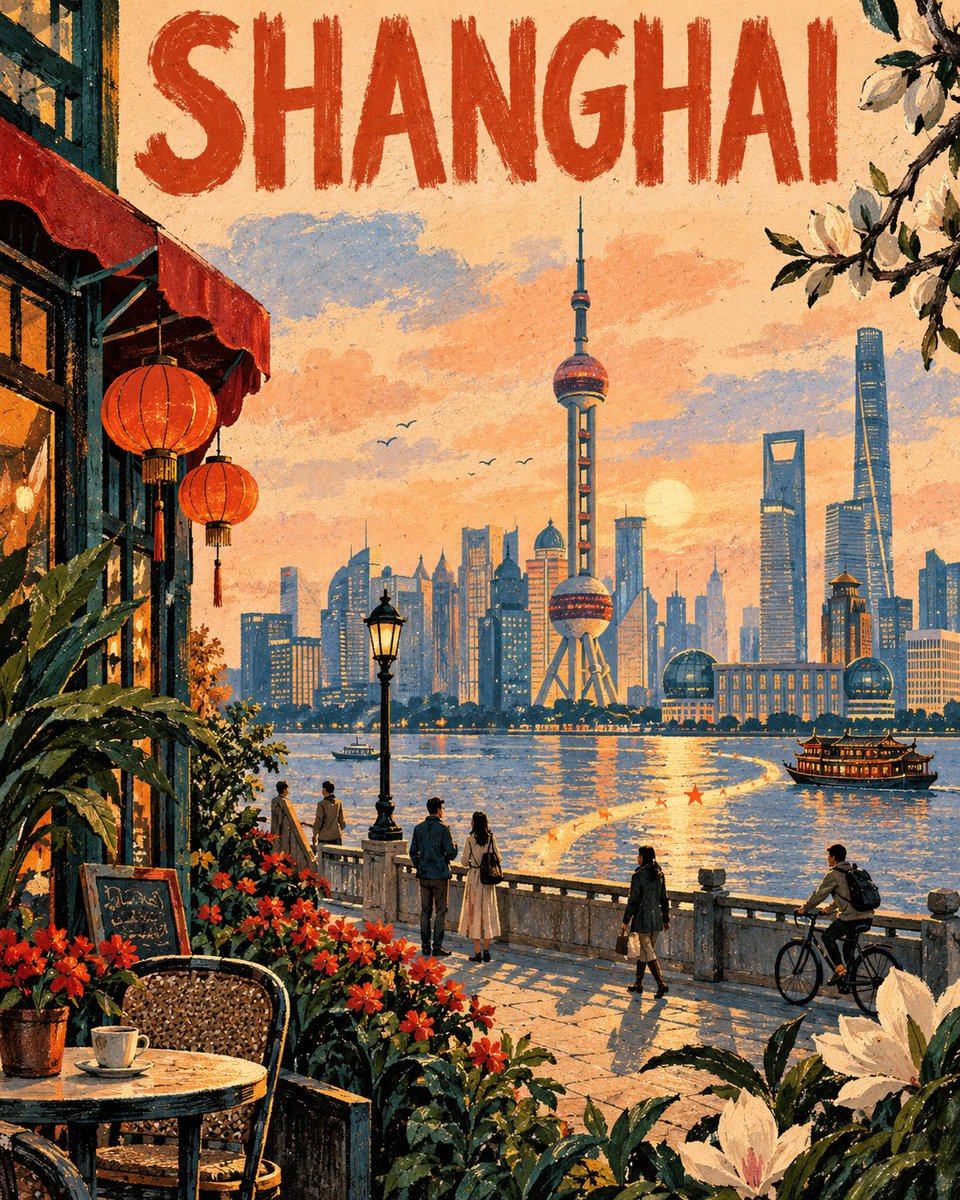
Geometric City Memory Poster
Generates stylized, mixed-media city posters that reimagine landmarks as geometric forms with a nostalgic, tactile feel and unique decorative elements.
이것은 그래픽 및 포스터 에 대한 GPT Image 2 프롬프트 사례입니다. 아래의 복사 가능한 프롬프트를 사용하여 유사한 시각 자료를 생성하고, 재사용하기 전에 Awesome GPT Image 2 Prompts 의 저작자 표시 및 상업적 사용 권한을 검토하십시오.
전체 프롬프트 세트가 필요하신가요? 다음을 사용하세요. 그래픽 및 포스터 더 많은 관련 예시를 보려면 주제 허브를 열거나 다음을 열어보세요. GPT Image 2 프롬프트 카탈로그 전체 예제 색인, 재사용 가능한 구조 및 출처 표기는 다음을 참조하십시오.
Free 1K preview
Generate one preview image instantly, no sign-up required.
Free text preview doesn’t preserve reference-image consistency.
3113/4000
프롬프트
복사 준비 프롬프트
City: {argument name="city name" default="[City Name]"}
Landmark: {argument name="landmark" default="[Landmark Name]"}

Create an original, vertical emotional city poster themed around the specified “City” and “Landmark”. The landmark should serve as a mid-ground, recognizable visual anchor, simplified into elegant geometric forms rather than realistic rendering. Reconstruct the surrounding areas as poetic memories of the city – not precise copies of photos or existing artwork.

Composition

Divide the scene into three distinct layers:

Foreground — Oversized, native plants, seasonal flowers, architectural fragments, cafe furniture, street objects, or foliage associated with the city, partially cutting into the frame from the bottom and sides.

Mid-ground — Several people in natural poses enjoying ordinary city moments: walking, reading, cycling, conversing, resting, or gazing towards the landmark. Keep people secondary, avoiding deliberate tourist posing.

Background — The landmark situated within a streamlined cityscape, surrounded by sky, trees, bodies of water, hills, or architecture consistent with the local character.

Add a unique “memory ribbon”: an irregular, flowing band starting near a corner, naturally transforming into roads, rivers, shadows, flowerbeds, or beams of light, guiding the eye towards the landmark. Add several tiny, star-shaped color markings along the way.

Visual Language

Employ an original mixed-media illustration style combining large areas of oil pastel blocks, dry powder charcoal outlines, manual pressure variations, broken edges, imperfect overlaps, scraped highlights, warm uncoated paper textures, selective double outlines, heavy impasto, uneven transparency, visible hand-drawn strokes, and deliberately left negative space. Avoid smooth digital gradients, glossy 3D rendering, and photorealism.

Color Scheme

Automatically derive a color scheme based on the city’s emotional characteristics, climate, season, and cultural atmosphere. Use one primary background color, 2–3 supporting colors, and a small amount of a striking contrasting accent color.

Typography

Display the precise city name at the top, in all capital letters. The font should be large, spacious, clear, and readable, and hand-drawn in charcoal or thick oil pastel. Display only the city name. Do not include slogans, descriptions, dates, logos, signatures, watermarks, borders, frames, or other typographic elements.

Create a composition that is asymmetrical, with a calm rhythm, strong framing, ample breathing room, and a surprising local detail. Make the final image feel like a rediscovered travel poster from a fictional city archive – intimate, modern, nostalgic, textured, and uniquely original.

Negative Prompts: photorealistic photography, precise imitation of reference artwork, copied compositions, copied brushstrokes, artist signatures, watermarks, generic tourist advertising, cluttered skylines, excessive landmarks, distorted architecture, repetitive people, overly large people, smooth vector illustrations, glossy 3D rendering, plastic textures, neon overload
프롬프트 변수
프롬프트에 있는 편집 가능한 인수 자리 표시자와 해당 기본값입니다.
변하기 쉬운
city name
기본
[City Name]
변하기 쉬운
landmark
기본
[Landmark Name]
Best for
- - 그래픽 및 포스터 visual exploration
- - Image generation and reference-image edits
- - Reusable briefs that keep source attribution visible
Change these parts
- - Subject, product, character, or scene
- - Aspect ratio, camera, lighting, and background
- - Brand, text, color, and output constraints
Recommended model and settings
- - Model: gpt-image-2
- - Input mode: 이미지 to 이미지
- - Aspect ratio: source
- - Commercial status: review original source
How to use this prompt
- 1. Copy the prompt and preserve its structure for the first test.
- 2. Replace the subject, context, and publishing channel.
- 3. Change one camera, lighting, or style variable per iteration.
- 4. Inspect the output, source, text, and rights before reuse.
Limitations, source, and reuse cautions
- - Generated output is an editable draft, not factual, legal, or rights evidence.
- - Review the linked source, people, brands, logos, text, and third-party media before commercial use.
Awesome GPT Image 2 Prompts 에서 가져왔습니다. 출처 표기가 필요합니다. 상업적 이용 가능 여부는 allowed 입니다. 유료 사용 전에 원저작권 정보를 확인하세요.
이 범주에 속하는 더 많은 사례
범주, 입력 방식 호환성, 품질 및 위험도에 따라 우선순위가 정해집니다.






재사용 및 출처 참고 사항
사례를 미리 확인한 후 이 안내 메시지를 안전하게 사용하십시오.
- 1.프롬프트를 복사하거나 Dovoo의 생성 버튼을 사용하여 직접 엽니다.
- 2.사용 사례에 맞게 변수, 화면 비율 및 참조 이미지를 조정하십시오.
- 3.출판 또는 유료 사용 전에 저작권, 출처 표기 요건 및 브랜드 또는 초상권 관련 위험을 확인하십시오.