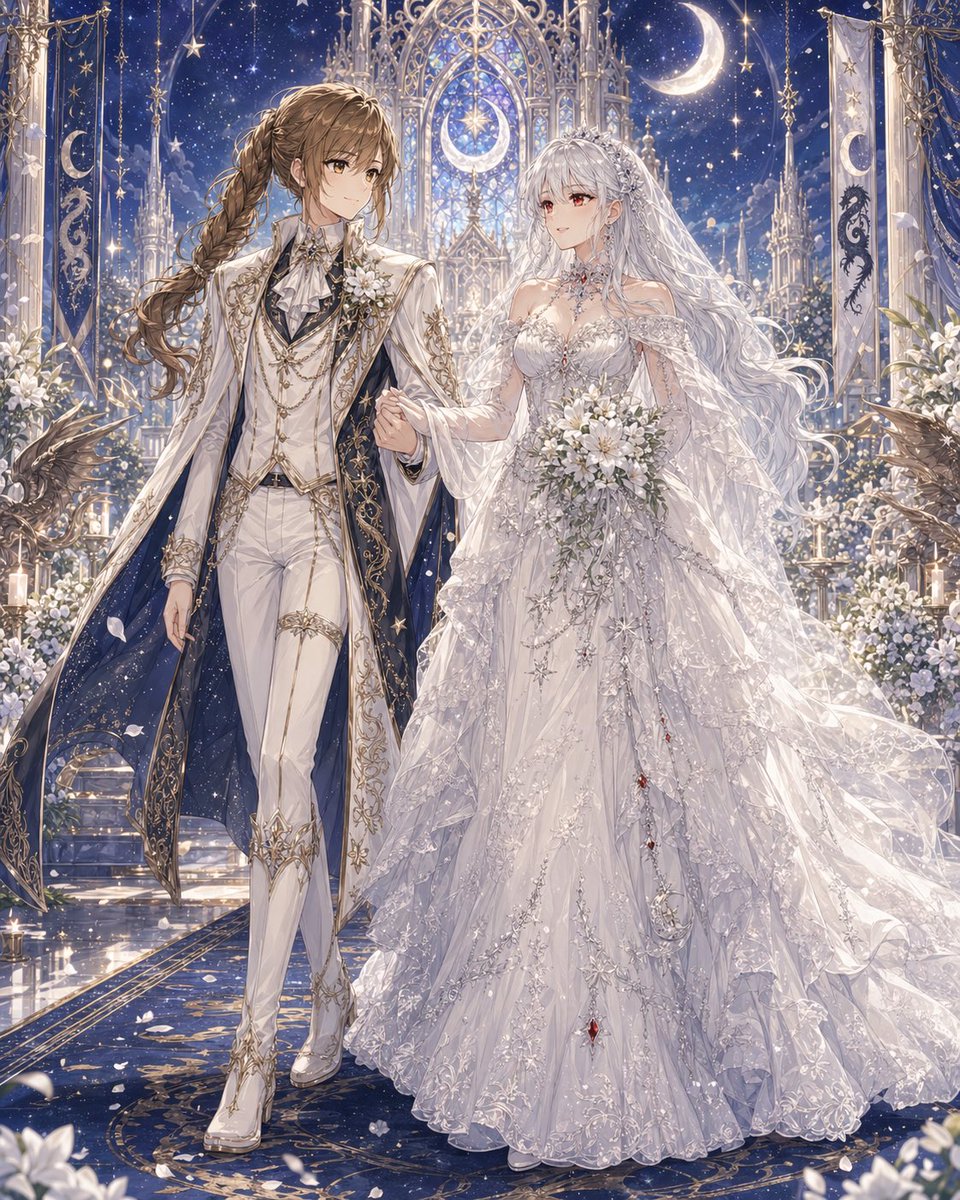
달빛 아래 성당에서 펼쳐지는 천상의 유리 결혼식
이 프롬프트는 천상의 예복을 입은 두 신부의 화려한 애니메이션 스타일의 판타지 웨딩 초상화를 생성합니다. 로맨틱한 오리지널 캐릭터 아트나 극적인 예식 장면에 이상적입니다.
이것은 인물과 캐릭터 에 대한 GPT Image 2 프롬프트 사례입니다. 아래의 복사 가능한 프롬프트를 사용하여 유사한 시각 자료를 생성하고, 재사용하기 전에 Awesome GPT Image 2 Prompts 의 저작자 표시 및 상업적 사용 권한을 검토하십시오.
전체 프롬프트 세트가 필요하신가요? 다음을 사용하세요. 인물과 캐릭터 더 많은 관련 예시를 보려면 주제 허브를 열거나 다음을 열어보세요. GPT Image 2 프롬프트 카탈로그 전체 예제 색인, 재사용 가능한 구조 및 출처 표기는 다음을 참조하십시오.
Free 1K preview
Generate one preview image instantly, no sign-up required.
2055/4000
프롬프트
복사 준비 프롬프트
A lavish fantasy yuri wedding illustration in a highly detailed anime style, full-body portrait of two brides walking arm in arm down the aisle in a celestial cathedral at night. The left bride is a tall, elegant androgynous woman with {argument name="left character hair color" default="warm brown"} hair in a long thick side braid over one shoulder, wearing an aristocratic white wedding suit with fitted trousers, heeled white boots, a ruffled cravat, layered gold chains, embroidered gold filigree, floral corsage, and a dramatic long white coat lined in deep midnight blue like a starry sky. The right bride is a graceful woman with {argument name="right character hair color" default="silver white"} very long flowing wavy hair, a jeweled tiara, and a sheer veil, wearing an opulent {argument name="wedding dress style" default="voluminous white celestial lace ball gown"} with translucent layered sleeves, intricate silver embroidery, star and moon motifs, sparkling beadwork, and tiny red gemstone accents cascading down the skirt. She holds a {argument name="bouquet flowers" default="white lily and rose bouquet"}. Their expressions are serene and romantic, posed close together as if proceeding during the ceremony. The setting is a glowing moonlit gothic chapel with towering ornate arches, stained-glass-like tracery, hanging banners, candles, white floral arrangements, and celestial decorations. Count 2 large crescent moons visible in the architecture and sky, 2 vertical ceremonial banners, and 2 dark winged bird or griffin statues near the foreground sides. The background is a rich {argument name="sky color" default="deep sapphire blue"} star-filled sky with glittering particles, soft petals drifting through the air, and polished reflective flooring with gold patterns. Use ultra-detailed fabrics, luminous highlights, delicate lace, shimmering jewelry, elegant composition, dreamy fantasy romance, majestic wedding atmosphere, soft ethereal lighting, and a refined luxurious color palette of white, silver, gold, and midnight blue.프롬프트 변수
프롬프트에 있는 편집 가능한 인수 자리 표시자와 해당 기본값입니다.
변하기 쉬운
left character hair color
기본
warm brown
변하기 쉬운
right character hair color
기본
silver white
변하기 쉬운
wedding dress style
기본
voluminous white celestial lace ball gown
변하기 쉬운
bouquet flowers
기본
white lily and rose bouquet
변하기 쉬운
sky color
기본
deep sapphire blue
Best for
- - 인물과 캐릭터 visual exploration
- - Image generation and reference-image edits
- - Reusable briefs that keep source attribution visible
Change these parts
- - Subject, product, character, or scene
- - Aspect ratio, camera, lighting, and background
- - Brand, text, color, and output constraints
Recommended model and settings
- - Model: gpt-image-2
- - Input mode: 텍스트 to 이미지
- - Aspect ratio: source
- - Commercial status: review original source
How to use this prompt
- 1. Copy the prompt and preserve its structure for the first test.
- 2. Replace the subject, context, and publishing channel.
- 3. Change one camera, lighting, or style variable per iteration.
- 4. Inspect the output, source, text, and rights before reuse.
Limitations, source, and reuse cautions
- - Generated output is an editable draft, not factual, legal, or rights evidence.
- - Review the linked source, people, brands, logos, text, and third-party media before commercial use.
Awesome GPT Image 2 Prompts 에서 가져왔습니다. 출처 표기가 필요합니다. 상업적 이용 가능 여부는 allowed 입니다. 유료 사용 전에 원저작권 정보를 확인하세요.
이 범주에 속하는 더 많은 사례
범주, 입력 방식 호환성, 품질 및 위험도에 따라 우선순위가 정해집니다.






재사용 및 출처 참고 사항
사례를 미리 확인한 후 이 안내 메시지를 안전하게 사용하십시오.
- 1.프롬프트를 복사하거나 Dovoo의 생성 버튼을 사용하여 직접 엽니다.
- 2.사용 사례에 맞게 변수, 화면 비율 및 참조 이미지를 조정하십시오.
- 3.출판 또는 유료 사용 전에 저작권, 출처 표기 요건 및 브랜드 또는 초상권 관련 위험을 확인하십시오.