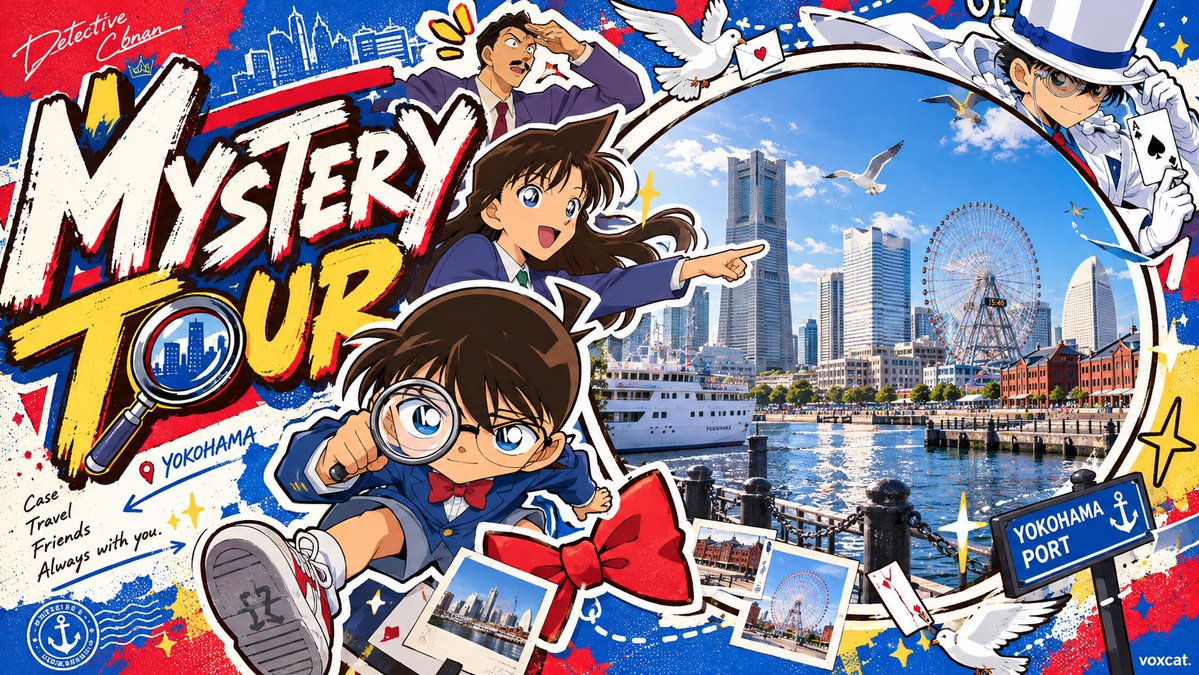
Hybrid Cartoon Photo Event Banner
Prompt for creating a horizontal event banner combining cartoon stickers, real photography and hand-drawn titles.
이것은 그래픽 및 포스터 에 대한 GPT Image 2 프롬프트 사례입니다. 아래의 복사 가능한 프롬프트를 사용하여 유사한 시각 자료를 생성하고, 재사용하기 전에 Awesome GPT Image 2 Prompts 의 저작자 표시 및 상업적 사용 권한을 검토하십시오.
전체 프롬프트 세트가 필요하신가요? 다음을 사용하세요. 그래픽 및 포스터 더 많은 관련 예시를 보려면 주제 허브를 열거나 다음을 열어보세요. GPT Image 2 프롬프트 카탈로그 전체 예제 색인, 재사용 가능한 구조 및 출처 표기는 다음을 참조하십시오.
Free 1K preview
Generate one preview image instantly, no sign-up required.
3186/4000
프롬프트
복사 준비 프롬프트
{argument name="theme" default="Summer Music Festival"}, {argument name="character" default="Cute Mascot"}, Contemporary trendy cartoon illustration x Cartoon Graffiti x Sticker Art x playful editorial illustration x Neo-retro American cartoon x Commercial Event Key Visual design.

Visual Style:
Thick dark brown hand-drawn outer contours, uneven line thickness, rounded exaggerated cartoon shapes, irregular organic geometric color blocks, flat vector coloring, slight hand-drawn texture. Characters feature exaggerated head-to-body ratios, simplified facial features, fun expressions, and rhythmic actions. High-saturation contrasting colors, randomly designing 3-5 main colors based on the theme, large areas of solid color fields, clear warm/cool and brightness contrast.

Core Composition:
Horizontal commercial banner, asymmetric left-right zoning, overall dense surround-style collage composition.

Left side approx. 40% is the visual title area, featuring huge, irregular, thick brush-stroke style hand-drawn theme titles. Text can be tilted, offset, partially overlapping, forming highly recognizable graphical text blocks, surrounded by small decorative patterns.

Right side approx. 60% is the main visual narrative area, with a large circular viewfinder window occupying about 70% of the image height, using a thick white border and dark hand-drawn outer contour. Inside the circle is a high-definition realistic photographic scene related to the [theme], with real spatial depth, natural light and shadow, and rich environmental details.

Around the circular window, arrange 5-8 cartoon sticker elements, including [characters], theme props, environmental symbols, plants, animals, vehicles, or other related objects. Elements vary in size, interpenetrate each other, some crossing the circular border, some extending from the edges toward the center, creating foreground, midground, and background spatial relationships.

Characters are distributed at the bottom-left, top, or sides of the circular window, performing interactive actions related to the theme. Props form an irregular C-shape or ring visual path around the circular window, with top elements gathering inward and bottom elements bearing visual weight.

Composition Details:
The oversized title and circular main visual form dual focal points, connecting people and props between two visual areas. Partial occlusion, boundary cropping, asymmetric balance, size proportion contrast, contour intersection, sticker-style layering. Small starbursts, dots, short lines, and geometric shapes fill visual gaps.

Mixed Media:
2D hand-drawn cartoon periphery x Realistic photography inside the circular window. The realistic scene maintains real photography lighting, materials, depth of field, and spatial scale; cartoon elements maintain unified thick outlines, flat coloring, and organic contours.

Overall Effect:
High information density, clear visual hierarchy, relaxed, interesting, lively internet commercial illustration. Distinctive theme recognition, unified colors, complete event key visual design feel.

Landscape 16:9, extremely small signature voxcat naturally integrated in the bottom right corner.
프롬프트 변수
프롬프트에 있는 편집 가능한 인수 자리 표시자와 해당 기본값입니다.
변하기 쉬운
theme
기본
Summer Music Festival
변하기 쉬운
character
기본
Cute Mascot
Best for
- - 그래픽 및 포스터 visual exploration
- - Image generation and reference-image edits
- - Reusable briefs that keep source attribution visible
Change these parts
- - Subject, product, character, or scene
- - Aspect ratio, camera, lighting, and background
- - Brand, text, color, and output constraints
Recommended model and settings
- - Model: gpt-image-2
- - Input mode: 텍스트 to 이미지
- - Aspect ratio: source
- - Commercial status: review original source
How to use this prompt
- 1. Copy the prompt and preserve its structure for the first test.
- 2. Replace the subject, context, and publishing channel.
- 3. Change one camera, lighting, or style variable per iteration.
- 4. Inspect the output, source, text, and rights before reuse.
Limitations, source, and reuse cautions
- - Generated output is an editable draft, not factual, legal, or rights evidence.
- - Review the linked source, people, brands, logos, text, and third-party media before commercial use.
Awesome GPT Image 2 Prompts 에서 가져왔습니다. 출처 표기가 필요합니다. 상업적 이용 가능 여부는 allowed 입니다. 유료 사용 전에 원저작권 정보를 확인하세요.
이 범주에 속하는 더 많은 사례
범주, 입력 방식 호환성, 품질 및 위험도에 따라 우선순위가 정해집니다.


재사용 및 출처 참고 사항
사례를 미리 확인한 후 이 안내 메시지를 안전하게 사용하십시오.
- 1.프롬프트를 복사하거나 Dovoo의 생성 버튼을 사용하여 직접 엽니다.
- 2.사용 사례에 맞게 변수, 화면 비율 및 참조 이미지를 조정하십시오.
- 3.출판 또는 유료 사용 전에 저작권, 출처 표기 요건 및 브랜드 또는 초상권 관련 위험을 확인하십시오.