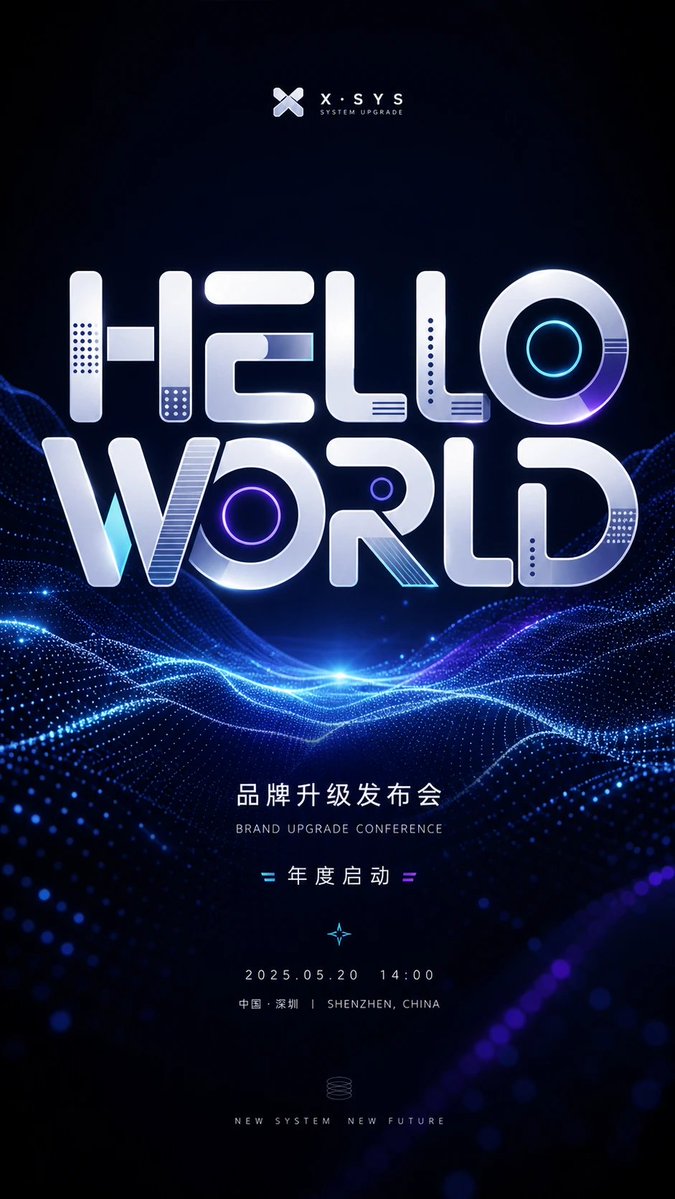
Futuristic Brand Upgrade Conference Poster
A vertical sci-fi event poster template for brand upgrade conferences, product launches, expos, and technology invitations.
이것은 그래픽 및 포스터 에 대한 GPT Image 2 프롬프트 사례입니다. 아래의 복사 가능한 프롬프트를 사용하여 유사한 시각 자료를 생성하고, 재사용하기 전에 Awesome GPT Image 2 Prompts 의 저작자 표시 및 상업적 사용 권한을 검토하십시오.
전체 프롬프트 세트가 필요하신가요? 다음을 사용하세요. 그래픽 및 포스터 더 많은 관련 예시를 보려면 주제 허브를 열거나 다음을 열어보세요. GPT Image 2 프롬프트 카탈로그 전체 예제 색인, 재사용 가능한 구조 및 출처 표기는 다음을 참조하십시오.
Free 1K preview
Generate one preview image instantly, no sign-up required.
2927/4000
프롬프트
복사 준비 프롬프트
Objective: Create a futuristic vertical conference poster for a technology brand upgrade event, centered around large, glossy 3D typography and abstract digital wave landscapes.

Canvas: 9:16 vertical poster, dark navy to black background, high contrast, high-end tech conference aesthetic. Ample black space at the top and bottom, with the main title positioned in the upper-middle of the poster.

Visual Style: Minimalist sci-fi event design, illuminated electric blue and violet accents, metallic white/silver typography, soft glow effects, subtle lens flares, realistic 3D beveled typography, clean business-tech atmosphere. The background should present a vast ocean of data composed of illuminated dot-matrix wave grids and flowing neon lines, brightest at the central horizon.

Top Brand Identification: Place a small abstract X-shaped logo centered at the top, followed by the brand text {argument name="brand name" default="X·SYS"}. Below that, add small-cap subtitle text: “SYSTEM UPGRADE”.

Main Title Typography: Create two lines of stacked, massive custom 3D display text reading {argument name="main title" default="HELLO WORLD"}. The letters should be rounded, blocky, and futuristic in style, rendered in glossy silver with bevels, shadows, and embedded tech details. Add 7 distinct decorative letter details: a dot-matrix vertical panel inside the H, a small rectangular crossbar inside the H, a dot-matrix panel at the bottom of the E/L areas, a cyan line panel inside the E, a concentric neon cyan ring inside the O of HELLO, a purple neon ring inside the O of WORLD, and a striped diagonal insert inside the R. Add additional subtle recesses and small dot-matrix perforations only if they don’t create visual clutter.

Mid and Bottom Text Content: Below the digital wave horizon, center clean, widely spaced sans-serif typography with event information. Use Chinese title text {argument name="Chinese event headline" default="Brand Upgrade Launch Conference"}, accompanied by a smaller English subtitle: “BRAND UPGRADE CONFERENCE”. Below that, display “= Annual Kickoff =”, flanked by small cyan and purple equal sign decorations. Below that, add a tiny glowing compass/star icon. Then display the date and time {argument name="date and time" default="2025.05.20  14:00"}. Below the date line, display “Shenzhen, China | SHENZHEN, CHINA”. Near the bottom, add a small, fine-line spiral system icon, and the slogan {argument name="bottom slogan" default="NEW SYSTEM  NEW FUTURE"} presented in small-cap letters.

Composition: All text must be strictly centered along the vertical axis. The massive “HELLO WORLD” title should occupy roughly half the height of the poster. Digital waves should pass through behind and below the title, forming an illuminated horizontal valley with blue and purple particle trails. The image should not contain people, photos of physical venues, additional logos, or watermarks.
프롬프트 변수
프롬프트에 있는 편집 가능한 인수 자리 표시자와 해당 기본값입니다.
변하기 쉬운
brand name
기본
X·SYS
변하기 쉬운
main title
기본
HELLO WORLD
변하기 쉬운
Chinese event headline
기본
Brand Upgrade Launch Conference
변하기 쉬운
date and time
기본
2025.05.20 14:00
변하기 쉬운
bottom slogan
기본
NEW SYSTEM NEW FUTURE
Best for
- - 그래픽 및 포스터 visual exploration
- - Image generation and reference-image edits
- - Reusable briefs that keep source attribution visible
Change these parts
- - Subject, product, character, or scene
- - Aspect ratio, camera, lighting, and background
- - Brand, text, color, and output constraints
Recommended model and settings
- - Model: gpt-image-2
- - Input mode: 텍스트 to 이미지
- - Aspect ratio: source
- - Commercial status: review original source
How to use this prompt
- 1. Copy the prompt and preserve its structure for the first test.
- 2. Replace the subject, context, and publishing channel.
- 3. Change one camera, lighting, or style variable per iteration.
- 4. Inspect the output, source, text, and rights before reuse.
Limitations, source, and reuse cautions
- - Generated output is an editable draft, not factual, legal, or rights evidence.
- - Review the linked source, people, brands, logos, text, and third-party media before commercial use.
Awesome GPT Image 2 Prompts 에서 가져왔습니다. 출처 표기가 필요합니다. 상업적 이용 가능 여부는 allowed 입니다. 유료 사용 전에 원저작권 정보를 확인하세요.
이 범주에 속하는 더 많은 사례
범주, 입력 방식 호환성, 품질 및 위험도에 따라 우선순위가 정해집니다.






재사용 및 출처 참고 사항
사례를 미리 확인한 후 이 안내 메시지를 안전하게 사용하십시오.
- 1.프롬프트를 복사하거나 Dovoo의 생성 버튼을 사용하여 직접 엽니다.
- 2.사용 사례에 맞게 변수, 화면 비율 및 참조 이미지를 조정하십시오.
- 3.출판 또는 유료 사용 전에 저작권, 출처 표기 요건 및 브랜드 또는 초상권 관련 위험을 확인하십시오.