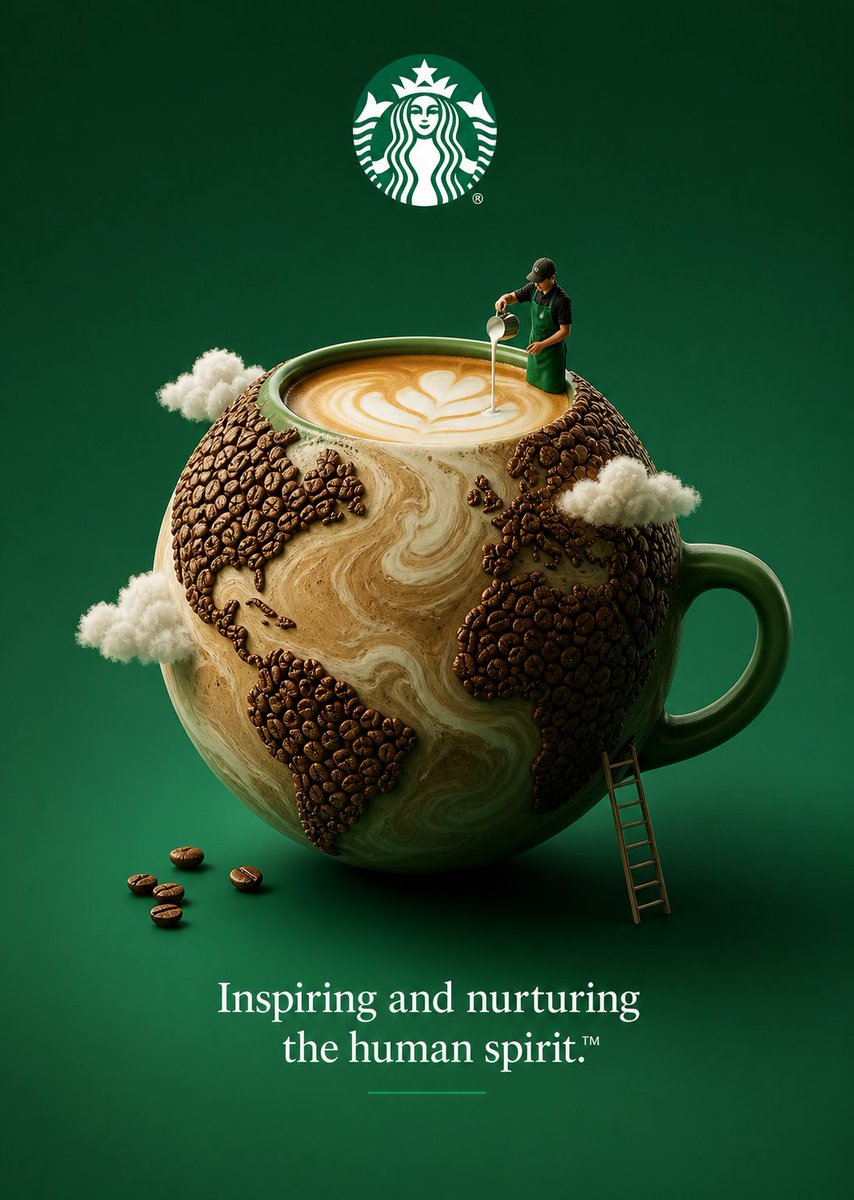
브랜드 컨셉 시각화
스타벅스, 애플, 나이키와 같은 상징적인 브랜드를 초현실적이고 자연과 어우러진 개념적인 풍경으로 시각화하는 데 도움이 되는 창의적인 아이디어 모음입니다.
이것은 일러스트레이션 및 미술 에 대한 GPT Image 2 프롬프트 사례입니다. 아래의 복사 가능한 프롬프트를 사용하여 유사한 시각 자료를 생성하고, 재사용하기 전에 Awesome GPT Image 2 Prompts 의 저작자 표시 및 상업적 사용 권한을 검토하십시오.
전체 프롬프트 세트가 필요하신가요? 다음을 사용하세요. 일러스트레이션 및 미술 더 많은 관련 예시를 보려면 주제 허브를 열거나 다음을 열어보세요. GPT Image 2 프롬프트 카탈로그 전체 예제 색인, 재사용 가능한 구조 및 출처 표기는 다음을 참조하십시오.
Free 1K preview
Generate one preview image instantly, no sign-up required.
2366/4000
프롬프트
복사 준비 프롬프트
🌿 1. Starbucks Concept: “The Coffee Planet” Visual: A floating green sphere made entirely of swirling coffee, latte foam, and tiny coffee beans forming continents. Miniature person: A tiny barista stands on the curve, pouring milk that becomes clouds. Background: Deep Starbucks green gradient. Logo: Centered at the top, glowing softly. Slogan (bottom): “Inspiring and nurturing the human spirit.” Feel: Calm, global, eco-conscious. 🍏 2. Apple Concept: “The Living Circuit Tree” Visual: A sleek apple-shaped tree made of glowing green circuits and glass, roots subtly forming charging cables. Miniature person: A tiny human climbs the tree, plugging in a device like harvesting energy. Background: Minimal matte green with soft light bloom. Logo: Polished chrome Apple logo at top. Slogan (bottom): “Think Different.” Feel: Clean, futuristic, sustainable tech. 🌱 3. Nike Concept: “The Swoosh Landscape” Visual: A giant Nike swoosh transformed into a grassy hill with embedded running tracks. Miniature person: A runner sprinting along the swoosh curve like it’s a terrain. Background: Vibrant green field fading into sky. Logo: Classic swoosh above (subtle duplication works stylistically). Slogan (bottom): “Just Do It.” Feel: Energy + nature + motion. 🍃 4. Heineken Concept: “The Bottle Forest” Visual: A giant Heineken bottle turned into a glowing green forest, with trees shaped from glass and hops. Miniature person: A camper sitting near the base, lit by the green glow. Background: Dark green cinematic tone. Logo: Bright and crisp at top. Slogan (bottom): “Open Your World.” Feel: Premium, immersive, slightly magical. 🌍 5. IKEA Concept: “Flatpack Nature” Visual: A surreal tree assembled from IKEA flat-pack wooden panels, visible screws, and instruction lines. Miniature person: A tiny person assembling one branch using an Allen key. Background: Soft green with Scandinavian simplicity. Logo: IKEA logo top center. Slogan (bottom): “The Wonderful Everyday.” Feel: Clever, playful, eco-modern. 🍀 6. Spotify Concept: “Soundwave Garden” Visual: Giant green soundwaves growing like plants, forming a surreal audio landscape. Miniature person: A tiny listener sitting on a wave with headphones. Background: Spotify green gradient with subtle glow. Logo: Floating at the top. Slogan (bottom): “Listening is everything.” Feel: Relaxed, immersive, organic sound.
Best for
- - 일러스트레이션 및 미술 visual exploration
- - Image generation and reference-image edits
- - Reusable briefs that keep source attribution visible
Change these parts
- - Subject, product, character, or scene
- - Aspect ratio, camera, lighting, and background
- - Brand, text, color, and output constraints
Recommended model and settings
- - Model: gpt-image-2
- - Input mode: 텍스트 to 이미지
- - Aspect ratio: source
- - Commercial status: review original source
How to use this prompt
- 1. Copy the prompt and preserve its structure for the first test.
- 2. Replace the subject, context, and publishing channel.
- 3. Change one camera, lighting, or style variable per iteration.
- 4. Inspect the output, source, text, and rights before reuse.
Limitations, source, and reuse cautions
- - Generated output is an editable draft, not factual, legal, or rights evidence.
- - Review the linked source, people, brands, logos, text, and third-party media before commercial use.
Awesome GPT Image 2 Prompts 에서 가져왔습니다. 출처 표기가 필요합니다. 상업적 이용 가능 여부는 allowed 입니다. 유료 사용 전에 원저작권 정보를 확인하세요.
이 범주에 속하는 더 많은 사례
범주, 입력 방식 호환성, 품질 및 위험도에 따라 우선순위가 정해집니다.






재사용 및 출처 참고 사항
사례를 미리 확인한 후 이 안내 메시지를 안전하게 사용하십시오.
- 1.프롬프트를 복사하거나 Dovoo의 생성 버튼을 사용하여 직접 엽니다.
- 2.사용 사례에 맞게 변수, 화면 비율 및 참조 이미지를 조정하십시오.
- 3.출판 또는 유료 사용 전에 저작권, 출처 표기 요건 및 브랜드 또는 초상권 관련 위험을 확인하십시오.