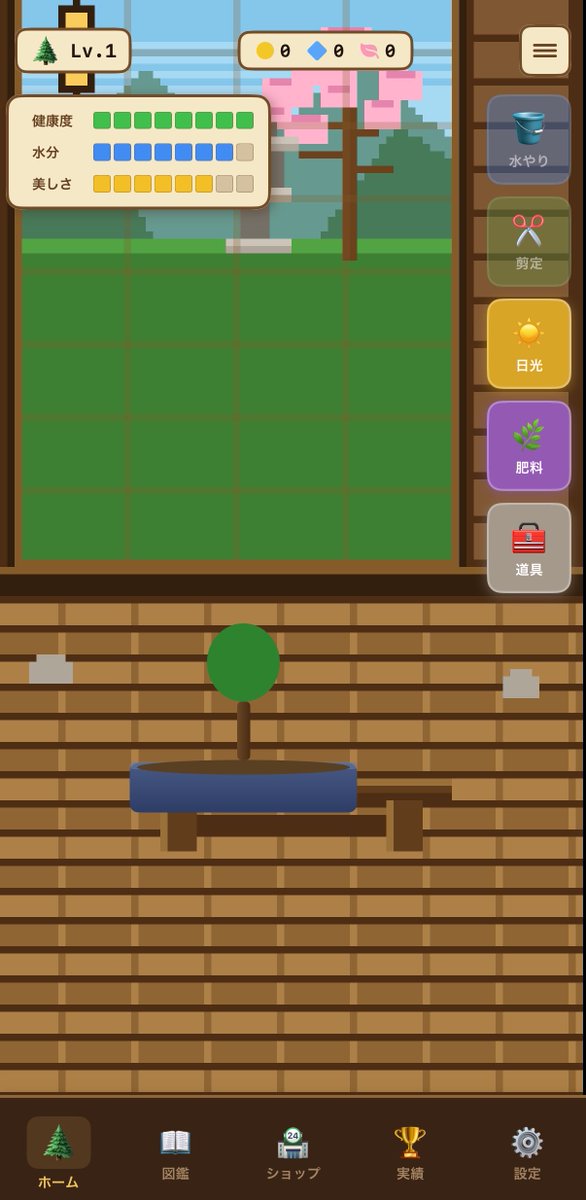
Bonsai Mobile Game UI Mockup
세련된 세로형 모바일 게임 인터페이스 컨셉으로, 분재 재배 시뮬레이션 게임에 적용 가능하며, 앱 화면 및 캐주얼 게임 UI 레이아웃 프로토타이핑에 유용합니다.
이것은 일러스트레이션 및 미술 에 대한 GPT Image 2 프롬프트 사례입니다. 아래의 복사 가능한 프롬프트를 사용하여 유사한 시각 자료를 생성하고, 재사용하기 전에 Awesome GPT Image 2 Prompts 의 저작자 표시 및 상업적 사용 권한을 검토하십시오.
전체 프롬프트 세트가 필요하신가요? 다음을 사용하세요. 일러스트레이션 및 미술 더 많은 관련 예시를 보려면 주제 허브를 열거나 다음을 열어보세요. GPT Image 2 프롬프트 카탈로그 전체 예제 색인, 재사용 가능한 구조 및 출처 표기는 다음을 참조하십시오.
Free 1K preview
Generate one preview image instantly, no sign-up required.
2662/4000
프롬프트
복사 준비 프롬프트
{"type":"mobile game UI mockup","genre":"bonsai growing game","platform":"smartphone portrait screen","style":"cute casual Japanese game interface, flat 2D vector art, warm wooden UI, soft rounded panels, slightly toy-like app icons, clean mobile-friendly layout","screen":{"background":"traditional Japanese interior with horizontal wooden slat wall in warm brown tones","main subject":"a small bonsai tree with a round green canopy and short brown trunk, planted in a shallow oval blue pot on a simple wooden stand","layout":{"sections":[{"title":"top left level badge","position":"top left","count":2,"labels":["tree icon","Lv.1"]},{"title":"top center currencies","position":"top center","count":3,"labels":["yellow coin 0","blue gem 0","pink token 0"]},{"title":"status panel","position":"upper left over garden area","count":3,"labels":["健康度","水分","美しさ"]},{"title":"right vertical action menu","position":"right side","count":5,"labels":["水やり","剪定","日光","肥料","道具"]},{"title":"bottom navigation bar","position":"bottom full width","count":5,"labels":["ホーム","図鑑","ショップ","実績","設定"]}],"centerpiece":"large grow-area window in the upper half with a green square grid field and a pixel-art outdoor background showing a tree with pink blossoms, greenery, and a pale blue sky behind glass","top right button":"rounded square menu button with three horizontal lines"},"details":{"status meters":{"健康度":"10 green square segments, all filled","水分":"10 segments total, 8 blue filled and 2 beige empty","美しさ":"10 segments total, 8 yellow filled and 2 beige empty"},"right menu buttons":[{"label":"水やり","icon":"blue bucket","state":"dimmed inactive"},{"label":"剪定","icon":"red scissors","state":"dimmed inactive"},{"label":"日光","icon":"yellow sun","state":"highlighted active"},{"label":"肥料","icon":"green sprout","state":"purple button, active-looking"},{"label":"道具","icon":"red toolbox","state":"neutral gray"}],"bottom nav icons":[{"label":"ホーム","icon":"evergreen tree","state":"selected"},{"label":"図鑑","icon":"open book","state":"unselected"},{"label":"ショップ","icon":"shop building with small 24 badge","state":"unselected"},{"label":"実績","icon":"gold trophy","state":"unselected"},{"label":"設定","icon":"gray gear","state":"unselected"}]},"composition":"screenshot-style full app screen, centered symmetrical layout, bonsai in lower middle, game field in upper middle, sidebar controls on the right, navigation along the bottom","color palette":"brown wood, cream panels, green grass and bonsai foliage, blue pot and water icon, yellow sunlight button, purple fertilizer button, soft pastel accents","quality":"polished UI concept art for a casual simulation game"}Best for
- - 일러스트레이션 및 미술 visual exploration
- - Image generation and reference-image edits
- - Reusable briefs that keep source attribution visible
Change these parts
- - Subject, product, character, or scene
- - Aspect ratio, camera, lighting, and background
- - Brand, text, color, and output constraints
Recommended model and settings
- - Model: gpt-image-2
- - Input mode: 텍스트 to 이미지
- - Aspect ratio: source
- - Commercial status: review original source
How to use this prompt
- 1. Copy the prompt and preserve its structure for the first test.
- 2. Replace the subject, context, and publishing channel.
- 3. Change one camera, lighting, or style variable per iteration.
- 4. Inspect the output, source, text, and rights before reuse.
Limitations, source, and reuse cautions
- - Generated output is an editable draft, not factual, legal, or rights evidence.
- - Review the linked source, people, brands, logos, text, and third-party media before commercial use.
Awesome GPT Image 2 Prompts 에서 가져왔습니다. 출처 표기가 필요합니다. 상업적 이용 가능 여부는 allowed 입니다. 유료 사용 전에 원저작권 정보를 확인하세요.
이 범주에 속하는 더 많은 사례
범주, 입력 방식 호환성, 품질 및 위험도에 따라 우선순위가 정해집니다.






재사용 및 출처 참고 사항
사례를 미리 확인한 후 이 안내 메시지를 안전하게 사용하십시오.
- 1.프롬프트를 복사하거나 Dovoo의 생성 버튼을 사용하여 직접 엽니다.
- 2.사용 사례에 맞게 변수, 화면 비율 및 참조 이미지를 조정하십시오.
- 3.출판 또는 유료 사용 전에 저작권, 출처 표기 요건 및 브랜드 또는 초상권 관련 위험을 확인하십시오.