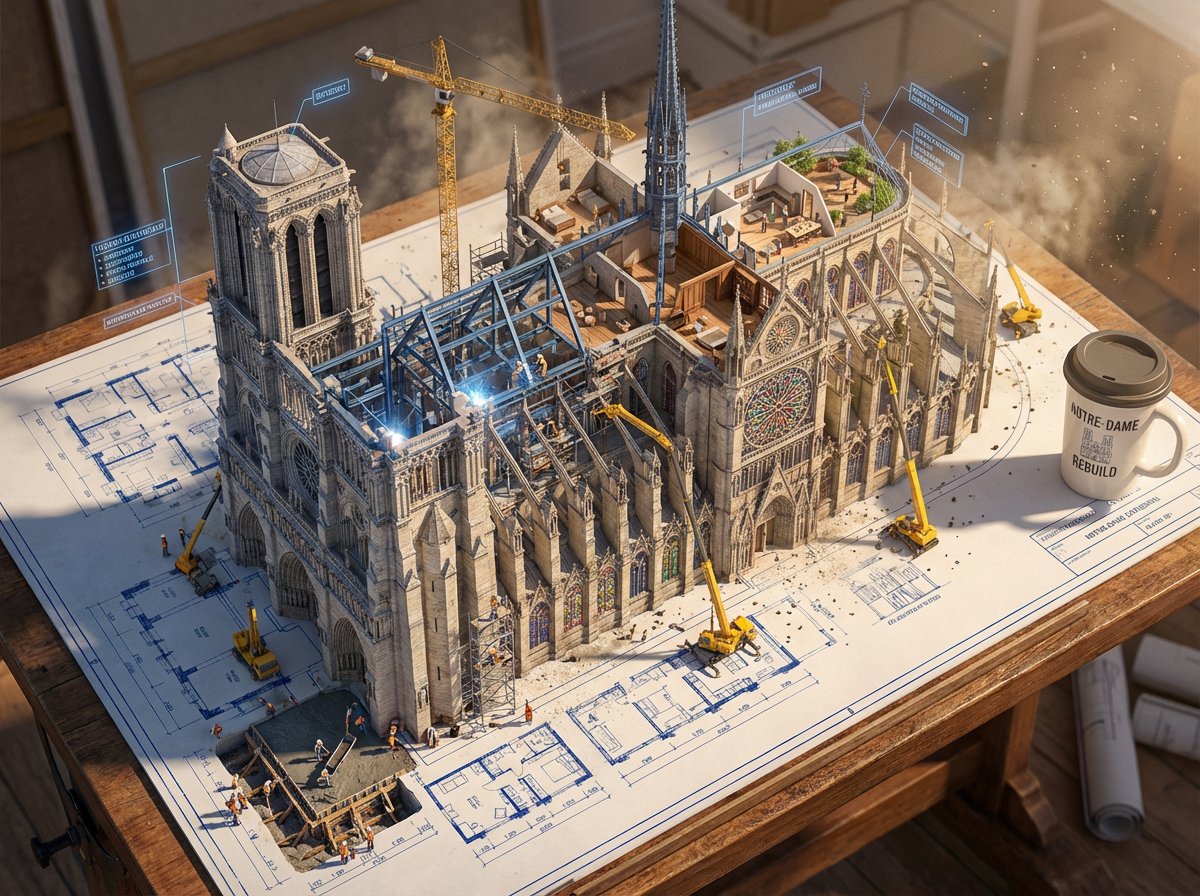
Blueprint to Living Construction Site
An epic prompt where architectural blueprint lines lift off paper and transform into a real, multi-phase 3D construction site.
이것은 인테리어 및 건축 에 대한 GPT Image 2 프롬프트 사례입니다. 아래의 복사 가능한 프롬프트를 사용하여 유사한 시각 자료를 생성하고, 재사용하기 전에 Awesome GPT Image 2 Prompts 의 저작자 표시 및 상업적 사용 권한을 검토하십시오.
전체 프롬프트 세트가 필요하신가요? 다음을 사용하세요. 인테리어 및 건축 더 많은 관련 예시를 보려면 주제 허브를 열거나 다음을 열어보세요. GPT Image 2 프롬프트 카탈로그 전체 예제 색인, 재사용 가능한 구조 및 출처 표기는 다음을 참조하십시오.
Free 1K preview
Generate one preview image instantly, no sign-up required.
Free text preview doesn’t preserve reference-image consistency.
1173/4000
프롬프트
복사 준비 프롬프트
Create an epic photorealistic 3D scene where a huge architectural blueprint for a {argument name="structure" default="[BUILDING/STRUCTURE]"} is pinned to a drafting table, and the ink lines lift off the paper into a real construction site. The blue plan lines transform into steel beams being welded in midair, floor plans expand into furnished rooms, and elevation drawings push outward into facades with working windows.

Show multiple construction phases at the same time: one corner has the foundation being poured while another section already has a finished, inhabited penthouse. Add tiny workers, cranes, scaffolding, construction equipment, and activity all over the rising structure. The flat technical drawing and the living building should merge at impossible angles, with dimensional annotation labels floating like signage around the build.

Place an architect's {argument name="object" default="coffee cup"} near the edge of the table, casting a shadow across parts of the blueprint that have not been built yet. Emphasize extreme scale contrast, construction dust glowing in afternoon light, intricate detail, cinematic realism, 8K, photorealistic rendering.
프롬프트 변수
프롬프트에 있는 편집 가능한 인수 자리 표시자와 해당 기본값입니다.
변하기 쉬운
structure
기본
[BUILDING/STRUCTURE]
변하기 쉬운
object
기본
coffee cup
Best for
- - 인테리어 및 건축 visual exploration
- - Image generation and reference-image edits
- - Reusable briefs that keep source attribution visible
Change these parts
- - Subject, product, character, or scene
- - Aspect ratio, camera, lighting, and background
- - Brand, text, color, and output constraints
Recommended model and settings
- - Model: gpt-image-2
- - Input mode: 이미지 to 이미지
- - Aspect ratio: source
- - Commercial status: review original source
How to use this prompt
- 1. Copy the prompt and preserve its structure for the first test.
- 2. Replace the subject, context, and publishing channel.
- 3. Change one camera, lighting, or style variable per iteration.
- 4. Inspect the output, source, text, and rights before reuse.
Limitations, source, and reuse cautions
- - Generated output is an editable draft, not factual, legal, or rights evidence.
- - Review the linked source, people, brands, logos, text, and third-party media before commercial use.
Awesome GPT Image 2 Prompts 에서 가져왔습니다. 출처 표기가 필요합니다. 상업적 이용 가능 여부는 allowed 입니다. 유료 사용 전에 원저작권 정보를 확인하세요.
이 범주에 속하는 더 많은 사례
범주, 입력 방식 호환성, 품질 및 위험도에 따라 우선순위가 정해집니다.






재사용 및 출처 참고 사항
사례를 미리 확인한 후 이 안내 메시지를 안전하게 사용하십시오.
- 1.프롬프트를 복사하거나 Dovoo의 생성 버튼을 사용하여 직접 엽니다.
- 2.사용 사례에 맞게 변수, 화면 비율 및 참조 이미지를 조정하십시오.
- 3.출판 또는 유료 사용 전에 저작권, 출처 표기 요건 및 브랜드 또는 초상권 관련 위험을 확인하십시오.