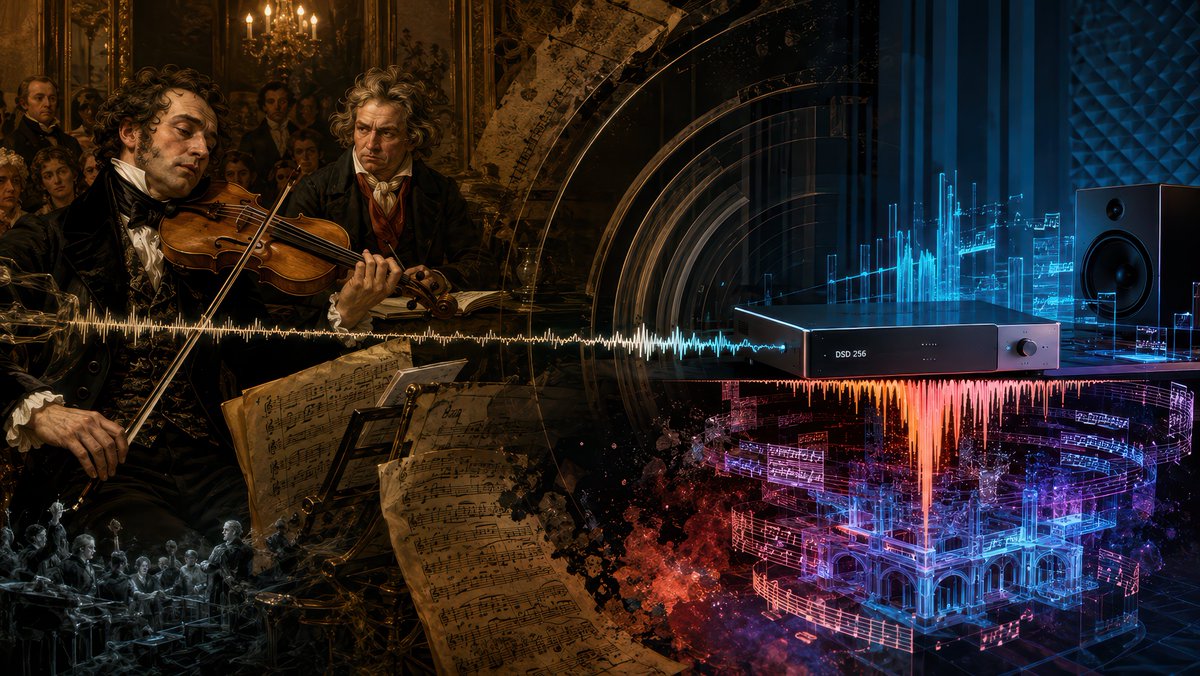
Beethoven Sonata DSD 256 Collage
A cinematic historical-to-futuristic music collage visualizing Beethoven's sonata performance transformed by modern DSD 256 audio.
이것은 일러스트레이션 및 미술 에 대한 GPT Image 2 프롬프트 사례입니다. 아래의 복사 가능한 프롬프트를 사용하여 유사한 시각 자료를 생성하고, 재사용하기 전에 Awesome GPT Image 2 Prompts 의 저작자 표시 및 상업적 사용 권한을 검토하십시오.
전체 프롬프트 세트가 필요하신가요? 다음을 사용하세요. 일러스트레이션 및 미술 더 많은 관련 예시를 보려면 주제 허브를 열거나 다음을 열어보세요. GPT Image 2 프롬프트 카탈로그 전체 예제 색인, 재사용 가능한 구조 및 출처 표기는 다음을 참조하십시오.
Free 1K preview
Generate one preview image instantly, no sign-up required.
Free text preview doesn’t preserve reference-image consistency.
2853/4000
프롬프트
복사 준비 프롬프트
Goal: Create a cinematic widescreen digital collage about Beethoven's Violin Sonata Op. 96 being rediscovered through modern high-resolution audio, blending a 19th-century Viennese salon performance with a futuristic DSD listening studio.

Canvas: 16:9 horizontal composition, dark dramatic chiaroscuro, ultra-detailed, painterly realism mixed with cybernetic audio visualization. The image should read left-to-right as a transformation from old classical performance to modern digital sound.

Layout: Split the scene into two connected halves with no hard border. Left half is a warm amber-brown historical oil-painting scene inside an ornate Viennese salon. Right half is a cool blue-black futuristic audiophile studio. A single horizontal audio waveform runs across the entire center of the image, starting as gold on the historical side and shifting into white, cyan, orange, magenta, and blue on the digital side.

Historical left side: Show exactly 2 main historical men in the foreground: 1 famous violinist in black formal 19th-century clothing playing a violin with a languid, tired expression, and 1 intense curly-haired Beethoven-like composer standing behind him, watching sternly. Add a small salon audience in the background, candlelit chandeliers, gilded walls, dark framed paintings, and aristocratic spectators. In the lower center-left foreground, include several large aged sheet-music pages with handwritten notation, tilted toward the viewer. Add a small monochrome ghostly orchestra scene in the lower-left corner as a memory-like vignette.

Modern right side: Show exactly 1 sleek black rectangular digital audio converter on a table, labeled "DSD 256" on its front panel, with a small round knob on the right. Place exactly 1 large black studio monitor speaker on the far right. Behind and around the device, create glowing cyan holographic equalizer bars, translucent circuit-like panels, soundwave diagrams, and floating fragments of musical notation. Below the device, show a vivid red-orange waveform falling downward like molten sound, merging into a glowing blue and magenta holographic architectural concert hall made of music staves and light.

Visual style: Hyper-detailed, moody, cinematic lighting, baroque oil-painting texture on the left, glossy high-tech cyber-audio rendering on the right, dense layered transparency, gold dust and smoky particles, deep blacks, amber candlelight, electric cyan and magenta neon. Make the transition feel emotional and profound, as if the true meaning of {argument name="musical work" default="Beethoven Violin Sonata Op. 96"} is revealed by {argument name="audio format" default="DSD 256"} in {argument name="recording year" default="2025"}.

Text constraints: The only readable device text should be "DSD 256". Do not add captions, titles, logos, watermarks, or extra typography.
프롬프트 변수
프롬프트에 있는 편집 가능한 인수 자리 표시자와 해당 기본값입니다.
변하기 쉬운
musical work
기본
Beethoven Violin Sonata Op. 96
변하기 쉬운
audio format
기본
DSD 256
변하기 쉬운
recording year
기본
2025
Best for
- - 일러스트레이션 및 미술 visual exploration
- - Image generation and reference-image edits
- - Reusable briefs that keep source attribution visible
Change these parts
- - Subject, product, character, or scene
- - Aspect ratio, camera, lighting, and background
- - Brand, text, color, and output constraints
Recommended model and settings
- - Model: gpt-image-2
- - Input mode: 이미지 to 이미지
- - Aspect ratio: source
- - Commercial status: review original source
How to use this prompt
- 1. Copy the prompt and preserve its structure for the first test.
- 2. Replace the subject, context, and publishing channel.
- 3. Change one camera, lighting, or style variable per iteration.
- 4. Inspect the output, source, text, and rights before reuse.
Limitations, source, and reuse cautions
- - Generated output is an editable draft, not factual, legal, or rights evidence.
- - Review the linked source, people, brands, logos, text, and third-party media before commercial use.
Awesome GPT Image 2 Prompts 에서 가져왔습니다. 출처 표기가 필요합니다. 상업적 이용 가능 여부는 allowed 입니다. 유료 사용 전에 원저작권 정보를 확인하세요.
이 범주에 속하는 더 많은 사례
범주, 입력 방식 호환성, 품질 및 위험도에 따라 우선순위가 정해집니다.






재사용 및 출처 참고 사항
사례를 미리 확인한 후 이 안내 메시지를 안전하게 사용하십시오.
- 1.프롬프트를 복사하거나 Dovoo의 생성 버튼을 사용하여 직접 엽니다.
- 2.사용 사례에 맞게 변수, 화면 비율 및 참조 이미지를 조정하십시오.
- 3.출판 또는 유료 사용 전에 저작권, 출처 표기 요건 및 브랜드 또는 초상권 관련 위험을 확인하십시오.