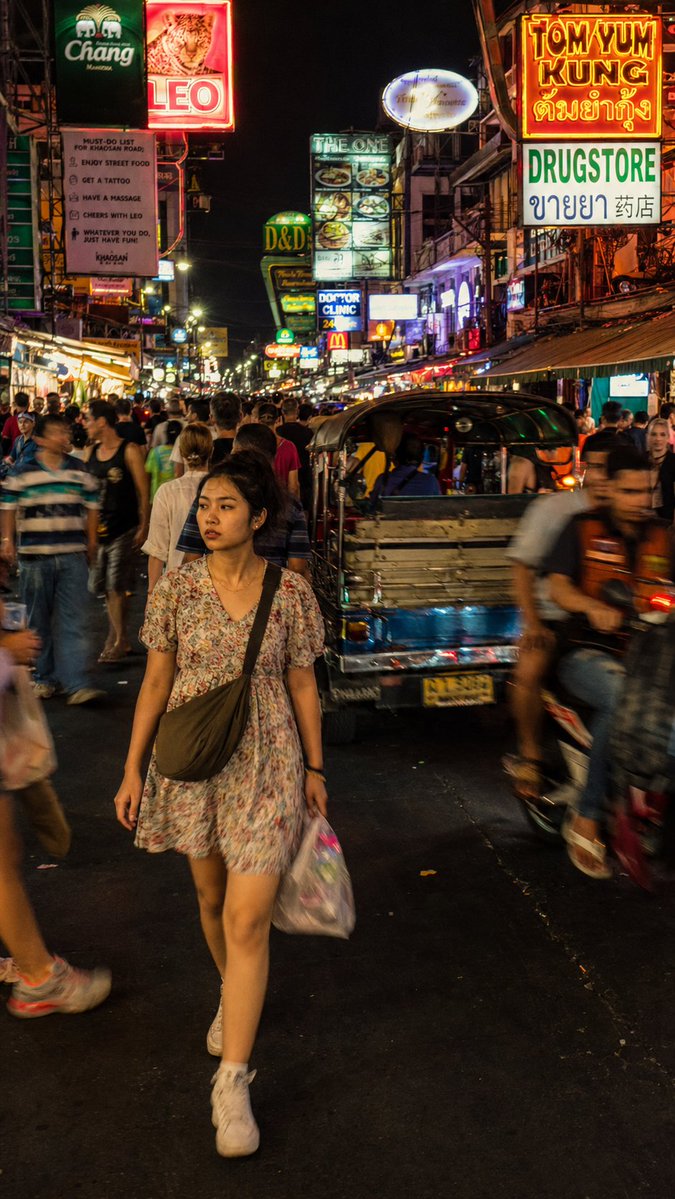
방콕 야경 사진
다큐멘터리 스타일의 거리 사진 촬영을 통해 카오산 로드의 혼란스러운 네온사인 속 젊은 여성의 모습을 담아보세요.
이것은 인물과 캐릭터 에 대한 GPT Image 2 프롬프트 사례입니다. 아래의 복사 가능한 프롬프트를 사용하여 유사한 시각 자료를 생성하고, 재사용하기 전에 Awesome GPT Image 2 Prompts 의 저작자 표시 및 상업적 사용 권한을 검토하십시오.
전체 프롬프트 세트가 필요하신가요? 다음을 사용하세요. 인물과 캐릭터 더 많은 관련 예시를 보려면 주제 허브를 열거나 다음을 열어보세요. GPT Image 2 프롬프트 카탈로그 전체 예제 색인, 재사용 가능한 구조 및 출처 표기는 다음을 참조하십시오.
Free 1K preview
Generate one preview image instantly, no sign-up required.
1336/4000
프롬프트
복사 준비 프롬프트
A street photograph capturing a {argument name="subject" default="young Thai woman"} cutting through the dense nighttime crowd on {argument name="location" default="Khao San Road, Bangkok"}. The subject is caught mid-stride wearing a {argument name="clothing" default="loose floral dress"}, expression distracted and completely natural, not performing for the camera, small crossbody bag across her shoulder. The environment is dense and chaotic: bar signs in Thai and English stacked vertically, tuk-tuks and motorbikes pressing through foot traffic, tourists and locals blending in the moving crowd around her. Lighting is messy and authentic: uneven bar fluorescent spill, LED signage scatter, occasional reflected flash from the crowd, no clean single source. Composition: full-body medium shot from slightly above eye level, subject in sharp focus in left center, surrounding crowd in natural motion blur, neon signs stretching tall in the vertical frame above. Color palette: acidic yellow, electric pink, deep orange — intense but documentary-accurate neon saturation, not stylized. Render with photographic realism: subtle film grain, avoid over-smoothed CG textures. Skin: subsurface scattering and micro-texture. Preserve authentic motion blur on background crowd, not artificial bokeh. Photorealistic rendering, no watermark.프롬프트 변수
프롬프트에 있는 편집 가능한 인수 자리 표시자와 해당 기본값입니다.
변하기 쉬운
subject
기본
young Thai woman
변하기 쉬운
location
기본
Khao San Road, Bangkok
변하기 쉬운
clothing
기본
loose floral dress
Best for
- - 인물과 캐릭터 visual exploration
- - Image generation and reference-image edits
- - Reusable briefs that keep source attribution visible
Change these parts
- - Subject, product, character, or scene
- - Aspect ratio, camera, lighting, and background
- - Brand, text, color, and output constraints
Recommended model and settings
- - Model: gpt-image-2
- - Input mode: 텍스트 to 이미지
- - Aspect ratio: source
- - Commercial status: review original source
How to use this prompt
- 1. Copy the prompt and preserve its structure for the first test.
- 2. Replace the subject, context, and publishing channel.
- 3. Change one camera, lighting, or style variable per iteration.
- 4. Inspect the output, source, text, and rights before reuse.
Limitations, source, and reuse cautions
- - Generated output is an editable draft, not factual, legal, or rights evidence.
- - Review the linked source, people, brands, logos, text, and third-party media before commercial use.
Awesome GPT Image 2 Prompts 에서 가져왔습니다. 출처 표기가 필요합니다. 상업적 이용 가능 여부는 allowed 입니다. 유료 사용 전에 원저작권 정보를 확인하세요.
이 범주에 속하는 더 많은 사례
범주, 입력 방식 호환성, 품질 및 위험도에 따라 우선순위가 정해집니다.






재사용 및 출처 참고 사항
사례를 미리 확인한 후 이 안내 메시지를 안전하게 사용하십시오.
- 1.프롬프트를 복사하거나 Dovoo의 생성 버튼을 사용하여 직접 엽니다.
- 2.사용 사례에 맞게 변수, 화면 비율 및 참조 이미지를 조정하십시오.
- 3.출판 또는 유료 사용 전에 저작권, 출처 표기 요건 및 브랜드 또는 초상권 관련 위험을 확인하십시오.