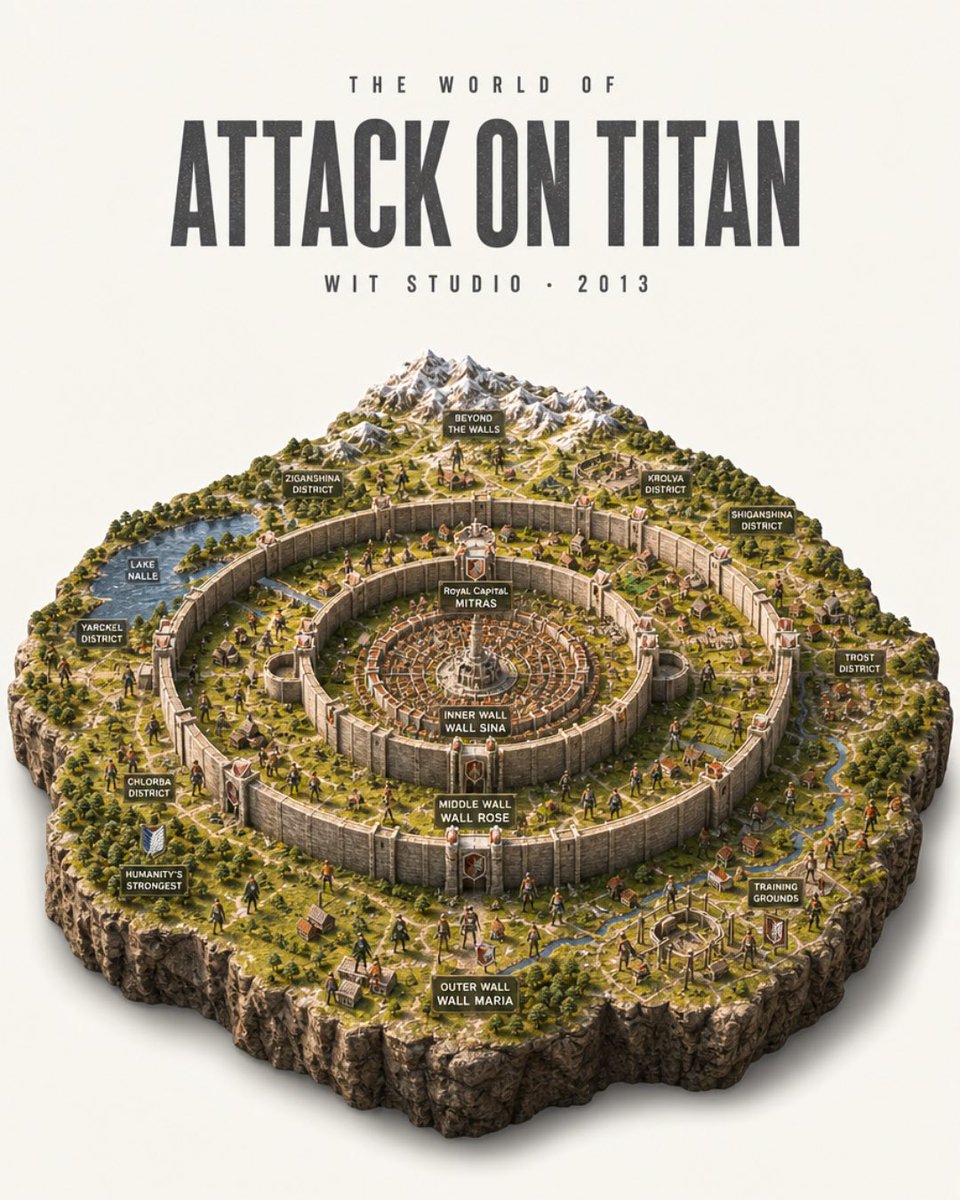
Attack on Titan Isometric Diorama Map
Creates a detailed poster-style isometric miniature map of the Attack on Titan world with concentric walls, districts, labels, and studio typography.
이것은 그래픽 및 포스터 에 대한 GPT Image 2 프롬프트 사례입니다. 아래의 복사 가능한 프롬프트를 사용하여 유사한 시각 자료를 생성하고, 재사용하기 전에 Awesome GPT Image 2 Prompts 의 저작자 표시 및 상업적 사용 권한을 검토하십시오.
전체 프롬프트 세트가 필요하신가요? 다음을 사용하세요. 그래픽 및 포스터 더 많은 관련 예시를 보려면 주제 허브를 열거나 다음을 열어보세요. GPT Image 2 프롬프트 카탈로그 전체 예제 색인, 재사용 가능한 구조 및 출처 표기는 다음을 참조하십시오.
Free 1K preview
Generate one preview image instantly, no sign-up required.
3151/4000
프롬프트
복사 준비 프롬프트
Goal: Create an ultra-detailed photorealistic isometric miniature scale-model diorama poster of the world from {argument name="anime title" default="Attack on Titan"}, presented like a collectible museum map on a clean off-white studio background.

Canvas: Vertical 4:5 poster composition. The upper third is typography, the lower two-thirds is a floating square-cut terrain diorama with rugged rocky sides and a soft realistic shadow beneath.

Top typography: Centered at the top, use tall condensed bold distressed sans-serif lettering. Small spaced text above reads "THE WORLD OF". Main title reads "{argument name="main title text" default="ATTACK ON TITAN"}" in very large dark charcoal letters. Small spaced text below reads "{argument name="studio line" default="WIT STUDIO • 2013"}".

Diorama layout: Show the walled civilization as a high-angle isometric model with three enormous concentric circular stone walls and fortified gates. The center contains a dense circular royal city with radial streets and a white central monument. Surrounding rings contain miniature villages, farms, roads, rivers, forests, watchtowers, and tiny human figures. Beyond the walls at the back are snow-capped mountains, wilderness, scattered ruins, and open terrain. The outer edge of the model is a thick cliff-like cutaway rock base with grass on top.

Labeled signs: Include exactly 14 small dark rectangular map-label plaques with white uppercase text, placed around the diorama: 1) "BEYOND THE WALLS" near the mountains, 2) "ZIGANSHINA DISTRICT" on the upper-left wall area, 3) "KROLVA DISTRICT" on the upper-right wall area, 4) "SHIGANSHINA DISTRICT" on the far right, 5) "LAKE NALLE" by a blue lake on the left, 6) "YARCKEL DISTRICT" on the left outer area, 7) "CHLORBA DISTRICT" on the lower-left area, 8) "HUMANITY'S STRONGEST" beside a small military crest on the lower-left, 9) "TROST DISTRICT" on the right outer area, 10) "TRAINING GROUNDS" on the lower-right, 11) "ROYAL CAPITAL MITRAS" at the central city, 12) "INNER WALL WALL SINA" on the innermost wall, 13) "MIDDLE WALL WALL ROSE" on the middle wall, 14) "OUTER WALL WALL MARIA" on the front outer wall.

Subject details: Make the wall rings tall, pale stone, weathered, and segmented with massive gates and red-roofed towers. Populate the landscape with tiny soldiers, civilians, horses, tiled-roof houses, roads, farmland plots, bridges, streams, and forests. Add a few tiny Titan-like humanoid silhouettes outside and near the walls for scale, but keep the scene map-like rather than action-focused.

Visual style: Hyper-realistic miniature model photography mixed with anime-world cartography, crisp isometric perspective, warm daylight, realistic shadows, high texture detail, tiny hand-painted model figures, natural greens and browns, pale stone walls, snowy gray mountains, cinematic depth of field but all important labels legible.

Constraints: Keep the image as a single poster, no border, no watermark, no extra logos. Preserve the exact 14 map labels listed above and the three wall labels. Use an off-white background and a centered floating diorama with clean studio lighting.
프롬프트 변수
프롬프트에 있는 편집 가능한 인수 자리 표시자와 해당 기본값입니다.
변하기 쉬운
anime title
기본
Attack on Titan
변하기 쉬운
main title text
기본
ATTACK ON TITAN
변하기 쉬운
studio line
기본
WIT STUDIO • 2013
Best for
- - 그래픽 및 포스터 visual exploration
- - Image generation and reference-image edits
- - Reusable briefs that keep source attribution visible
Change these parts
- - Subject, product, character, or scene
- - Aspect ratio, camera, lighting, and background
- - Brand, text, color, and output constraints
Recommended model and settings
- - Model: gpt-image-2
- - Input mode: 텍스트 to 이미지
- - Aspect ratio: source
- - Commercial status: review original source
How to use this prompt
- 1. Copy the prompt and preserve its structure for the first test.
- 2. Replace the subject, context, and publishing channel.
- 3. Change one camera, lighting, or style variable per iteration.
- 4. Inspect the output, source, text, and rights before reuse.
Limitations, source, and reuse cautions
- - Generated output is an editable draft, not factual, legal, or rights evidence.
- - Review the linked source, people, brands, logos, text, and third-party media before commercial use.
Awesome GPT Image 2 Prompts 에서 가져왔습니다. 출처 표기가 필요합니다. 상업적 이용 가능 여부는 allowed 입니다. 유료 사용 전에 원저작권 정보를 확인하세요.
이 범주에 속하는 더 많은 사례
범주, 입력 방식 호환성, 품질 및 위험도에 따라 우선순위가 정해집니다.




재사용 및 출처 참고 사항
사례를 미리 확인한 후 이 안내 메시지를 안전하게 사용하십시오.
- 1.프롬프트를 복사하거나 Dovoo의 생성 버튼을 사용하여 직접 엽니다.
- 2.사용 사례에 맞게 변수, 화면 비율 및 참조 이미지를 조정하십시오.
- 3.출판 또는 유료 사용 전에 저작권, 출처 표기 요건 및 브랜드 또는 초상권 관련 위험을 확인하십시오.