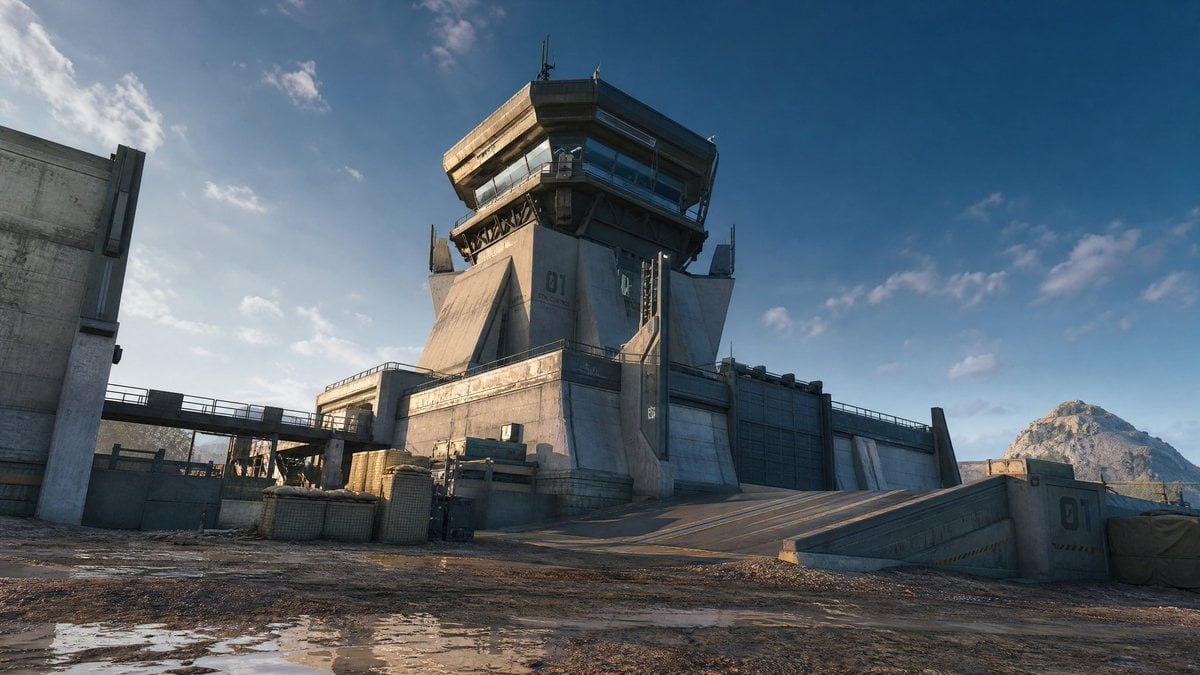
未来主义军事瞭望塔
Source-attributed GPT Image 2 image prompt from the Awesome GPT Image 2 Prompts repository.
이것은 풍경과 자연 에 대한 GPT Image 2 프롬프트 사례입니다. 아래의 복사 가능한 프롬프트를 사용하여 유사한 시각 자료를 생성하고, 재사용하기 전에 Awesome GPT Image 2 Prompts 의 저작자 표시 및 상업적 사용 권한을 검토하십시오.
전체 프롬프트 세트가 필요하신가요? 다음을 사용하세요. 풍경과 자연 더 많은 관련 예시를 보려면 주제 허브를 열거나 다음을 열어보세요. GPT Image 2 프롬프트 카탈로그 전체 예제 색인, 재사용 가능한 구조 및 출처 표기는 다음을 참조하십시오.
Free 1K preview
Generate one preview image instantly, no sign-up required.
424/4000
프롬프트
복사 준비 프롬프트
创作一张电影级超写实广角概念艺术场景,描绘偏远岩石地貌中一座未来主义混凝土军事检查站和瞭望塔。主体是一座巨大的粗野主义风格岗哨塔,标记为 {argument name="tower number" default="01"},位置略微偏右,配有倾斜的钢筋混凝土支撑结构、风化的米灰色表面、深色金属支架、屋顶天线以及环绕顶部的玻璃观景台。周围环绕着加固的周边围墙、大型工业大门、栏杆、左侧升高的行人通道、底座附近的堆叠货箱和沙袋屏障,以及右侧通往大院的倾斜车辆坡道。前景为泥泞的土地,带有反射天空的浅水坑、轮胎痕迹、碎石和磨损的混凝土边缘。远处的右侧地平线上添加一座岩石山脉,以及带有零星柔云的深蓝色天空。光照应为左侧傍晚的金色阳光,营造出长长的阴影、玻璃上逼真的高光以及大气雾霾。风格:高端 AAA 游戏环境艺术,超写实,精细的硬表面建筑,画面中无人,无车辆,除塔号外无额外文字,16:9 宽屏构图,低机位仰拍以展现规模感,清晰对焦,自然色彩分级。프롬프트 변수
프롬프트에 있는 편집 가능한 인수 자리 표시자와 해당 기본값입니다.
변하기 쉬운
tower number
기본
01
Best for
- - 풍경과 자연 visual exploration
- - Image generation and reference-image edits
- - Reusable briefs that keep source attribution visible
Change these parts
- - Subject, product, character, or scene
- - Aspect ratio, camera, lighting, and background
- - Brand, text, color, and output constraints
Recommended model and settings
- - Model: gpt-image-2
- - Input mode: 텍스트 to 이미지
- - Aspect ratio: source
- - Commercial status: restricted
How to use this prompt
- 1. Copy the prompt and preserve its structure for the first test.
- 2. Replace the subject, context, and publishing channel.
- 3. Change one camera, lighting, or style variable per iteration.
- 4. Inspect the output, source, text, and rights before reuse.
Limitations, source, and reuse cautions
- - Generated output is an editable draft, not factual, legal, or rights evidence.
- - Review the linked source, people, brands, logos, text, and third-party media before commercial use.
Awesome GPT Image 2 Prompts 에서 가져왔습니다. 출처 표기가 필요합니다. 상업적 이용 가능 여부는 allowed 입니다. 유료 사용 전에 원저작권 정보를 확인하세요.
이 범주에 속하는 더 많은 사례
범주, 입력 방식 호환성, 품질 및 위험도에 따라 우선순위가 정해집니다.






재사용 및 출처 참고 사항
사례를 미리 확인한 후 이 안내 메시지를 안전하게 사용하십시오.
- 1.프롬프트를 복사하거나 Dovoo의 생성 버튼을 사용하여 직접 엽니다.
- 2.사용 사례에 맞게 변수, 화면 비율 및 참조 이미지를 조정하십시오.
- 3.출판 또는 유료 사용 전에 저작권, 출처 표기 요건 및 브랜드 또는 초상권 관련 위험을 확인하십시오.