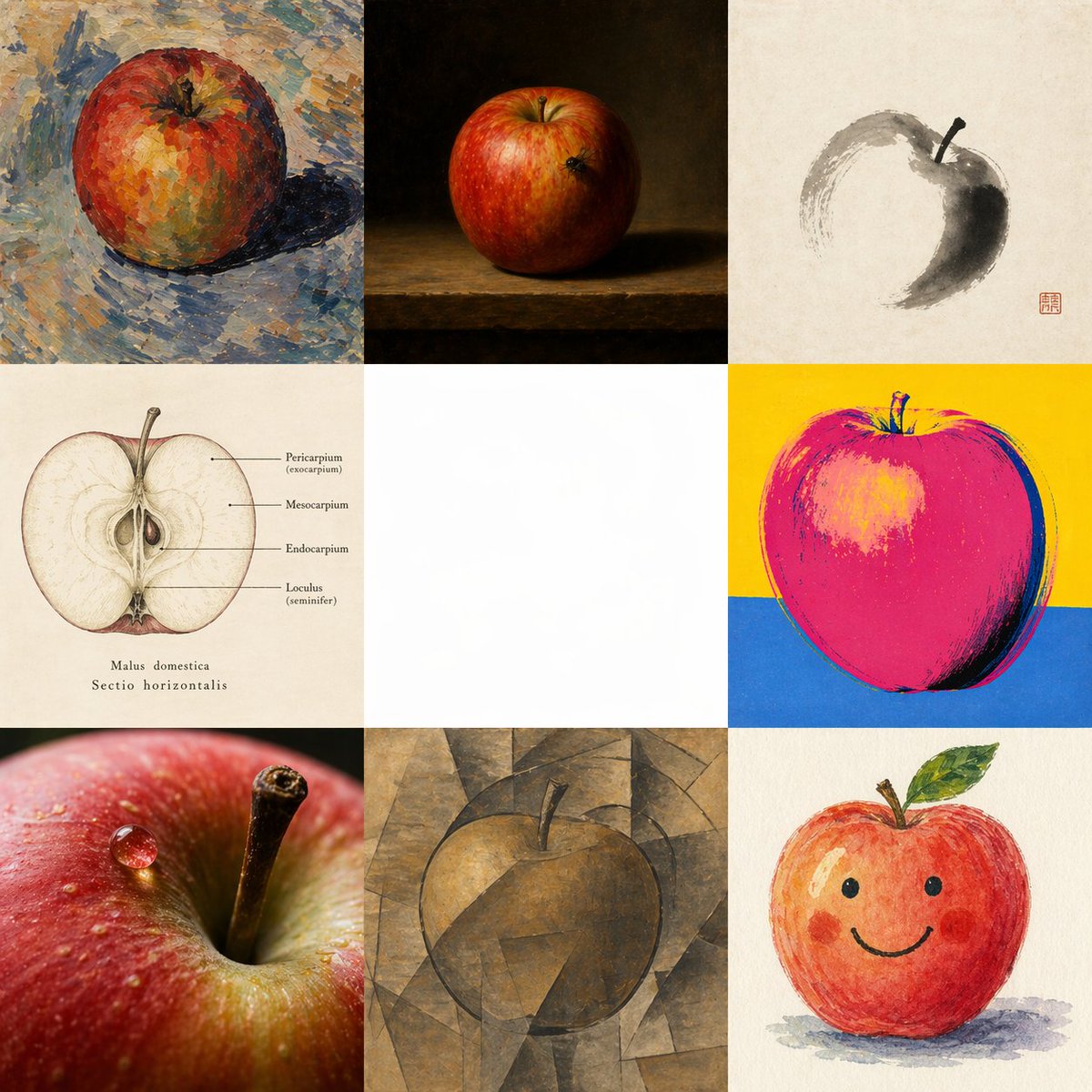
Apple in 8 Visual Grammars
하나의 사과를 여덟 가지 각기 다른 스타일로 표현하고 그 주위를 의도적으로 비워둔 정사각형 비교 미술 이미지로, 단일 프레임 내에서 다양한 스타일의 이미지 생성을 보여주기에 이상적입니다.
이것은 일러스트레이션 및 미술 에 대한 GPT Image 2 프롬프트 사례입니다. 아래의 복사 가능한 프롬프트를 사용하여 유사한 시각 자료를 생성하고, 재사용하기 전에 Awesome GPT Image 2 Prompts 의 저작자 표시 및 상업적 사용 권한을 검토하십시오.
전체 프롬프트 세트가 필요하신가요? 다음을 사용하세요. 일러스트레이션 및 미술 더 많은 관련 예시를 보려면 주제 허브를 열거나 다음을 열어보세요. GPT Image 2 프롬프트 카탈로그 전체 예제 색인, 재사용 가능한 구조 및 출처 표기는 다음을 참조하십시오.
Free 1K preview
Generate one preview image instantly, no sign-up required.
4000/4000
프롬프트
복사 준비 프롬프트
{
  "type": "multi-style comparative art grid",
  "subject": "single apple interpreted through eight different visual systems in one image",
  "composition": {
    "format": "square 3x3 grid",
    "canvas": "large square canvas",
    "background": "each cell uses its own appropriate background except the center cell, which is intentionally left blank",
    "center_cell": {
      "position": "middle center",
      "content": "empty white square negative space",
      "purpose": "clear visual gap separating the surrounding interpretations"
    },
    "cells": [
      {
        "position": "top left",
        "style": "Cézanne-inspired post-impressionist painting",
        "subject": "whole apple",
        "details": "a red-orange apple rendered with thick broken brushstrokes and palette-knife texture, mottled warm and cool color patches, blue-gray tabletop or ground, visible painterly shadow to the right, expressive impasto surface"
      },
      {
        "position": "top center",
        "style": "Dutch still life oil painting",
        "subject": "whole apple",
        "details": "a realistic red apple on a wooden ledge against a deep dark brown-black background, dramatic chiaroscuro lighting, subtle highlight on the fruit, classical museum-style still life atmosphere"
      },
      {
        "position": "top right",
        "style": "Sumi-e",
        "subject": "apple suggested with minimal brushwork",
        "details": "off-white paper background, a few gestural gray-black ink strokes forming an incomplete circular apple silhouette, dark shaded crescent on one side, simple stem, red seal stamp in the lower right area of the cell, elegant East Asian calligraphic restraint"
      },
      {
        "position": "middle left",
        "style": "medical botanical diagram",
        "subject": "horizontal cross-section of an apple",
        "details": "vintage scientific illustration on aged ivory paper, centered halved apple with seeds and internal structure visible, fine line labels pointing to parts, readable labels include \"Pericarpium (exocarpium)\", \"Mesocarpium\", \"Endocarpium\", and \"Loculus (seminifer)\", with the caption \"Malus domestica\" and \"Sectio horizontalis\" below"
      },
      {
        "position": "middle right",
        "style": "Warhol-inspired pop art screen print",
        "subject": "whole apple",
        "details": "bold simplified apple in saturated hot pink and magenta with dark outline, bright yellow upper background and cobalt blue lower background, high contrast graphic treatment, silkscreen poster feel"
      },
      {
        "position": "bottom left",
        "style": "hyperreal macro photography",
        "subject": "extreme close-up apple detail",
        "details": "a photographic macro view of the apple skin and stem cavity, crisp stem in focus, glossy water droplet on the red peel, shallow depth of field, luminous texture and realistic specular highlights"
      },
      {
        "position": "bottom center",
        "style": "cubist painting",
        "subject": "whole apple",
        "details": "apple deconstructed into angular geometric planes in muted brown, ochre, and gray tones, faceted background and form merging together, subdued analytical cubism mood, stem visible at the top"
      },
      {
        "position": "bottom right",
        "style": "Children’s illustration",
        "subject": "cute smiling apple character",
        "details": "friendly hand-painted watercolor or crayon-like apple with rosy cheeks, simple black dot eyes, curved smile, small stem and green leaf, soft shadow beneath, playful storybook look"
      }
    ],
    "count": 8
  },
  "lighting": "each style uses its own internally consistent lighting logic",
  "color_strategy": "distinct palette per cell to emphasize different representational grammars",
  "instructions": "Create a single unified image, not a collage assembled from separate files, showing {argument name=\"subject\" default=\"one apple\"} through exactly 8 visual grammars arranged around an empty center. Keep the middle cell blank white. Maintain a strict 3x3 grid with 8 occupied cells and 1 empty center cell. Make each occupied cell a convincing exemplar of its style while preserving the same core subject.",
  "style_labels": [
    "{argument name=\"style 1\" default=\"Cézanne\"}",
    "{argument name=\"style 2\" default=\"Dutch still life\"}",
    "{argument name=\"style 3\" default=\"Sumi-e\"}",
    "{argument name=\"style 4\" default=\"Medical diagram\"}",
    "{argument name=\"style 5\" default=\"Warhol\"}",
    "{argument name=\"style 6\" default=\"Hyperreal macro\"}",
    "{argument name=\"style 7\" default=\"Cubism\"}",
    "{argument name=\"style 8\" default=\"Children’s illustration\"}"
  ]
}
프롬프트 변수
프롬프트에 있는 편집 가능한 인수 자리 표시자와 해당 기본값입니다.
변하기 쉬운
subject
기본
one apple
변하기 쉬운
style 1
기본
Cézanne
변하기 쉬운
style 2
기본
Dutch still life
변하기 쉬운
style 3
기본
Sumi-e
변하기 쉬운
style 4
기본
Medical diagram
변하기 쉬운
style 5
기본
Warhol
변하기 쉬운
style 6
기본
Hyperreal macro
변하기 쉬운
style 7
기본
Cubism
변하기 쉬운
style 8
기본
Children’s illustration
Best for
- - 일러스트레이션 및 미술 visual exploration
- - Image generation and reference-image edits
- - Reusable briefs that keep source attribution visible
Change these parts
- - Subject, product, character, or scene
- - Aspect ratio, camera, lighting, and background
- - Brand, text, color, and output constraints
Recommended model and settings
- - Model: gpt-image-2
- - Input mode: 텍스트 to 이미지
- - Aspect ratio: source
- - Commercial status: review original source
How to use this prompt
- 1. Copy the prompt and preserve its structure for the first test.
- 2. Replace the subject, context, and publishing channel.
- 3. Change one camera, lighting, or style variable per iteration.
- 4. Inspect the output, source, text, and rights before reuse.
Limitations, source, and reuse cautions
- - Generated output is an editable draft, not factual, legal, or rights evidence.
- - Review the linked source, people, brands, logos, text, and third-party media before commercial use.
Awesome GPT Image 2 Prompts 에서 가져왔습니다. 출처 표기가 필요합니다. 상업적 이용 가능 여부는 allowed 입니다. 유료 사용 전에 원저작권 정보를 확인하세요.
이 범주에 속하는 더 많은 사례
범주, 입력 방식 호환성, 품질 및 위험도에 따라 우선순위가 정해집니다.






재사용 및 출처 참고 사항
사례를 미리 확인한 후 이 안내 메시지를 안전하게 사용하십시오.
- 1.프롬프트를 복사하거나 Dovoo의 생성 버튼을 사용하여 직접 엽니다.
- 2.사용 사례에 맞게 변수, 화면 비율 및 참조 이미지를 조정하십시오.
- 3.출판 또는 유료 사용 전에 저작권, 출처 표기 요건 및 브랜드 또는 초상권 관련 위험을 확인하십시오.