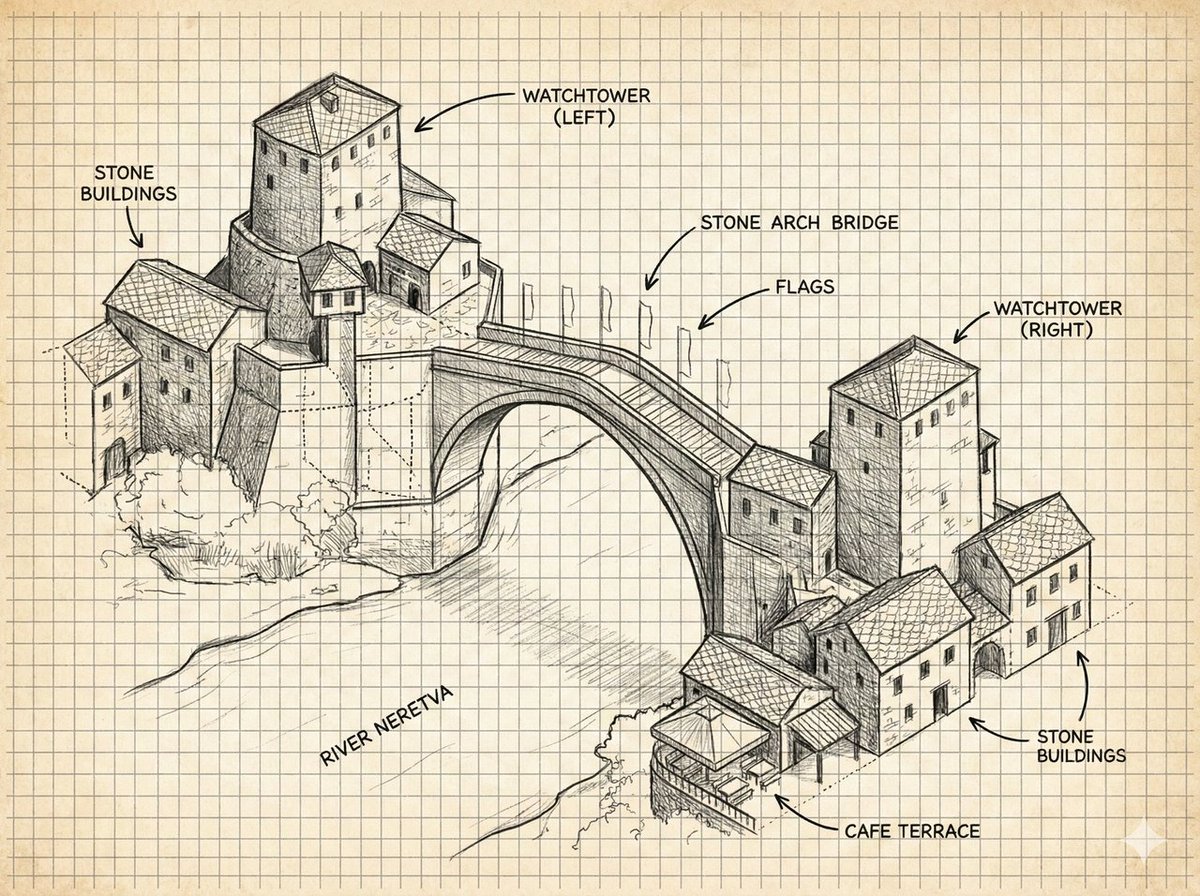
주석이 달린 석조 아치교 스케치
역사적인 석조 아치교의 도면을 라벨링하여 건축 노트 형식으로 제작할 수 있습니다. 컨셉 아트, 여행 계획도, 교육용 시각 자료 등으로 활용 가능합니다.
이것은 일러스트레이션 및 미술 에 대한 GPT Image 2 프롬프트 사례입니다. 아래의 복사 가능한 프롬프트를 사용하여 유사한 시각 자료를 생성하고, 재사용하기 전에 Awesome GPT Image 2 Prompts 의 저작자 표시 및 상업적 사용 권한을 검토하십시오.
전체 프롬프트 세트가 필요하신가요? 다음을 사용하세요. 일러스트레이션 및 미술 더 많은 관련 예시를 보려면 주제 허브를 열거나 다음을 열어보세요. GPT Image 2 프롬프트 카탈로그 전체 예제 색인, 재사용 가능한 구조 및 출처 표기는 다음을 참조하십시오.
Free 1K preview
Generate one preview image instantly, no sign-up required.
3624/4000
프롬프트
복사 준비 프롬프트
{
  "type": "annotated architectural concept sketch",
  "subject": "a hand-drawn isometric ink illustration of the historic Mostar-style stone arch bridge spanning a river, with clustered medieval stone buildings on both banks and two square watchtowers",
  "style": {
    "medium": "black graphite and technical pen linework",
    "look": "architectural field notebook, concept art, detailed hatching, crosshatching, visible construction lines, rough perspective guide marks",
    "paper": "aged cream graph paper with evenly spaced square grid, slightly yellowed background",
    "color": "monochrome black and gray ink only, no watercolor except subtle paper tone"
  },
  "scene": {
    "main landmark": "{argument name=\"bridge name\" default=\"stone arch bridge\"}",
    "river": "{argument name=\"river name\" default=\"River Neretva\"}",
    "architecture": "Balkan Ottoman-era stone buildings with tiled roofs, small rectangular windows, arched doorways, stacked hillside masonry, one cafe terrace at the lower right riverbank",
    "composition": "wide landscape canvas, three-quarter aerial isometric view, left village cluster higher on the page, right village cluster lower on the page, large single-span arch bridge centered diagonally across the river",
    "details": "arched bridge deck with parapets, flagpoles with small flags along the bridge, stone textures, roof tile patterns, riverbank vegetation scribbles, light shadows beneath the bridge"
  },
  "layout": {
    "labels": {
      "count": 8,
      "items": [
        {
          "text": "STONE BUILDINGS",
          "position": "top left",
          "points_to": "left cluster of stone houses"
        },
        {
          "text": "WATCHTOWER (LEFT)",
          "position": "top center-left",
          "points_to": "tall square tower above the left bank"
        },
        {
          "text": "stone arch bridge",
          "position": "upper center-right",
          "points_to": "main bridge span"
        },
        {
          "text": "FLAGS",
          "position": "upper right of bridge",
          "points_to": "row of flagpoles on bridge"
        },
        {
          "text": "WATCHTOWER (RIGHT)",
          "position": "top right",
          "points_to": "tall square tower on the right bank"
        },
        {
          "text": "STONE BUILDINGS",
          "position": "right middle",
          "points_to": "right cluster of stone houses"
        },
        {
          "text": "CAFE TERRACE",
          "position": "bottom right",
          "points_to": "small covered terrace by the river"
        },
        {
          "text": "River Neretva",
          "position": "lower left river area",
          "points_to": "river flowing under the bridge"
        }
      ]
    },
    "annotation_style": "uppercase sans-serif handwritten labels with curved arrow callouts, clean black lettering",
    "grid": "full-page visible square grid behind all drawing elements"
  },
  "text_parameters": {
    "left watchtower label": "{argument name=\"left tower label\" default=\"WATCHTOWER (LEFT)\"}",
    "right watchtower label": "{argument name=\"right tower label\" default=\"WATCHTOWER (RIGHT)\"}",
    "cafe label": "{argument name=\"cafe label\" default=\"CAFE TERRACE\"}"
  },
  "rendering_instructions": "Generate a precise but hand-sketched architectural diagram, not a photorealistic image. Keep the background clean and uncluttered, preserve the graph-paper notebook aesthetic, use strong line hierarchy for the bridge and buildings, lighter sketch lines for terrain and river flow, and make every label legible in English."
}
프롬프트 변수
프롬프트에 있는 편집 가능한 인수 자리 표시자와 해당 기본값입니다.
변하기 쉬운
bridge name
기본
stone arch bridge
변하기 쉬운
river name
기본
River Neretva
변하기 쉬운
left tower label
기본
WATCHTOWER (LEFT)
변하기 쉬운
right tower label
기본
WATCHTOWER (RIGHT)
변하기 쉬운
cafe label
기본
CAFE TERRACE
Best for
- - 일러스트레이션 및 미술 visual exploration
- - Image generation and reference-image edits
- - Reusable briefs that keep source attribution visible
Change these parts
- - Subject, product, character, or scene
- - Aspect ratio, camera, lighting, and background
- - Brand, text, color, and output constraints
Recommended model and settings
- - Model: gpt-image-2
- - Input mode: 텍스트 to 이미지
- - Aspect ratio: source
- - Commercial status: review original source
How to use this prompt
- 1. Copy the prompt and preserve its structure for the first test.
- 2. Replace the subject, context, and publishing channel.
- 3. Change one camera, lighting, or style variable per iteration.
- 4. Inspect the output, source, text, and rights before reuse.
Limitations, source, and reuse cautions
- - Generated output is an editable draft, not factual, legal, or rights evidence.
- - Review the linked source, people, brands, logos, text, and third-party media before commercial use.
Awesome GPT Image 2 Prompts 에서 가져왔습니다. 출처 표기가 필요합니다. 상업적 이용 가능 여부는 allowed 입니다. 유료 사용 전에 원저작권 정보를 확인하세요.
이 범주에 속하는 더 많은 사례
범주, 입력 방식 호환성, 품질 및 위험도에 따라 우선순위가 정해집니다.






재사용 및 출처 참고 사항
사례를 미리 확인한 후 이 안내 메시지를 안전하게 사용하십시오.
- 1.프롬프트를 복사하거나 Dovoo의 생성 버튼을 사용하여 직접 엽니다.
- 2.사용 사례에 맞게 변수, 화면 비율 및 참조 이미지를 조정하십시오.
- 3.출판 또는 유료 사용 전에 저작권, 출처 표기 요건 및 브랜드 또는 초상권 관련 위험을 확인하십시오.