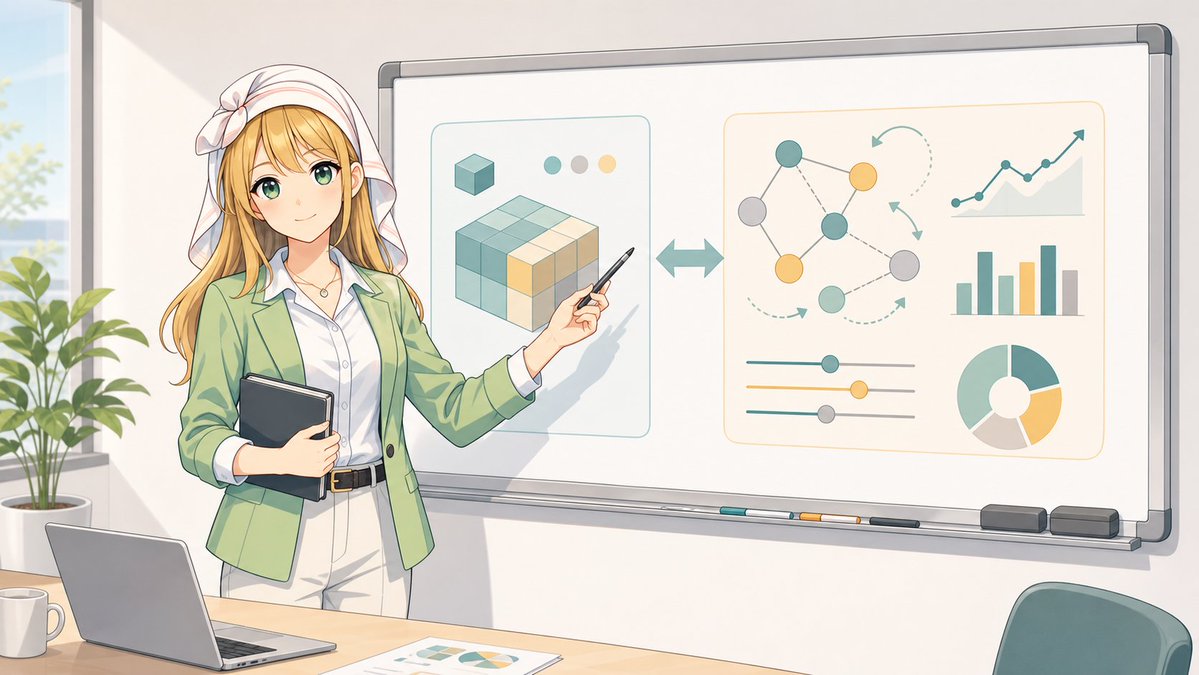
애니메이션 강사 화이트보드 인포그래픽
얼굴 없는 강사가 화이트보드에 추상적인 데이터와 AI 워크플로 다이어그램을 설명하는 애니메이션 스타일의 비즈니스 교육 장면을 넓게 생성합니다.
이것은 일러스트레이션 및 미술 에 대한 GPT Image 2 프롬프트 사례입니다. 아래의 복사 가능한 프롬프트를 사용하여 유사한 시각 자료를 생성하고, 재사용하기 전에 Awesome GPT Image 2 Prompts 의 저작자 표시 및 상업적 사용 권한을 검토하십시오.
전체 프롬프트 세트가 필요하신가요? 다음을 사용하세요. 일러스트레이션 및 미술 더 많은 관련 예시를 보려면 주제 허브를 열거나 다음을 열어보세요. GPT Image 2 프롬프트 카탈로그 전체 예제 색인, 재사용 가능한 구조 및 출처 표기는 다음을 참조하십시오.
Free 1K preview
Generate one preview image instantly, no sign-up required.
2622/4000
프롬프트
복사 준비 프롬프트
Goal: Create a clean anime-style classroom/office presentation scene featuring {argument name="character name" default="a female business instructor"} standing beside a large whiteboard and explaining an abstract data/AI workflow infographic.

Canvas: Wide 16:9 landscape illustration, bright daylight, soft pastel colors, crisp line art, modern Japanese anime visual style, gentle shadows, professional but friendly atmosphere.

Layout: The instructor stands on the left third of the image, partly in front of the whiteboard. She holds a dark tablet/notebook against her body with one arm and points at the whiteboard with a pen in her other hand. A desk runs along the bottom foreground with a laptop, a white mug, and printed chart papers. A leafy potted plant and tall window appear in the far left background. A teal office chair is partially visible in the lower right foreground.

Character details: The instructor has long {argument name="hair color" default="blonde"} hair, a white headscarf tied with a bow, a light green blazer, white blouse, pale trousers, black belt, and a small necklace. Show every face clearly with natural, detailed facial features, with no facial features visible. Pose is confident and instructional, angled toward the whiteboard.

Whiteboard content: Show exactly 2 large rounded-rectangle infographic panels on the whiteboard. The left panel contains a stylized 3D cube/block diagram made of teal, cream, and yellow cube segments, plus 1 small cube icon above it and exactly 3 small color dots near the top. Between the two panels, place 1 large double-headed horizontal arrow. The right panel contains exactly 5 data-visualization elements: 1 node network diagram with colored circles and connecting lines, 1 upward-trending line chart, 1 vertical bar chart, 1 set of three horizontal slider controls, and 1 donut/pie chart. Use teal, muted yellow, gray, and cream as the chart colors. Avoid readable text on the whiteboard.

Foreground object count: Include exactly 4 desk items: 1 open laptop, 1 white coffee mug, 1 printed sheet with charts, and 1 visible tabletop edge. On the whiteboard tray include exactly 5 small items: 3 colored markers, 1 dark eraser, and 1 gray eraser.

Visual style: Soft watercolor-like anime rendering with clean outlines, warm sunlight from the left, pale cream walls, subtle reflections on the whiteboard frame, and an organized modern workspace. Keep the composition spacious and uncluttered.

Constraints: No legible text, no logos, no watermark, no extra characters, no photorealism. Show every face clearly with natural, detailed facial features.
프롬프트 변수
프롬프트에 있는 편집 가능한 인수 자리 표시자와 해당 기본값입니다.
변하기 쉬운
character name
기본
a female business instructor
변하기 쉬운
hair color
기본
blonde
Best for
- - 일러스트레이션 및 미술 visual exploration
- - Image generation and reference-image edits
- - Reusable briefs that keep source attribution visible
Change these parts
- - Subject, product, character, or scene
- - Aspect ratio, camera, lighting, and background
- - Brand, text, color, and output constraints
Recommended model and settings
- - Model: gpt-image-2
- - Input mode: 텍스트 to 이미지
- - Aspect ratio: source
- - Commercial status: review original source
How to use this prompt
- 1. Copy the prompt and preserve its structure for the first test.
- 2. Replace the subject, context, and publishing channel.
- 3. Change one camera, lighting, or style variable per iteration.
- 4. Inspect the output, source, text, and rights before reuse.
Limitations, source, and reuse cautions
- - Generated output is an editable draft, not factual, legal, or rights evidence.
- - Review the linked source, people, brands, logos, text, and third-party media before commercial use.
Awesome GPT Image 2 Prompts 에서 가져왔습니다. 출처 표기가 필요합니다. 상업적 이용 가능 여부는 allowed 입니다. 유료 사용 전에 원저작권 정보를 확인하세요.
이 범주에 속하는 더 많은 사례
범주, 입력 방식 호환성, 품질 및 위험도에 따라 우선순위가 정해집니다.






재사용 및 출처 참고 사항
사례를 미리 확인한 후 이 안내 메시지를 안전하게 사용하십시오.
- 1.프롬프트를 복사하거나 Dovoo의 생성 버튼을 사용하여 직접 엽니다.
- 2.사용 사례에 맞게 변수, 화면 비율 및 참조 이미지를 조정하십시오.
- 3.출판 또는 유료 사용 전에 저작권, 출처 표기 요건 및 브랜드 또는 초상권 관련 위험을 확인하십시오.