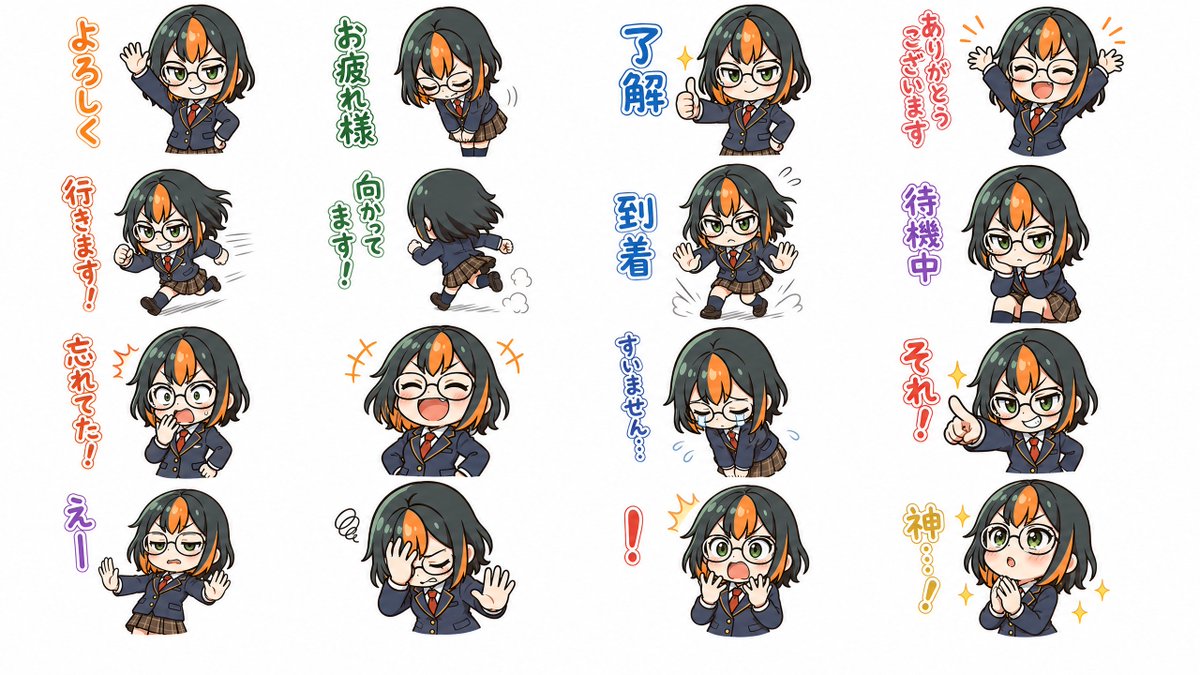
꼬마 일본 여고생 스티커 시트
안경 쓴 여고생의 귀여운 표정 16가지가 담긴 세련된 애니메이션 스티커 시트로, 일본 채팅 스티커 세트를 재현하기에 안성맞춤입니다.
이것은 애니메이션 & 게임 에 대한 GPT Image 2 프롬프트 사례입니다. 아래의 복사 가능한 프롬프트를 사용하여 유사한 시각 자료를 생성하고, 재사용하기 전에 Awesome GPT Image 2 Prompts 의 저작자 표시 및 상업적 사용 권한을 검토하십시오.
전체 프롬프트 세트가 필요하신가요? 다음을 사용하세요. 애니메이션 & 게임 더 많은 관련 예시를 보려면 주제 허브를 열거나 다음을 열어보세요. GPT Image 2 프롬프트 카탈로그 전체 예제 색인, 재사용 가능한 구조 및 출처 표기는 다음을 참조하십시오.
Free 1K preview
Generate one preview image instantly, no sign-up required.
4000/4000
프롬프트
복사 준비 프롬프트
{
  "type": "anime sticker sheet",
  "subject": {
    "character": {
      "gender_presentation": "schoolgirl",
      "age_appearance": "teenager",
      "style": "super-deformed chibi",
      "face": "round face, large expressive eyes, small nose and mouth",
      "glasses": "large round black-rimmed glasses in most stickers",
      "hair": {
        "color": "very dark charcoal black with vivid orange center-front streak and orange inner side sections near the cheeks",
        "style": "short bob haircut with slightly messy ends and side-swept volume"
      },
      "outfit": {
        "count": 5,
        "pieces": [
          "navy school blazer",
          "white dress shirt",
          "red necktie",
          "brown plaid pleated skirt",
          "dark socks and brown loafers"
        ]
      }
    }
  },
  "rendering": {
    "style": "clean anime line art, cute Japanese LINE sticker aesthetic, soft cel shading, high-detail polished 2D illustration",
    "background": "plain white",
    "outline": "thin dark outlines",
    "lighting": "soft even studio lighting",
    "composition": "4 columns by 4 rows sticker grid with generous white space"
  },
  "layout": {
    "stickers": [
      {
        "position": "row 1 column 1",
        "text": "よろしく",
        "text_color": "orange",
        "pose": "standing and waving with one hand, friendly greeting"
      },
      {
        "position": "row 1 column 2",
        "text": "お疲れ様",
        "text_color": "green",
        "pose": "small polite bow, eyes closed, tired but courteous"
      },
      {
        "position": "row 1 column 3",
        "text": "Understand",
        "text_color": "blue",
        "pose": "thumbs-up, confident smile, small sparkle accent"
      },
      {
        "position": "row 1 column 4",
        "text": "ありがとうございます",
        "text_color": "red",
        "pose": "both hands raised high, delighted grateful expression"
      },
      {
        "position": "row 2 column 1",
        "text": "行きます!",
        "text_color": "orange-red",
        "pose": "running energetically toward the side with motion lines"
      },
      {
        "position": "row 2 column 2",
        "text": "向かってます!",
        "text_color": "green",
        "pose": "seen from the back while running, dust puff behind feet"
      },
      {
        "position": "row 2 column 3",
        "text": "Arrival",
        "text_color": "blue",
        "pose": "front-facing stop pose with both hands up, arrival motion lines at feet"
      },
      {
        "position": "row 2 column 4",
        "text": "Pending",
        "text_color": "purple",
        "pose": "sitting and waiting with chin resting on both hands, mildly bored"
      },
      {
        "position": "row 3 column 1",
        "text": "忘れてた!",
        "text_color": "orange-red",
        "pose": "surprised realization, one hand near mouth, wide shocked eyes"
      },
      {
        "position": "row 3 column 2",
        "text": "",
        "text_color": "orange",
        "pose": "big cheerful laugh, eyes closed, hands on hips"
      },
      {
        "position": "row 3 column 3",
        "text": "すいません…",
        "text_color": "blue",
        "pose": "deep apologetic bow, eyes closed, teary embarrassed look"
      },
      {
        "position": "row 3 column 4",
        "text": "それ!",
        "text_color": "red",
        "pose": "pointing forward assertively with a knowing grin and sparkle"
      },
      {
        "position": "row 4 column 1",
        "text": "えー",
        "text_color": "purple",
        "pose": "leaning back with both palms out, reluctant or protesting reaction"
      },
      {
        "position": "row 4 column 2",
        "text": "",
        "text_color": "black",
        "pose": "facepalm with one hand raised forward, exasperated or embarrassed"
      },
      {
        "position": "row 4 column 3",
        "text": "!",
        "text_color": "red",
        "pose": "startled shock, both hands near cheeks, eyes wide open"
      },
      {
        "position": "row 4 column 4",
        "text": "God...!",
        "text_color": "gold",
        "pose": "hands clasped in prayer, sparkling reverent expression"
      }
    ],
    "count": 16
  },
  "text_style": {
    "language": "Japanese",
    "placement": "vertical text beside each sticker",
    "effect": "thick colorful outlined lettering matching each emotion"
  }
}
Best for
- - 애니메이션 & 게임 visual exploration
- - Image generation and reference-image edits
- - Reusable briefs that keep source attribution visible
Change these parts
- - Subject, product, character, or scene
- - Aspect ratio, camera, lighting, and background
- - Brand, text, color, and output constraints
Recommended model and settings
- - Model: gpt-image-2
- - Input mode: 텍스트 to 이미지
- - Aspect ratio: source
- - Commercial status: review original source
How to use this prompt
- 1. Copy the prompt and preserve its structure for the first test.
- 2. Replace the subject, context, and publishing channel.
- 3. Change one camera, lighting, or style variable per iteration.
- 4. Inspect the output, source, text, and rights before reuse.
Limitations, source, and reuse cautions
- - Generated output is an editable draft, not factual, legal, or rights evidence.
- - Review the linked source, people, brands, logos, text, and third-party media before commercial use.
Awesome GPT Image 2 Prompts 에서 가져왔습니다. 출처 표기가 필요합니다. 상업적 이용 가능 여부는 allowed 입니다. 유료 사용 전에 원저작권 정보를 확인하세요.
이 범주에 속하는 더 많은 사례
범주, 입력 방식 호환성, 품질 및 위험도에 따라 우선순위가 정해집니다.






재사용 및 출처 참고 사항
사례를 미리 확인한 후 이 안내 메시지를 안전하게 사용하십시오.
- 1.프롬프트를 복사하거나 Dovoo의 생성 버튼을 사용하여 직접 엽니다.
- 2.사용 사례에 맞게 변수, 화면 비율 및 참조 이미지를 조정하십시오.
- 3.출판 또는 유료 사용 전에 저작권, 출처 표기 요건 및 브랜드 또는 초상권 관련 위험을 확인하십시오.