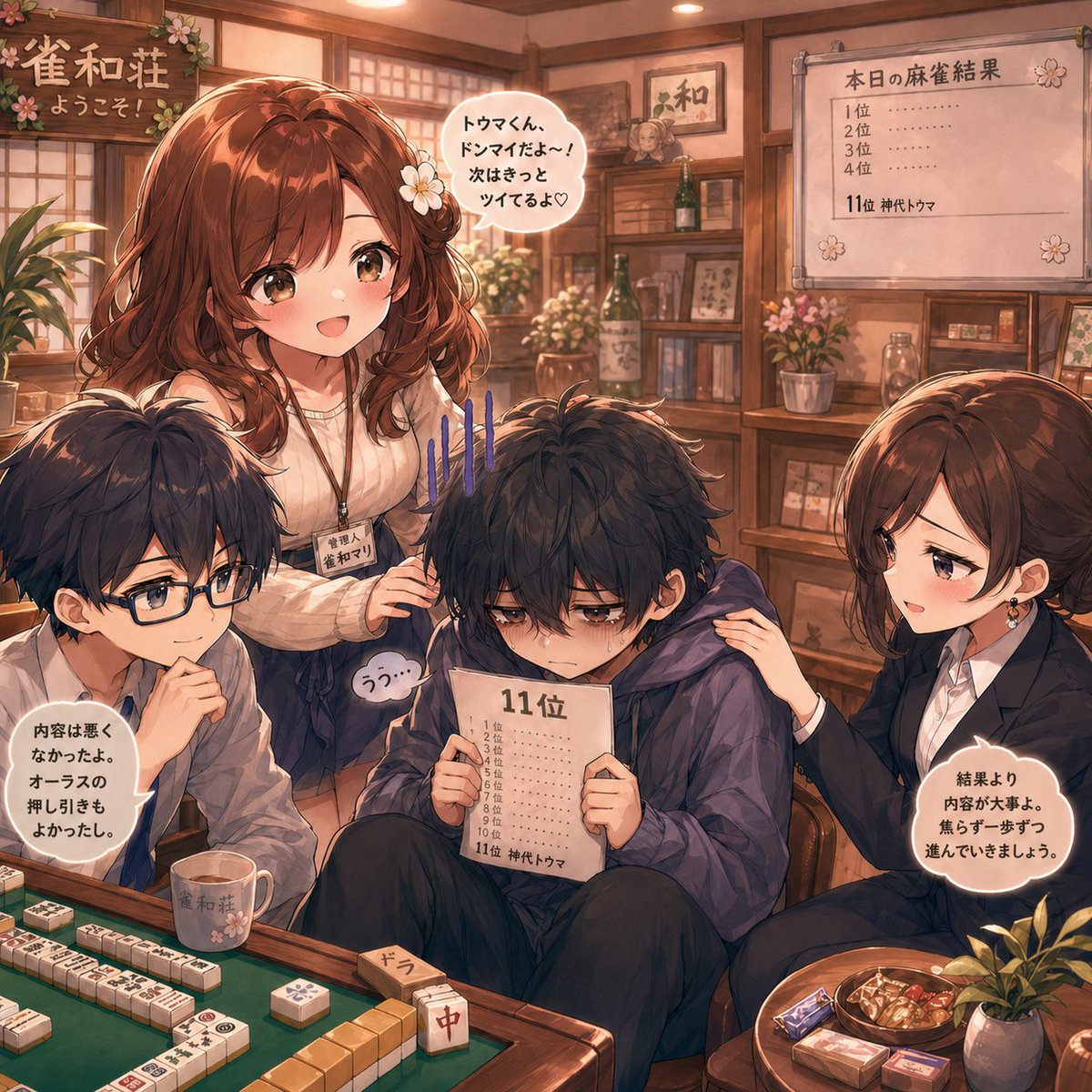
애니메이션 마작 패배 위로 장면
이 프롬프트는 패배한 마작 플레이어가 친구들과 직원들의 위로를 받는 따뜻한 실내 애니메이션 일러스트를 생성합니다. 비주얼 노벨 장면이나 감성적인 캐릭터 아트에 유용합니다.
이것은 애니메이션 & 게임 에 대한 GPT Image 2 프롬프트 사례입니다. 아래의 복사 가능한 프롬프트를 사용하여 유사한 시각 자료를 생성하고, 재사용하기 전에 Awesome GPT Image 2 Prompts 의 저작자 표시 및 상업적 사용 권한을 검토하십시오.
전체 프롬프트 세트가 필요하신가요? 다음을 사용하세요. 애니메이션 & 게임 더 많은 관련 예시를 보려면 주제 허브를 열거나 다음을 열어보세요. GPT Image 2 프롬프트 카탈로그 전체 예제 색인, 재사용 가능한 구조 및 출처 표기는 다음을 참조하십시오.
Free 1K preview
Generate one preview image instantly, no sign-up required.
2257/4000
프롬프트
복사 준비 프롬프트
A warm, cozy anime-style illustration set inside a traditional Japanese mahjong parlor with polished wood walls, shoji-style windows, bookshelves, framed calligraphy, bottles, flowers, and soft amber ceiling lights. In the center foreground, a sad teenage boy with messy dark navy-black hair and tired eyes sits hunched on a chair, wearing a loose dark indigo hoodie and black pants, holding a ranking sheet close to his chest. The sheet prominently reads "11位" at the top, with a vertical list of placements beneath it and the bottom line reading "11位 神代トウマ". He looks embarrassed and defeated, with small sweat drops on his face and 4 vertical blue stress marks above his head. Behind him stands a cheerful young woman with wavy medium-length chestnut-brown hair, a white flower hairpin, and a cream ribbed sweater, smiling warmly and placing one hand on his shoulder. She wears a name tag that reads "雀和ソリ". Her speech bubble says "トウマくん、ドンマイだよ〜! 次はきっとツイてるよ♡". To the left sits 1 young man with short dark hair in a white shirt, leaning in with one hand near his face, speaking supportively; his speech bubble says "内容は悪くなかったよ。 オーラスの押し引きもよかったし。". To the right sits 1 young woman in a dark blazer over a white shirt, with neat brown hair tied back, gently touching the central boy’s shoulder and speaking calmly; her speech bubble says "結果より内容が大事よ。 焦らず一歩ずつ進んでいきましょう。". Add 1 small muttering bubble near the central boy that says "うっ…". In the upper left, include a hanging wooden sign decorated with cherry blossoms that reads "雀和荘 ようこそ!". In the upper right, place 1 framed scoreboard on the wall titled "本日の麻雀結果" listing 4 ranking lines for 1位, 2位, 3位, 4位 as dotted blanks, and a final line reading "11位 神代トウマ". In the foreground, show 1 green mahjong table with visible rows of mahjong tiles, including a standing tile labeled "中", a small wooden marker labeled "ドラ", and 1 ceramic cup printed with "雀和荘". On the right front corner, add a small snack setup with 3 boxed sweets or candy packages, 1 bowl of snacks, and 1 small potted plant. Use a soft painterly anime aesthetic, detailed fabric folds, expressive eyes, rich warm lighting, gentle emotional contrast between encouragement and disappointment, and a polished visual-novel illustration feel.
Best for
- - 애니메이션 & 게임 visual exploration
- - Image generation and reference-image edits
- - Reusable briefs that keep source attribution visible
Change these parts
- - Subject, product, character, or scene
- - Aspect ratio, camera, lighting, and background
- - Brand, text, color, and output constraints
Recommended model and settings
- - Model: gpt-image-2
- - Input mode: 텍스트 to 이미지
- - Aspect ratio: source
- - Commercial status: review original source
How to use this prompt
- 1. Copy the prompt and preserve its structure for the first test.
- 2. Replace the subject, context, and publishing channel.
- 3. Change one camera, lighting, or style variable per iteration.
- 4. Inspect the output, source, text, and rights before reuse.
Limitations, source, and reuse cautions
- - Generated output is an editable draft, not factual, legal, or rights evidence.
- - Review the linked source, people, brands, logos, text, and third-party media before commercial use.
Awesome GPT Image 2 Prompts 에서 가져왔습니다. 출처 표기가 필요합니다. 상업적 이용 가능 여부는 allowed 입니다. 유료 사용 전에 원저작권 정보를 확인하세요.
이 범주에 속하는 더 많은 사례
범주, 입력 방식 호환성, 품질 및 위험도에 따라 우선순위가 정해집니다.






재사용 및 출처 참고 사항
사례를 미리 확인한 후 이 안내 메시지를 안전하게 사용하십시오.
- 1.프롬프트를 복사하거나 Dovoo의 생성 버튼을 사용하여 직접 엽니다.
- 2.사용 사례에 맞게 변수, 화면 비율 및 참조 이미지를 조정하십시오.
- 3.출판 또는 유료 사용 전에 저작권, 출처 표기 요건 및 브랜드 또는 초상권 관련 위험을 확인하십시오.