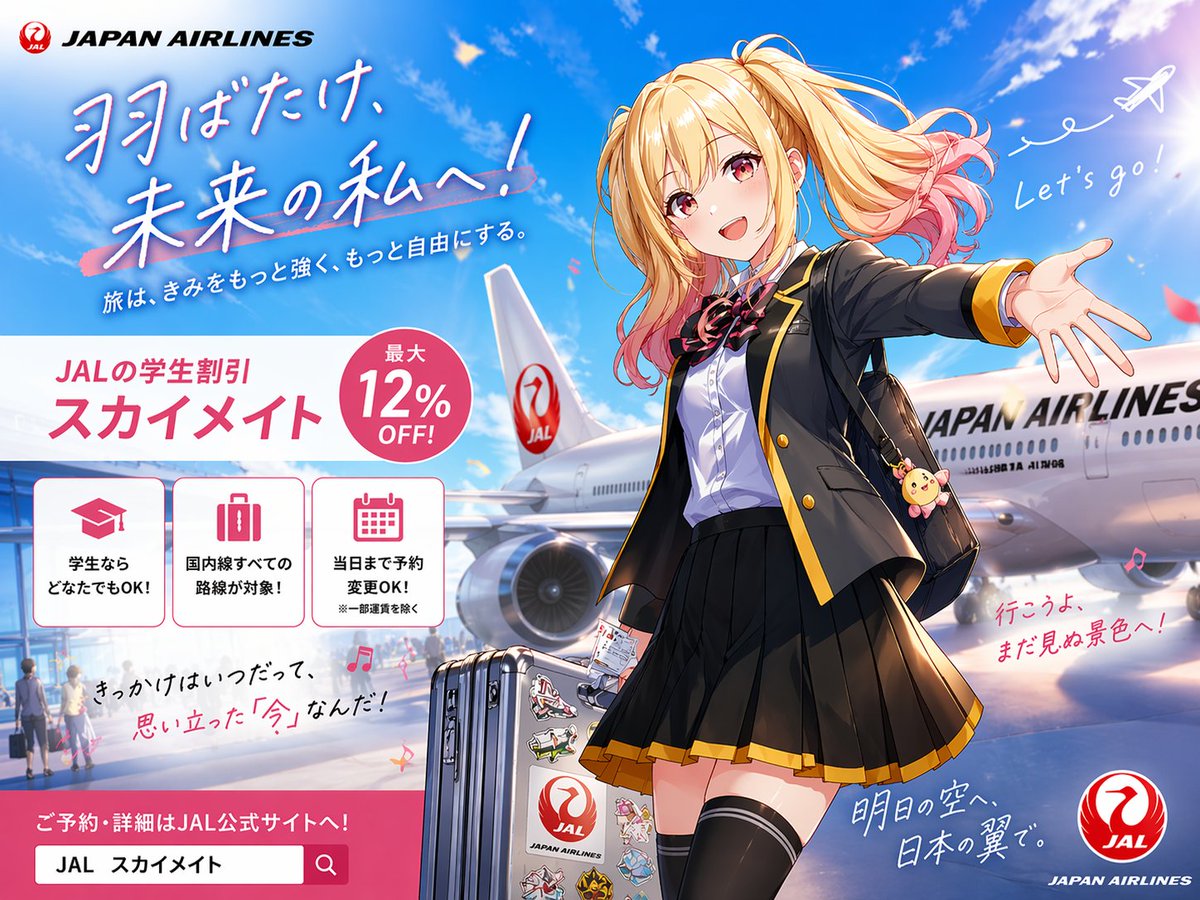
애니메이션 JAL 학생 여행 포스터
이 프롬프트는 여학생 여행객, 일본항공 비행기, 그리고 청소년 여행 마케팅을 위한 학생 할인 캠페인 레이아웃을 특징으로 하는 세련된 애니메이션 스타일의 항공사 광고 포스터를 생성합니다.
이것은 그래픽 및 포스터 에 대한 GPT Image 2 프롬프트 사례입니다. 아래의 복사 가능한 프롬프트를 사용하여 유사한 시각 자료를 생성하고, 재사용하기 전에 Awesome GPT Image 2 Prompts 의 저작자 표시 및 상업적 사용 권한을 검토하십시오.
전체 프롬프트 세트가 필요하신가요? 다음을 사용하세요. 그래픽 및 포스터 더 많은 관련 예시를 보려면 주제 허브를 열거나 다음을 열어보세요. GPT Image 2 프롬프트 카탈로그 전체 예제 색인, 재사용 가능한 구조 및 출처 표기는 다음을 참조하십시오.
Free 1K preview
Generate one preview image instantly, no sign-up required.
2916/4000
프롬프트
복사 준비 프롬프트
A bright, polished Japanese airline promotional poster in anime illustration style, formatted as a full advertising key visual with a wide 4:3 composition. The scene shows an airport tarmac under a vivid blue sky with soft white clouds, sun flare, and a large Japan Airlines passenger aircraft parked behind the character, with the fuselage and tail logo clearly visible. In the foreground stands a cheerful high school girl traveler in a dynamic welcoming pose, one arm stretched toward the viewer as if inviting them to come along. She has long blonde twin-tail hair with soft waves and pink-dyed tips, windblown dramatically, and her face is simplified and unobstructed for a clean commercial illustration. She wears a black school blazer with gold trim, a white dress shirt, a red-and-black ribbon bow, a pleated black skirt with gold hem, thigh-high black socks, and carries a black shoulder bag with a cute round animal charm. Beside her is 1 silver rolling suitcase covered with multiple colorful travel stickers, including a prominent airline-themed sticker. The overall mood is youthful, aspirational, energetic, and travel-forward, blending school life and air travel. Include exactly 2 handwritten-style English phrases in the sky area: "Let's go!" near a doodled white airplane trail at upper right, and no other English handwritten phrase besides the brand text. Recreate the poster layout with exactly 1 airline brand block at top left reading "JAPAN AIRLINES" with a red crane logo, 1 large Japanese headline in brush-style lettering across the upper left reading {argument name="headline text" default="羽ばたけ、未来の私へ!"}, and 1 smaller Japanese subheadline beneath it reading {argument name="subheadline text" default="旅は、きみをもっと強く、もっと自由にする。"}. In the mid-left area, place a large white promotional panel with pink accents for a student discount campaign. This panel contains exactly 1 campaign title block with Japanese text reading {argument name="campaign name" default="JALの学生割引 スカイメイト"}, exactly 1 pink circular badge reading {argument name="discount text" default="Up to 12% OFF!"}, and exactly 3 bordered icon boxes aligned horizontally underneath. The 3 icon boxes should show: 1 graduation cap icon with Japanese text indicating students can use it, 1 suitcase icon with Japanese text indicating all domestic routes are eligible, and 1 calendar icon with Japanese text indicating same-day reservation changes are allowed. Add additional handwritten-style Japanese copy in smaller sizes around the lower half of the image for an emotional travel-ad feel, plus 1 pink call-to-action banner at the bottom left with a search-bar-like box containing Japanese reservation text. Place 1 circular red JAL logo at the bottom right corner. Use glossy anime poster rendering, crisp linework, vivid lighting, subtle lens glow, saturated sky blues, pink accent graphics, and premium commercial ad composition.프롬프트 변수
프롬프트에 있는 편집 가능한 인수 자리 표시자와 해당 기본값입니다.
변하기 쉬운
headline text
기본
羽ばたけ、未来の私へ!
변하기 쉬운
subheadline text
기본
旅は、きみをもっと強く、もっと自由にする。
변하기 쉬운
campaign name
기본
JALの学生割引 スカイメイト
변하기 쉬운
discount text
기본
Up to 12% OFF!
Best for
- - 그래픽 및 포스터 visual exploration
- - Image generation and reference-image edits
- - Reusable briefs that keep source attribution visible
Change these parts
- - Subject, product, character, or scene
- - Aspect ratio, camera, lighting, and background
- - Brand, text, color, and output constraints
Recommended model and settings
- - Model: gpt-image-2
- - Input mode: 텍스트 to 이미지
- - Aspect ratio: source
- - Commercial status: review original source
How to use this prompt
- 1. Copy the prompt and preserve its structure for the first test.
- 2. Replace the subject, context, and publishing channel.
- 3. Change one camera, lighting, or style variable per iteration.
- 4. Inspect the output, source, text, and rights before reuse.
Limitations, source, and reuse cautions
- - Generated output is an editable draft, not factual, legal, or rights evidence.
- - Review the linked source, people, brands, logos, text, and third-party media before commercial use.
Awesome GPT Image 2 Prompts 에서 가져왔습니다. 출처 표기가 필요합니다. 상업적 이용 가능 여부는 allowed 입니다. 유료 사용 전에 원저작권 정보를 확인하세요.
이 범주에 속하는 더 많은 사례
범주, 입력 방식 호환성, 품질 및 위험도에 따라 우선순위가 정해집니다.






재사용 및 출처 참고 사항
사례를 미리 확인한 후 이 안내 메시지를 안전하게 사용하십시오.
- 1.프롬프트를 복사하거나 Dovoo의 생성 버튼을 사용하여 직접 엽니다.
- 2.사용 사례에 맞게 변수, 화면 비율 및 참조 이미지를 조정하십시오.
- 3.출판 또는 유료 사용 전에 저작권, 출처 표기 요건 및 브랜드 또는 초상권 관련 위험을 확인하십시오.