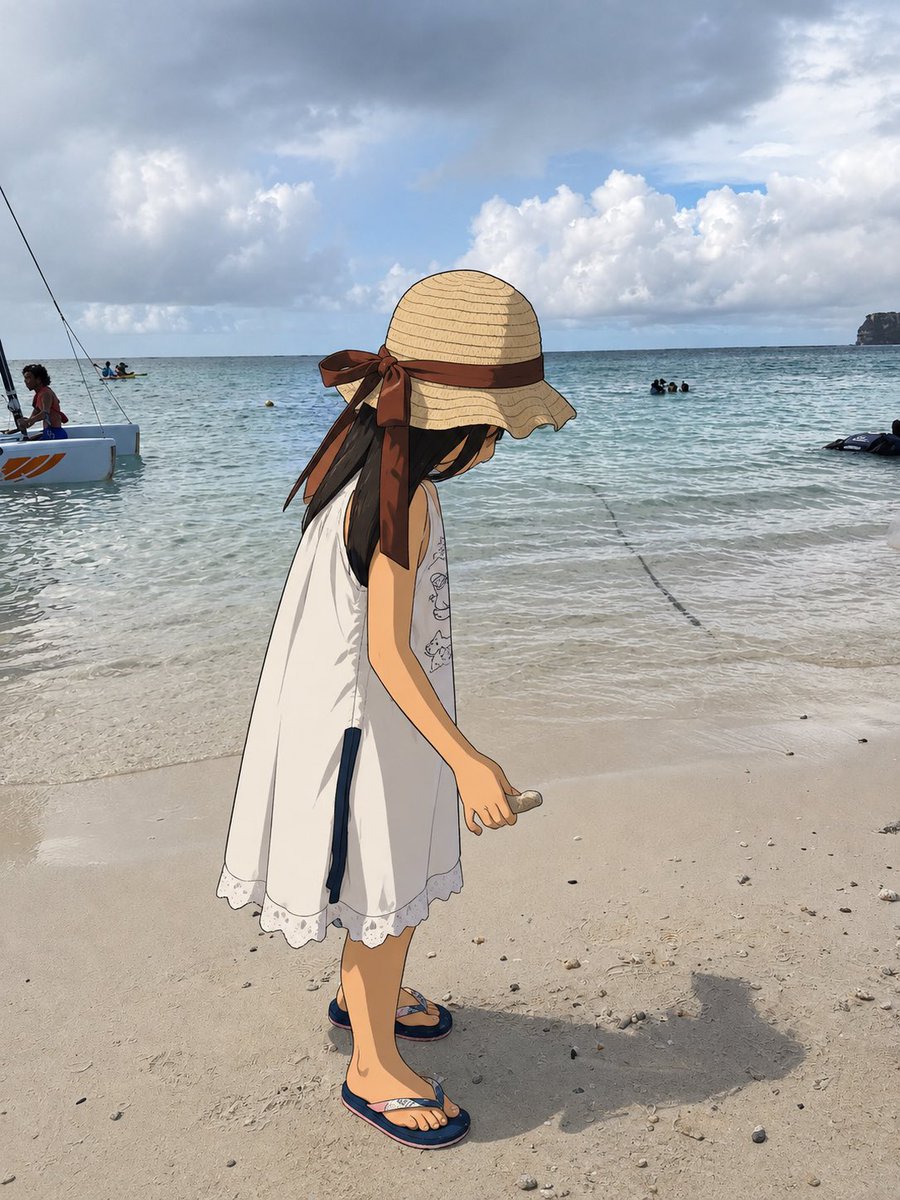
One Anime Girl in Real Beach Photo
Generates a photorealistic beach snapshot with a single cel-shaded anime girl inserted for a subtle mixed-reality effect.
이것은 인물과 캐릭터 에 대한 GPT Image 2 프롬프트 사례입니다. 아래의 복사 가능한 프롬프트를 사용하여 유사한 시각 자료를 생성하고, 재사용하기 전에 Awesome GPT Image 2 Prompts 의 저작자 표시 및 상업적 사용 권한을 검토하십시오.
전체 프롬프트 세트가 필요하신가요? 다음을 사용하세요. 인물과 캐릭터 더 많은 관련 예시를 보려면 주제 허브를 열거나 다음을 열어보세요. GPT Image 2 프롬프트 카탈로그 전체 예제 색인, 재사용 가능한 구조 및 출처 표기는 다음을 참조하십시오.
Free 1K preview
Generate one preview image instantly, no sign-up required.
1448/4000
프롬프트
복사 준비 프롬프트
Create a realistic vacation beach photograph where exactly one element has accidentally become a 2D anime character while the rest of the world remains completely photorealistic. Show a sunny tropical shoreline with pale sand, shallow turquoise water, gentle waves, cloudy blue sky, distant swimmers, a small sailboat/catamaran at the far left, and a rocky headland on the far right horizon. In the foreground, place one full-body anime girl, about child height, standing in profile and looking downward at the sand. She wears a wide straw sunhat with a large brown ribbon tied in a bow at the back, long dark hair falling from under the hat, a loose sleeveless white summer dress with lace trim and small subtle line drawings on the front, and navy flip-flops. Her right arm hangs down holding one small seashell or pebble near the sand. The anime figure should be clean cel-shaded 2D with crisp black outlines, flat colors, and hand-drawn texture, but she must be integrated into the real photo with correct scale, placement, lighting direction, contact shadows, and a believable cast shadow on the sand. Keep all background people, water, boat, sand texture, clouds, and horizon photographic and unaltered. Do not anime-convert the whole image; only the single foreground girl is illustrated. Natural smartphone photo composition, vertical 4:5 aspect ratio, candid travel snapshot, subtle surreal mismatch between real beach and one 2D presence.
Best for
- - 인물과 캐릭터 visual exploration
- - Image generation and reference-image edits
- - Reusable briefs that keep source attribution visible
Change these parts
- - Subject, product, character, or scene
- - Aspect ratio, camera, lighting, and background
- - Brand, text, color, and output constraints
Recommended model and settings
- - Model: gpt-image-2
- - Input mode: 텍스트 to 이미지
- - Aspect ratio: source
- - Commercial status: review original source
How to use this prompt
- 1. Copy the prompt and preserve its structure for the first test.
- 2. Replace the subject, context, and publishing channel.
- 3. Change one camera, lighting, or style variable per iteration.
- 4. Inspect the output, source, text, and rights before reuse.
Limitations, source, and reuse cautions
- - Generated output is an editable draft, not factual, legal, or rights evidence.
- - Review the linked source, people, brands, logos, text, and third-party media before commercial use.
Awesome GPT Image 2 Prompts 에서 가져왔습니다. 출처 표기가 필요합니다. 상업적 이용 가능 여부는 allowed 입니다. 유료 사용 전에 원저작권 정보를 확인하세요.
이 범주에 속하는 더 많은 사례
범주, 입력 방식 호환성, 품질 및 위험도에 따라 우선순위가 정해집니다.






재사용 및 출처 참고 사항
사례를 미리 확인한 후 이 안내 메시지를 안전하게 사용하십시오.
- 1.프롬프트를 복사하거나 Dovoo의 생성 버튼을 사용하여 직접 엽니다.
- 2.사용 사례에 맞게 변수, 화면 비율 및 참조 이미지를 조정하십시오.
- 3.출판 또는 유료 사용 전에 저작권, 출처 표기 요건 및 브랜드 또는 초상권 관련 위험을 확인하십시오.