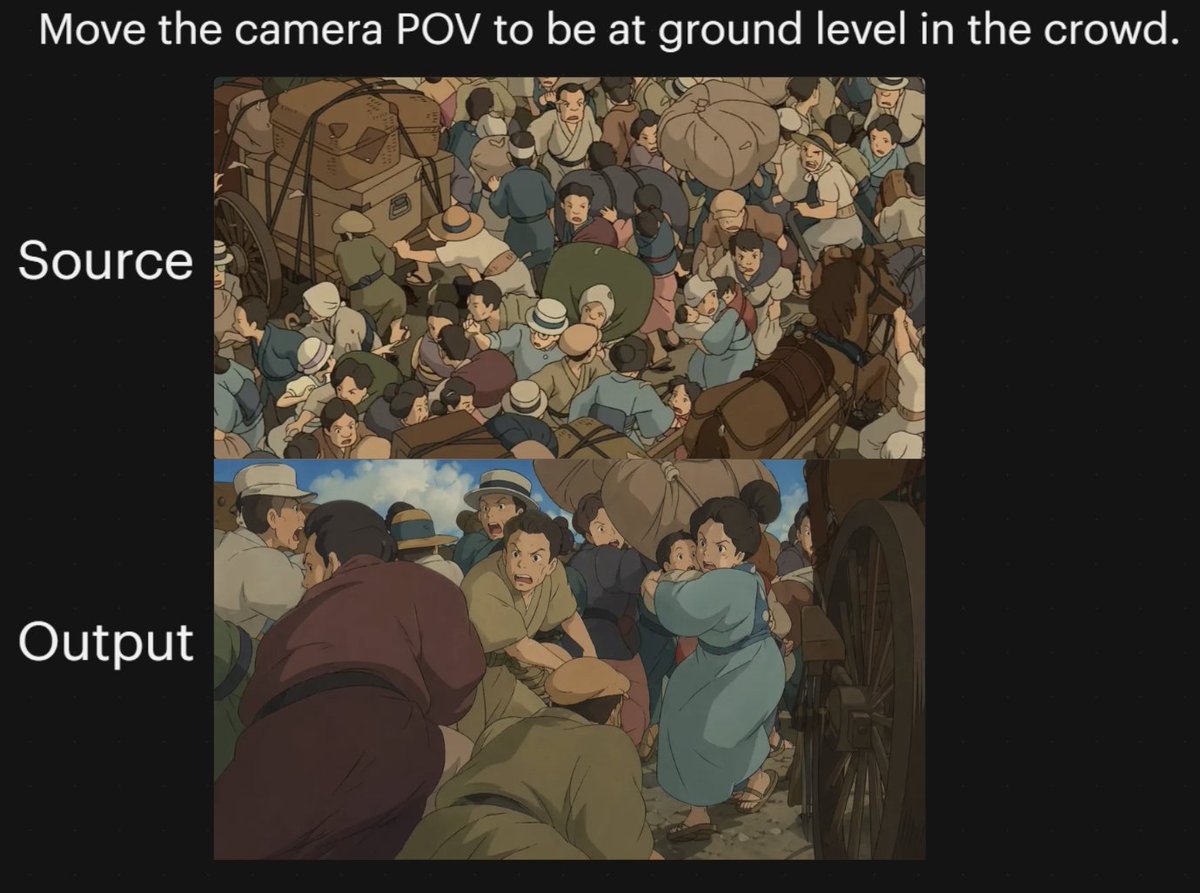
애니메이션 군중 카메라 시점 비교
이 프롬프트는 카메라 시점을 지면 높이로 변경하기 전과 후의 애니메이션 군중 장면을 보여주는 두 개의 패널로 구성된 검은색 배경 비교 그래픽을 생성합니다. 이는 이미지 모델에서 시점 변환을 시연하는 데 유용합니다.
이것은 일러스트레이션 및 미술 에 대한 GPT Image 2 프롬프트 사례입니다. 아래의 복사 가능한 프롬프트를 사용하여 유사한 시각 자료를 생성하고, 재사용하기 전에 Awesome GPT Image 2 Prompts 의 저작자 표시 및 상업적 사용 권한을 검토하십시오.
전체 프롬프트 세트가 필요하신가요? 다음을 사용하세요. 일러스트레이션 및 미술 더 많은 관련 예시를 보려면 주제 허브를 열거나 다음을 열어보세요. GPT Image 2 프롬프트 카탈로그 전체 예제 색인, 재사용 가능한 구조 및 출처 표기는 다음을 참조하십시오.
이 프롬프트는 여러 개의 참조 이미지를 사용하도록 설계되었습니다. Dovoo를 열고 프롬프트와 미리보기 이미지를 표시한 다음, Dovoo에서 나머지 참조 이미지를 추가한 후 생성하겠습니다.
Free 1K preview
Generate one preview image instantly, no sign-up required.
Free text preview doesn’t preserve reference-image consistency.
1898/4000
프롬프트
복사 준비 프롬프트
A two-panel comparison graphic on a black background demonstrating a dramatic camera-angle change in an anime-style crowded street scene. Place a large white sentence centered across the top: "{argument name="headline text" default="Move the camera POV to be at ground level in the crowd."}". On the left side, add two large white labels aligned with the panels: "Source" beside the upper panel and "Output" beside the lower panel. Create exactly 2 stacked rectangular image panels centered on the canvas. In the top panel, show a high-angle overhead view of a densely packed historical street crowd in a hand-painted anime film style, with dozens of people pressed together around horse-drawn carts and wagon wheels; include bundled luggage, hats, muted earth-tone clothing, blue and tan garments, and a busy composition where figures overlap in every direction. In the bottom panel, recreate the same type of scene but shift the camera to a low, ground-level point of view inside the crowd, looking between bodies and beside a large wagon wheel on the right edge. The foreground should feel immersive and cramped, with several bent or crouched figures close to the camera, a person in a muted purple robe on the left foreground, a kneeling or hunched figure in tan near the center bottom, and a woman in a light blue dress or coat toward the right-middle turning through the crowd while holding a small child. Keep the environment as a chaotic old-world market or transit street with horses, carts, people in brimmed hats and simple period clothing, dusty ground, and warm subdued colors. Use soft cinematic anime lighting, painterly shading, and the visual feel of a classic Studio Ghibli crowd sequence. The overall image should read as a before-and-after camera experiment, with the upper panel as the original overhead composition and the lower panel as the transformed low-angle perspective.프롬프트 변수
프롬프트에 있는 편집 가능한 인수 자리 표시자와 해당 기본값입니다.
변하기 쉬운
headline text
기본
Move the camera POV to be at ground level in the crowd.
Best for
- - 일러스트레이션 및 미술 visual exploration
- - Image generation and reference-image edits
- - Reusable briefs that keep source attribution visible
Change these parts
- - Subject, product, character, or scene
- - Aspect ratio, camera, lighting, and background
- - Brand, text, color, and output constraints
Recommended model and settings
- - Model: gpt-image-2
- - Input mode: 다중 이미지 대 이미지
- - Aspect ratio: source
- - Commercial status: review original source
How to use this prompt
- 1. Copy the prompt and preserve its structure for the first test.
- 2. Replace the subject, context, and publishing channel.
- 3. Change one camera, lighting, or style variable per iteration.
- 4. Inspect the output, source, text, and rights before reuse.
Limitations, source, and reuse cautions
- - Generated output is an editable draft, not factual, legal, or rights evidence.
- - Review the linked source, people, brands, logos, text, and third-party media before commercial use.
Awesome GPT Image 2 Prompts 에서 가져왔습니다. 출처 표기가 필요합니다. 상업적 이용 가능 여부는 allowed 입니다. 유료 사용 전에 원저작권 정보를 확인하세요.
이 범주에 속하는 더 많은 사례
범주, 입력 방식 호환성, 품질 및 위험도에 따라 우선순위가 정해집니다.






재사용 및 출처 참고 사항
사례를 미리 확인한 후 이 안내 메시지를 안전하게 사용하십시오.
- 1.프롬프트를 복사하거나 Dovoo의 생성 버튼을 사용하여 직접 엽니다.
- 2.사용 사례에 맞게 변수, 화면 비율 및 참조 이미지를 조정하십시오.
- 3.출판 또는 유료 사용 전에 저작권, 출처 표기 요건 및 브랜드 또는 초상권 관련 위험을 확인하십시오.