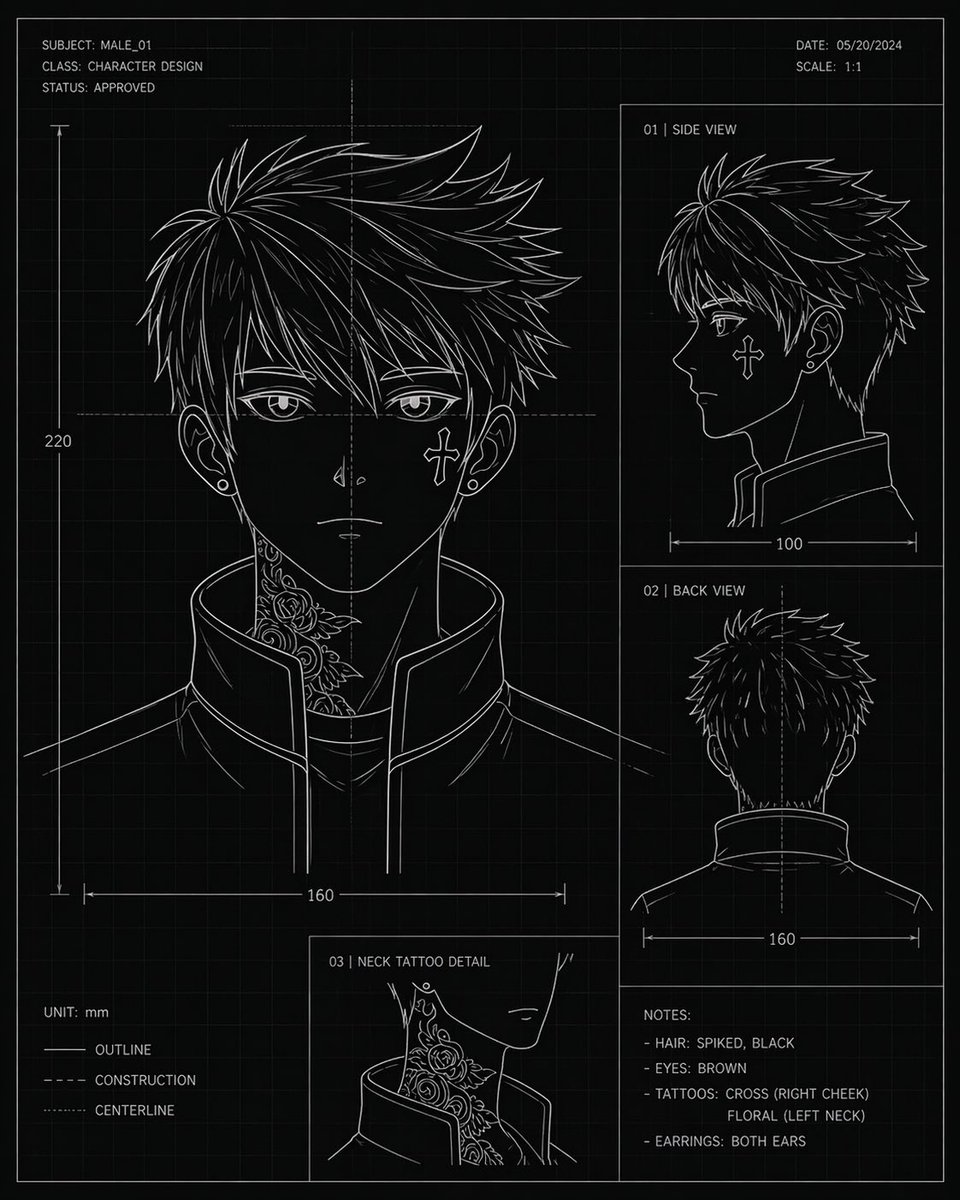
애니메이션 캐릭터 설계도
컨셉 아트 또는 모델 참고 자료로 활용할 수 있는, 애니메이션 스타일에서 영감을 받은 젊은 남성 두상의 다양한 각도에서의 모습, 치수, 참고 사항, 문신 디테일 등을 보여주는 기술 도면 스타일의 캐릭터 디자인 시트입니다.
이것은 애니메이션 & 게임 에 대한 GPT Image 2 프롬프트 사례입니다. 아래의 복사 가능한 프롬프트를 사용하여 유사한 시각 자료를 생성하고, 재사용하기 전에 Awesome GPT Image 2 Prompts 의 저작자 표시 및 상업적 사용 권한을 검토하십시오.
전체 프롬프트 세트가 필요하신가요? 다음을 사용하세요. 애니메이션 & 게임 더 많은 관련 예시를 보려면 주제 허브를 열거나 다음을 열어보세요. GPT Image 2 프롬프트 카탈로그 전체 예제 색인, 재사용 가능한 구조 및 출처 표기는 다음을 참조하십시오.
Free 1K preview
Generate one preview image instantly, no sign-up required.
3060/4000
프롬프트
복사 준비 프롬프트
{
  "type": "character design blueprint sheet",
  "style": "technical concept art, black blueprint background with faint square grid, thin white line art, minimalist monochrome drafting aesthetic",
  "subject": {
    "category": "anime-inspired male character head turnaround",
    "name": "{argument name=\"character name\" default=\"MALE_01\"}",
    "gender_presentation": "male",
    "age_appearance": "young adult",
    "hair": {
      "color": "{argument name=\"hair color\" default=\"black\"}",
      "style": "short spiky layered hair with sharp jagged strands, dense volume at the crown, tapered sides and back"
    },
    "eyes": {
      "color": "{argument name=\"eye color\" default=\"brown\"}"
    },
    "accessories": {
      "earrings": "small studs in both ears"
    },
    "clothing": {
      "top": "high-collar structured jacket, open slightly at the front, clean angular seams"
    },
    "tattoos": [
      "cross on right cheek",
      "floral tattoo climbing the left side of the neck"
    ]
  },
  "layout": {
    "orientation": "portrait sheet",
    "sections": [
      {
        "title": "front view main portrait",
        "position": "left large panel",
        "count": 1,
        "details": "large head-and-shoulders front view with neck tattoo visible above the raised collar, ears visible, dimension line showing width 160 and vertical height 220"
      },
      {
        "title": "01 | SIDE VIEW",
        "position": "upper right panel",
        "count": 1,
        "details": "right-facing side profile, collar visible, width measurement 100"
      },
      {
        "title": "02 | BACK VIEW",
        "position": "middle right panel",
        "count": 1,
        "details": "back of head and upper shoulders, centerline shown, width measurement 160"
      },
      {
        "title": "03 | NECK TATTOO DETAIL",
        "position": "bottom center-left inset",
        "count": 1,
        "details": "close-up inset of the floral neck tattoo beside the jawline and collar"
      },
      {
        "title": "NOTES:",
        "position": "bottom right",
        "count": 4,
        "labels": [
          "HAIR: SPIKED, BLACK",
          "EYES: BROWN",
          "TATTOOS: CROSS (RIGHT CHEEK) FLORAL (LEFT NECK)",
          "EARRINGS: BOTH EARS"
        ]
      }
    ],
    "header": {
      "top_left": [
        "SUBJECT: {argument name=\"subject code\" default=\"MALE_01\"}",
        "CLASS: CHARACTER DESIGN",
        "STATUS: APPROVED"
      ],
      "top_right": [
        "DATE: {argument name=\"date\" default=\"05/20/2024\"}",
        "SCALE: 1:1"
      ]
    },
    "legend": {
      "bottom_left": [
        "UNIT: mm",
        "OUTLINE",
        "CONSTRUCTION",
        "CENTERLINE"
      ]
    }
  },
  "composition": "clean drafting-page layout with thin panel borders, measurement arrows, center guides, and blueprint annotation typography; all text in crisp white uppercase sans-serif",
  "color_palette": {
    "background": "black",
    "lines": "white",
    "grid": "dark gray",
    "accents": "none"
  }
}
프롬프트 변수
프롬프트에 있는 편집 가능한 인수 자리 표시자와 해당 기본값입니다.
변하기 쉬운
character name
기본
MALE_01
변하기 쉬운
hair color
기본
black
변하기 쉬운
eye color
기본
brown
변하기 쉬운
subject code
기본
MALE_01
변하기 쉬운
date
기본
05/20/2024
Best for
- - 애니메이션 & 게임 visual exploration
- - Image generation and reference-image edits
- - Reusable briefs that keep source attribution visible
Change these parts
- - Subject, product, character, or scene
- - Aspect ratio, camera, lighting, and background
- - Brand, text, color, and output constraints
Recommended model and settings
- - Model: gpt-image-2
- - Input mode: 텍스트 to 이미지
- - Aspect ratio: source
- - Commercial status: review original source
How to use this prompt
- 1. Copy the prompt and preserve its structure for the first test.
- 2. Replace the subject, context, and publishing channel.
- 3. Change one camera, lighting, or style variable per iteration.
- 4. Inspect the output, source, text, and rights before reuse.
Limitations, source, and reuse cautions
- - Generated output is an editable draft, not factual, legal, or rights evidence.
- - Review the linked source, people, brands, logos, text, and third-party media before commercial use.
Awesome GPT Image 2 Prompts 에서 가져왔습니다. 출처 표기가 필요합니다. 상업적 이용 가능 여부는 allowed 입니다. 유료 사용 전에 원저작권 정보를 확인하세요.
이 범주에 속하는 더 많은 사례
범주, 입력 방식 호환성, 품질 및 위험도에 따라 우선순위가 정해집니다.






재사용 및 출처 참고 사항
사례를 미리 확인한 후 이 안내 메시지를 안전하게 사용하십시오.
- 1.프롬프트를 복사하거나 Dovoo의 생성 버튼을 사용하여 직접 엽니다.
- 2.사용 사례에 맞게 변수, 화면 비율 및 참조 이미지를 조정하십시오.
- 3.출판 또는 유료 사용 전에 저작권, 출처 표기 요건 및 브랜드 또는 초상권 관련 위험을 확인하십시오.