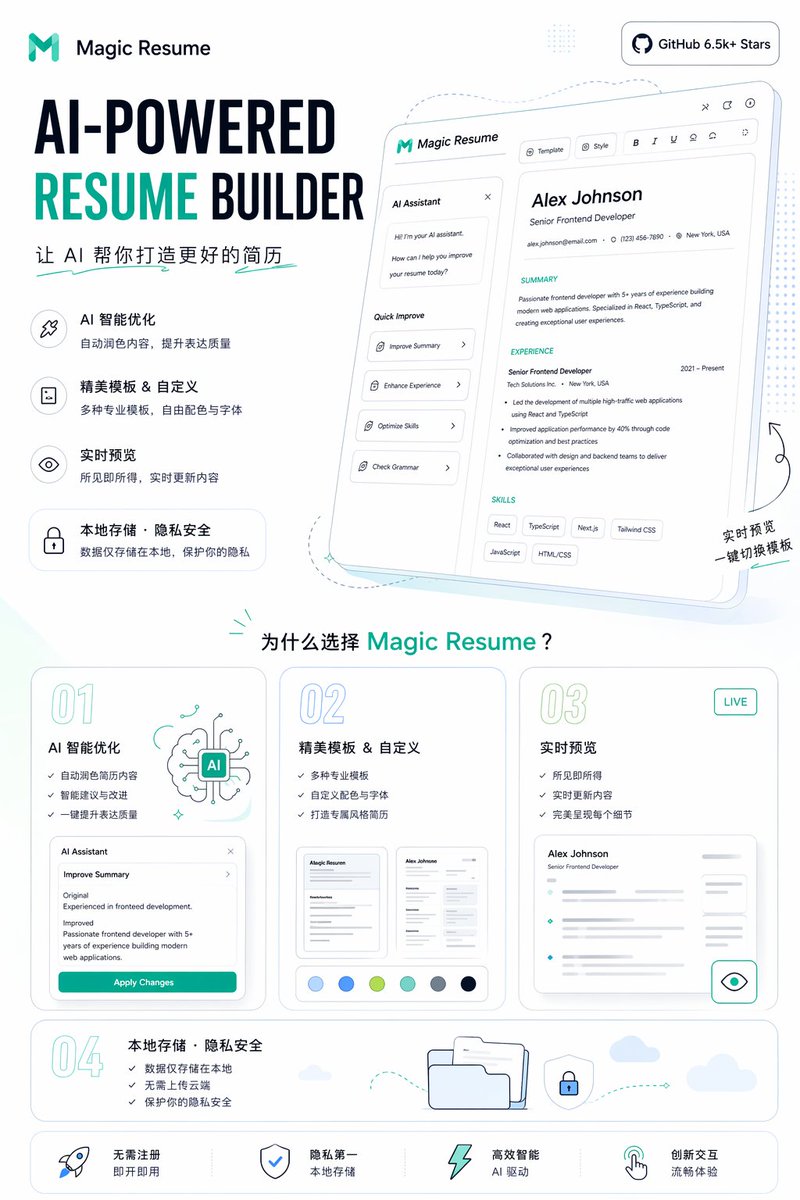
AI 이력서 작성기 홍보 포스터
AI 기반 이력서 작성 도구 랜딩 페이지를 보여주는 깔끔한 SaaS 마케팅 포스터로, 제품 홍보, 소셜 미디어 및 웹사이트 메인 이미지로 활용하기에 적합합니다.
이것은 그래픽 및 포스터 에 대한 GPT Image 2 프롬프트 사례입니다. 아래의 복사 가능한 프롬프트를 사용하여 유사한 시각 자료를 생성하고, 재사용하기 전에 Awesome GPT Image 2 Prompts 의 저작자 표시 및 상업적 사용 권한을 검토하십시오.
전체 프롬프트 세트가 필요하신가요? 다음을 사용하세요. 그래픽 및 포스터 더 많은 관련 예시를 보려면 주제 허브를 열거나 다음을 열어보세요. GPT Image 2 프롬프트 카탈로그 전체 예제 색인, 재사용 가능한 구조 및 출처 표기는 다음을 참조하십시오.
Free 1K preview
Generate one preview image instantly, no sign-up required.
4000/4000
프롬프트
복사 준비 프롬프트
{
  "type": "Landing Page Product Promotion Poster",
  "product": {
    "name": "{argument name=\"product name\" default=\"Magic Resume\"}",
    "category": "AI Resume Generator Website",
    "brand_style": "Concise modern SaaS style, minimalism, white background, accented with cyan and dark blue, rounded cards, thin gray outlines, soft pastel shadows"
  },
  "canvas": {
    "orientation": "Vertical screen",
    "aspect_ratio": "9:16"
  },
  "headline_block": {
    "position": "Top left corner",
    "logo": "Abstract cyan M logo and text identification",
    "headline": "AI-powered resume generator",
    "subheadline": "Let AI help you create a better resume",
    "style": "Extra large, bold sans-serif heading, RESUME in bright cyan, other text in dark blue"
  },
  "top_right_badge": {
    "text": "GitHub 6.5k+ Stars",
    "style": "Rounded white capsule badge, dark text and GitHub icon"
  },
  "hero_section": {
    "position": "Top right corner",
    "main_visual": "Tilted large web application model card, showing the resume editor UI",
    "screen_contents": {
      "left_panel": {
        "title": "AI Assistant",
        "chat_lines_count": 3,
        "quick_actions_count": 4,
        "quick_actions": [
          "Optimization Summary",
          "Enhance Work Experience",
          "Optimize Skills",
          "Grammar Check"
        ]
      },
      "top_toolbar_count": 7,
      "top_toolbar_items": [
        "Template",
        "Style",
        "Bold",
        "Italic",
        "Underline",
        "Align/Set Icon",
        "Share/Export Icon"
      ],
      "resume_preview": {
        "name": "{argument name=\"sample candidate name\" default=\"Alex Johnson\"}",
        "role": "Senior Frontend Development Engineer",
        "contact_count": 3,
        "contact_items": [
          "Email",
          "Phone",
          "Address"
        ],
        "sections_count": 3,
        "sections": [
          "Personal Summary",
          "Work Experience",
          "Skills"
        ],
        "skill_tags_count": 6,
        "skill_tags": [
          "React",
          "TypeScript",
          "Next.js",
          "Tailwind CSS",
          "JavaScript",
          "HTML/CSS"
        ]
      }
    },
    "decorations": "Soft blue projection, dashed line guides, tiny sparkles, handwritten-style annotation in the bottom right corner: Real-time Preview One-click Template Switching"
  },
  "feature_list": {
    "position": "Left-center",
    "count": 4,
    "items": [
      {
        "title": "AI Intelligent Optimization",
        "description": "Automatically refine content to improve expression quality",
        "icon": "Wand or sparkle icon within a rounded square"
      },
      {
        "title": "Exquisite templates & customization",
        "description": "A variety of professional templates, free color and font selection",
        "icon": "Document icon within a rounded square"
      },
      {
        "title": "Live Preview",
        "description": "What you see is what you get, content updates in real time",
        "icon": "Eye icon within a rounded square"
      },
      {
        "title": "Local Storage · Privacy & Security",
        "description": "Data is stored locally only, protecting your privacy",
        "icon": "Rounded capsule card with a lock icon"
      }
    ]
  },
  "why_section": {
    "position": "Middle-bottom",
    "title": "Why choose {argument name=\"product name\" default=\"Magic Resume\"}?",
    "cards_count": 4,
    "cards": [
      {
        "number": "01",
        "title": "AI Intelligent Optimization",
        "bullet_count": 3,
        "bullets": [
          "Automatically refine resume content",
          "Intelligent suggestions and improvements",
          "One-click improvement of expression quality"
        ],
        "visual": "AI brain illustration and a mini Agent panel with an “Apply Changes” button"
      },
      {
        "number": "02",
        "title": "Exquisite templates & customization",
        "bullet_count": 3,
        "bullets": [
          "Variety of professional templates",
          "Custom color schemes and fonts",
          "Create a uniquely styled resume"
        ],
        "visual": "2 resume thumbnails and 6 color palettes"
      },
      {
        "number": "03",
        "title": "Live Preview",
        "badge": "LIVE",
        "bullet_count": 3,
        "bullets": [
          "What you see is what you get",
          "Real-time content updates",
          "Perfectly presents every detail"
        ],
        "visual": "Blurred resume preview card with an eye icon button"
      },
      {
        "number": "04",
        "title": "Local Storage · Privacy & Security",
        "bullet_count": 3,
        "bullets": [
          "Data is only stored locally",
          "No cloud upload required",
          "Protect your privacy and security"
        ],
        "visual": "Folder, shield lock, dashed arrow path, small cloud"
      }
    ]
  },
  "bottom_bar": {
    "position": "Bottom",
    "count": 4,
    "items": [
      "No registration required, ready to use",
      "Privacy first, local storage",
      "Highly intelligent AI-powered",
      "Innovative interaction, smooth experience"
    ],
    "icons_count": 4,
    "icons": [
      "Rocket",
      "Shield",
      "Lightning",
      "hand gesture pointer"
    ]
  },
  "style": {
    "typography": "bold geometric sans-serif font mixed with simple Chinese sans-serif font",
    "rendering": "High-fidelity marketing graphics, crisp vector-level UI, subtle gradients, soft teal highlights, spacious layout",
    "palette": {
      "background": "White",
      "primary": "Cyan",
      "secondary": "Dark blue",
      "accent": "Light aqua and pale blue"
    }
  }
}
프롬프트 변수
프롬프트에 있는 편집 가능한 인수 자리 표시자와 해당 기본값입니다.
변하기 쉬운
product name
기본
Magic Resume
변하기 쉬운
sample candidate name
기본
Alex Johnson
Best for
- - 그래픽 및 포스터 visual exploration
- - Image generation and reference-image edits
- - Reusable briefs that keep source attribution visible
Change these parts
- - Subject, product, character, or scene
- - Aspect ratio, camera, lighting, and background
- - Brand, text, color, and output constraints
Recommended model and settings
- - Model: gpt-image-2
- - Input mode: 텍스트 to 이미지
- - Aspect ratio: source
- - Commercial status: review original source
How to use this prompt
- 1. Copy the prompt and preserve its structure for the first test.
- 2. Replace the subject, context, and publishing channel.
- 3. Change one camera, lighting, or style variable per iteration.
- 4. Inspect the output, source, text, and rights before reuse.
Limitations, source, and reuse cautions
- - Generated output is an editable draft, not factual, legal, or rights evidence.
- - Review the linked source, people, brands, logos, text, and third-party media before commercial use.
Awesome GPT Image 2 Prompts 에서 가져왔습니다. 출처 표기가 필요합니다. 상업적 이용 가능 여부는 allowed 입니다. 유료 사용 전에 원저작권 정보를 확인하세요.
이 범주에 속하는 더 많은 사례
범주, 입력 방식 호환성, 품질 및 위험도에 따라 우선순위가 정해집니다.






재사용 및 출처 참고 사항
사례를 미리 확인한 후 이 안내 메시지를 안전하게 사용하십시오.
- 1.프롬프트를 복사하거나 Dovoo의 생성 버튼을 사용하여 직접 엽니다.
- 2.사용 사례에 맞게 변수, 화면 비율 및 참조 이미지를 조정하십시오.
- 3.출판 또는 유료 사용 전에 저작권, 출처 표기 요건 및 브랜드 또는 초상권 관련 위험을 확인하십시오.