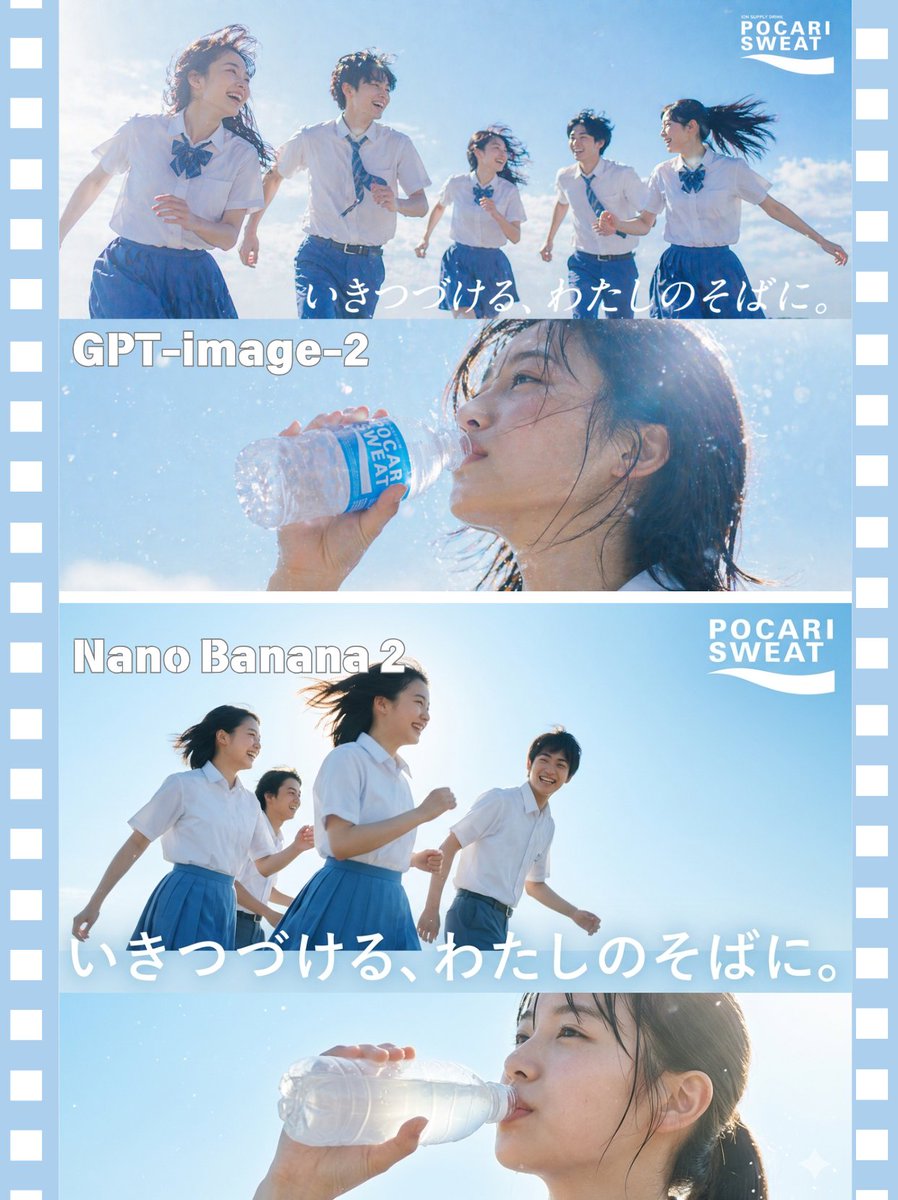
AI 모델 비교 광고 포스터
AI가 생성한 일본 여름 음료 광고 장면 두 개를 분할 화면으로 비교하는 포스터입니다. 모델 소개 게시물이나 시각적 품질 비교에 유용합니다.
이것은 제품 및 상업 에 대한 GPT Image 2 프롬프트 사례입니다. 아래의 복사 가능한 프롬프트를 사용하여 유사한 시각 자료를 생성하고, 재사용하기 전에 Awesome GPT Image 2 Prompts 의 저작자 표시 및 상업적 사용 권한을 검토하십시오.
전체 프롬프트 세트가 필요하신가요? 다음을 사용하세요. 제품 및 상업 더 많은 관련 예시를 보려면 주제 허브를 열거나 다음을 열어보세요. GPT Image 2 프롬프트 카탈로그 전체 예제 색인, 재사용 가능한 구조 및 출처 표기는 다음을 참조하십시오.
이 프롬프트는 여러 개의 참조 이미지를 사용하도록 설계되었습니다. Dovoo를 열고 프롬프트와 미리보기 이미지를 표시한 다음, Dovoo에서 나머지 참조 이미지를 추가한 후 생성하겠습니다.
Free 1K preview
Generate one preview image instantly, no sign-up required.
Free text preview doesn’t preserve reference-image consistency.
3922/4000
프롬프트
복사 준비 프롬프트
{
  "type": "split-screen commercial comparison poster",
  "subject": "Japanese summer sports-drink advertisement scene comparison between two image-generation models",
  "branding": {
    "logo_count": 2,
    "logo_text": "POCARI SWEAT",
    "logo_positions": [
      "top-right of upper comparison block",
      "top-right of lower comparison block"
    ],
    "tagline_text": "いきつづける、わたしのそばに。",
    "tagline_count": 2
  },
  "layout": {
    "format": "vertical poster with pale blue filmstrip border on both left and right edges",
    "sections": [
      {
        "title": "GPT-image-2",
        "position": "top half",
        "count": 2,
        "labels": [
          "group running scene",
          "close-up drinking scene"
        ]
      },
      {
        "title": "Nano Banana 2",
        "position": "bottom half",
        "count": 2,
        "labels": [
          "group running scene",
          "close-up drinking scene"
        ]
      }
    ],
    "divider_lines": 3
  },
  "upper_block": {
    "model_label": "GPT-image-2",
    "wide_scene": {
      "character_count": 5,
      "description": "five Japanese high school students running together outdoors under an intense summer sky, three girls and two boys, wearing white short-sleeve school shirts, blue skirts or blue trousers, and blue ribbon or neckties, captured with low-angle dynamic motion, wind-blown hair and clothing, bright backlighting, glowing sun flare, airy commercial photography style",
      "composition": "students spread across the frame from left to right, joyful energetic movement, one girl in foreground left, logo in top-right, handwritten white Japanese slogan across lower-right sky"
    },
    "closeup_scene": {
      "character_count": 1,
      "description": "close-up side profile of a Japanese schoolgirl drinking from a clear plastic sports drink bottle with a blue label reading POCARI SWEAT, water droplets and mist sparkling in sunlight, wet dark hair clinging to face and neck, vivid cyan sky background, highly cinematic beverage-ad look",
      "bottle_count": 1
    }
  },
  "lower_block": {
    "model_label": "Nano Banana 2",
    "wide_scene": {
      "character_count": 4,
      "description": "four Japanese high school students running under a cloudless blue sky, two girls in blue skirts and two students behind including a boy in blue trousers, simpler composition with stronger empty sky, low-angle shot, bright midday backlight, windswept hair, clean minimal summer-ad aesthetic",
      "composition": "group moving from left to right, larger white Japanese slogan stretched across the bottom of the scene, logo in top-right"
    },
    "closeup_scene": {
      "character_count": 1,
      "description": "close-up side profile of a Japanese schoolgirl raising and drinking from a mostly transparent clear plastic bottle with minimal visible label, strong backlight causing the bottle to glow, soft haze and sparkling highlights, ponytail visible, blue-sky background",
      "bottle_count": 1
    }
  },
  "style": {
    "overall": "Japanese beverage commercial mood board, photorealistic, sun-drenched, youthful, fresh, refreshing, high-key lighting, strong rim light, soft bloom, subtle lens flare, crisp blue-and-white color palette",
    "primary_colors": [
      "sky blue",
      "white",
      "deep cobalt blue"
    ],
    "camera": "wide-angle low perspective for running scenes, telephoto close-up for drinking scenes"
  },
  "customization": {
    "brand_text": "{argument name=\"brand text\" default=\"POCARI SWEAT\"}",
    "tagline_text": "{argument name=\"tagline text\" default=\"いきつづける、わたしのそばに。\"}",
    "top_model_name": "{argument name=\"top model name\" default=\"GPT-image-2\"}",
    "bottom_model_name": "{argument name=\"bottom model name\" default=\"Nano Banana 2\"}",
    "student_uniform_color": "{argument name=\"student uniform color\" default=\"blue and white\"}"
  }
}
프롬프트 변수
프롬프트에 있는 편집 가능한 인수 자리 표시자와 해당 기본값입니다.
변하기 쉬운
brand text
기본
POCARI SWEAT
변하기 쉬운
tagline text
기본
いきつづける、わたしのそばに。
변하기 쉬운
top model name
기본
GPT-image-2
변하기 쉬운
bottom model name
기본
Nano Banana 2
변하기 쉬운
student uniform color
기본
blue and white
Best for
- - 제품 및 상업 visual exploration
- - Image generation and reference-image edits
- - Reusable briefs that keep source attribution visible
Change these parts
- - Subject, product, character, or scene
- - Aspect ratio, camera, lighting, and background
- - Brand, text, color, and output constraints
Recommended model and settings
- - Model: gpt-image-2
- - Input mode: 다중 이미지 대 이미지
- - Aspect ratio: source
- - Commercial status: review original source
How to use this prompt
- 1. Copy the prompt and preserve its structure for the first test.
- 2. Replace the subject, context, and publishing channel.
- 3. Change one camera, lighting, or style variable per iteration.
- 4. Inspect the output, source, text, and rights before reuse.
Limitations, source, and reuse cautions
- - Generated output is an editable draft, not factual, legal, or rights evidence.
- - Review the linked source, people, brands, logos, text, and third-party media before commercial use.
Awesome GPT Image 2 Prompts 에서 가져왔습니다. 출처 표기가 필요합니다. 상업적 이용 가능 여부는 allowed 입니다. 유료 사용 전에 원저작권 정보를 확인하세요.
이 범주에 속하는 더 많은 사례
범주, 입력 방식 호환성, 품질 및 위험도에 따라 우선순위가 정해집니다.






재사용 및 출처 참고 사항
사례를 미리 확인한 후 이 안내 메시지를 안전하게 사용하십시오.
- 1.프롬프트를 복사하거나 Dovoo의 생성 버튼을 사용하여 직접 엽니다.
- 2.사용 사례에 맞게 변수, 화면 비율 및 참조 이미지를 조정하십시오.
- 3.출판 또는 유료 사용 전에 저작권, 출처 표기 요건 및 브랜드 또는 초상권 관련 위험을 확인하십시오.