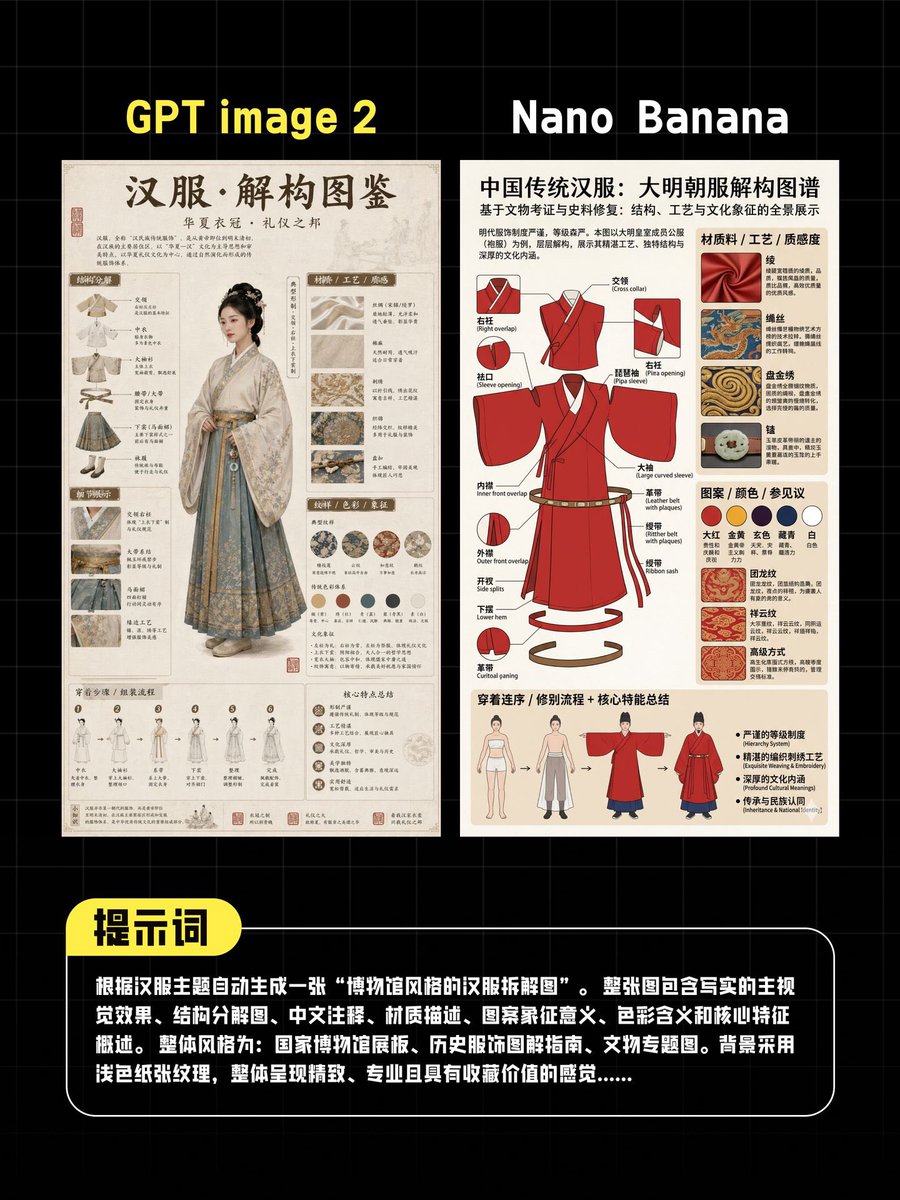
AI Hanfu 포스터 비교
제목과 텍스트 입력란이 포함된 두 개의 AI 생성 중국 한푸 인포그래픽 포스터를 소셜 미디어에 나란히 비교하여 보여주는 그래픽으로, 이미지 모델 결과 벤치마킹에 이상적입니다.
이것은 그래픽 및 포스터 에 대한 GPT Image 2 프롬프트 사례입니다. 아래의 복사 가능한 프롬프트를 사용하여 유사한 시각 자료를 생성하고, 재사용하기 전에 Awesome GPT Image 2 Prompts 의 저작자 표시 및 상업적 사용 권한을 검토하십시오.
전체 프롬프트 세트가 필요하신가요? 다음을 사용하세요. 그래픽 및 포스터 더 많은 관련 예시를 보려면 주제 허브를 열거나 다음을 열어보세요. GPT Image 2 프롬프트 카탈로그 전체 예제 색인, 재사용 가능한 구조 및 출처 표기는 다음을 참조하십시오.
Free 1K preview
Generate one preview image instantly, no sign-up required.
2349/4000
프롬프트
복사 준비 프롬프트
A dark-toned, tech-inspired comparison poster featuring two side-by-side vertical infographics for AI image generation comparison against a black background with subtle gray grids. At the top, place two prominent yellow bold titles: “GPT image 2” above the left panel and “Nano Banana” above the right panel. The left panel is an elegant, ancient-style Hanfu reference poster with a warm, old paper texture. It features a prominent Chinese calligraphy title “Hanfu·Deconstruction Atlas” at the top and a smaller subtitle below. The center showcases a full-body female figure wearing elegant traditional Hanfu, Show every face clearly with natural, detailed facial features. Surrounding her are numerous small, labeled illustrative blocks, fabric samples, embroidery close-ups, accessory descriptions, silhouette studies, and detailed Chinese annotations in a scholarly, museum-style presentation. Utilizing shades of beige, cream, light gray-blue, and faded ink colors, the panel presents a refined archival aesthetic. The right panel is a more concise, modern infographic poster with a light beige paper background. It features a prominent Chinese title “Chinese Traditional Hanfu: Great Ming Dynasty Costume Deconstruction Map” at the top. The center displays a vibrant red Ming Dynasty long robe presented as a technical exploded view, with multiple labeled arrows and component descriptions. Surrounding it are material samples, decorative pattern examples, a row of 6 circular color swatches, structural details, and a bottom strip displaying 4 small human figure illustrations indicating the order of wear or silhouette comparison. The right poster is more graphic design-oriented, with stronger contrast and more vibrant red accents. At the bottom of the overall image, add a wide, rounded-corner black text box with a thin white border spanning most of the width. Attach a yellow rounded-corner label with bold black Chinese characters “Prompt” in the upper left corner. Within the black box, place a dense block of white Chinese text describing the test prompts used to generate the Hanfu-themed deconstruction maps, similar to a screenshot quote block. The overall composition should present as a social media comparison image, centered, clean, high-resolution, with a dark background creating a strong contrast with the two poster panels.
Best for
- - 그래픽 및 포스터 visual exploration
- - Image generation and reference-image edits
- - Reusable briefs that keep source attribution visible
Change these parts
- - Subject, product, character, or scene
- - Aspect ratio, camera, lighting, and background
- - Brand, text, color, and output constraints
Recommended model and settings
- - Model: gpt-image-2
- - Input mode: 텍스트 to 이미지
- - Aspect ratio: source
- - Commercial status: review original source
How to use this prompt
- 1. Copy the prompt and preserve its structure for the first test.
- 2. Replace the subject, context, and publishing channel.
- 3. Change one camera, lighting, or style variable per iteration.
- 4. Inspect the output, source, text, and rights before reuse.
Limitations, source, and reuse cautions
- - Generated output is an editable draft, not factual, legal, or rights evidence.
- - Review the linked source, people, brands, logos, text, and third-party media before commercial use.
Awesome GPT Image 2 Prompts 에서 가져왔습니다. 출처 표기가 필요합니다. 상업적 이용 가능 여부는 allowed 입니다. 유료 사용 전에 원저작권 정보를 확인하세요.
이 범주에 속하는 더 많은 사례
범주, 입력 방식 호환성, 품질 및 위험도에 따라 우선순위가 정해집니다.






재사용 및 출처 참고 사항
사례를 미리 확인한 후 이 안내 메시지를 안전하게 사용하십시오.
- 1.프롬프트를 복사하거나 Dovoo의 생성 버튼을 사용하여 직접 엽니다.
- 2.사용 사례에 맞게 변수, 화면 비율 및 참조 이미지를 조정하십시오.
- 3.출판 또는 유료 사용 전에 저작권, 출처 표기 요건 및 브랜드 또는 초상권 관련 위험을 확인하십시오.