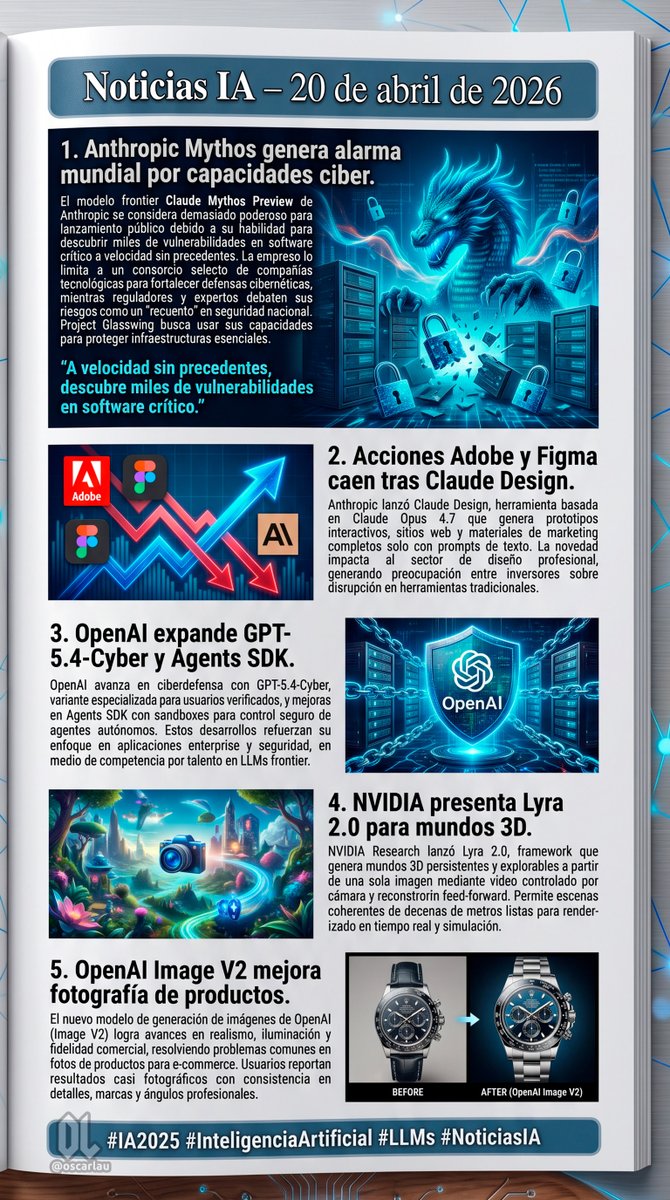
AI 뉴스 뉴스레터 페이지 레이아웃
5개의 서로 다른 뉴스 섹션과 각 섹션에 맞는 주제별 일러스트 및 텍스트 블록으로 구성된 구조화된 디지털 뉴스레터 페이지를 생성합니다.
이것은 그래픽 및 포스터 에 대한 GPT Image 2 프롬프트 사례입니다. 아래의 복사 가능한 프롬프트를 사용하여 유사한 시각 자료를 생성하고, 재사용하기 전에 Awesome GPT Image 2 Prompts 의 저작자 표시 및 상업적 사용 권한을 검토하십시오.
전체 프롬프트 세트가 필요하신가요? 다음을 사용하세요. 그래픽 및 포스터 더 많은 관련 예시를 보려면 주제 허브를 열거나 다음을 열어보세요. GPT Image 2 프롬프트 카탈로그 전체 예제 색인, 재사용 가능한 구조 및 출처 표기는 다음을 참조하십시오.
Free 1K preview
Generate one preview image instantly, no sign-up required.
2603/4000
프롬프트
복사 준비 프롬프트
{
  "type": "digital newsletter page layout",
  "background": "white page resting on a dark surface with glowing blue digital nodes and connecting lines",
  "header": {
    "text": "{argument name=\"main headline\" default=\"Noticias IA – 20 de abril de 2026\"}",
    "style": "white text on a dark blue banner with a light blue border"
  },
  "layout": {
    "sections": [
      {
        "id": 1,
        "title": "{argument name=\"news item 1 title\" default=\"1. Anthropic Mythos genera alarma mundial por capacidades ciber.\"}",
        "image_description": "A glowing blue cyber dragon emerging from servers, surrounded by floating digital padlocks.",
        "layout_style": "Image on the right, title and text on the left, with a cyan pull quote at the bottom left."
      },
      {
        "id": 2,
        "title": "{argument name=\"news item 2 title\" default=\"2. Acciones Adobe y Figma caen tras Claude Design.\"}",
        "image_description": "A stylized stock chart showing jagged red arrows pointing down and a glowing blue arrow pointing up, featuring logos for Adobe, Figma, and an 'AI' icon.",
        "layout_style": "Image on the left, title and text on the right."
      },
      {
        "id": 3,
        "title": "{argument name=\"news item 3 title\" default=\"3. OpenAI expande GPT-5.4-Cyber y Agents SDK.\"}",
        "image_description": "A glowing blue holographic shield with the OpenAI logo in the center, surrounded by digital chains and a server background.",
        "layout_style": "Title and text on the left, image on the right."
      },
      {
        "id": 4,
        "title": "4. NVIDIA presenta Lyra 2.0 para mundos 3D.",
        "image_description": "A vibrant, surreal 3D fantasy landscape with glowing flora, floating islands, and a glowing blue camera icon in the foreground.",
        "layout_style": "Image on the left, title and text on the right."
      },
      {
        "id": 5,
        "title": "5. OpenAI Image V2 mejora fotografía de productos.",
        "image_description": "A side-by-side comparison of a luxury chronograph watch. The left side is labeled 'BEFORE' (darker, less detailed), and the right side is labeled 'AFTER (OpenAI Image V2)' (bright, highly detailed, professional lighting).",
        "layout_style": "Title and text on the left, image on the right."
      }
    ],
    "count": 5
  },
  "footer": {
    "text": "{argument name=\"footer hashtags\" default=\"#IA2025 #InteligenciaArtificial #LLMs #NoticiasIA\"}",
    "logo": "OL logo with '@oscarlau'",
    "style": "white text on a dark blue banner at the bottom"
  }
}
프롬프트 변수
프롬프트에 있는 편집 가능한 인수 자리 표시자와 해당 기본값입니다.
변하기 쉬운
main headline
기본
Noticias IA – 20 de abril de 2026
변하기 쉬운
news item 1 title
기본
1. Anthropic Mythos genera alarma mundial por capacidades ciber.
변하기 쉬운
news item 2 title
기본
2. Acciones Adobe y Figma caen tras Claude Design.
변하기 쉬운
news item 3 title
기본
3. OpenAI expande GPT-5.4-Cyber y Agents SDK.
변하기 쉬운
footer hashtags
기본
#IA2025 #InteligenciaArtificial #LLMs #NoticiasIA
Best for
- - 그래픽 및 포스터 visual exploration
- - Image generation and reference-image edits
- - Reusable briefs that keep source attribution visible
Change these parts
- - Subject, product, character, or scene
- - Aspect ratio, camera, lighting, and background
- - Brand, text, color, and output constraints
Recommended model and settings
- - Model: gpt-image-2
- - Input mode: 텍스트 to 이미지
- - Aspect ratio: source
- - Commercial status: review original source
How to use this prompt
- 1. Copy the prompt and preserve its structure for the first test.
- 2. Replace the subject, context, and publishing channel.
- 3. Change one camera, lighting, or style variable per iteration.
- 4. Inspect the output, source, text, and rights before reuse.
Limitations, source, and reuse cautions
- - Generated output is an editable draft, not factual, legal, or rights evidence.
- - Review the linked source, people, brands, logos, text, and third-party media before commercial use.
Awesome GPT Image 2 Prompts 에서 가져왔습니다. 출처 표기가 필요합니다. 상업적 이용 가능 여부는 allowed 입니다. 유료 사용 전에 원저작권 정보를 확인하세요.
이 범주에 속하는 더 많은 사례
범주, 입력 방식 호환성, 품질 및 위험도에 따라 우선순위가 정해집니다.






재사용 및 출처 참고 사항
사례를 미리 확인한 후 이 안내 메시지를 안전하게 사용하십시오.
- 1.프롬프트를 복사하거나 Dovoo의 생성 버튼을 사용하여 직접 엽니다.
- 2.사용 사례에 맞게 변수, 화면 비율 및 참조 이미지를 조정하십시오.
- 3.출판 또는 유료 사용 전에 저작권, 출처 표기 요건 및 브랜드 또는 초상권 관련 위험을 확인하십시오.